 PH
Sige lang... working pa yan until now.Bm muna boss try koto mamaya
-
Welcome to PHCorner Forums! Sign up for free to unlock full access and exclusive privileges, including:
- Asking questions about computer and mobile issues
- Discovering internet tips for your mobile network and computer
You are using an out of date browser. It may not display this or other websites correctly.
You should upgrade or use an alternative browser.
You should upgrade or use an alternative browser.
👨🏫 Tutorial D1SC0RD QUESTS CHEAT
- Thread starter Soul Calibre
- Start date
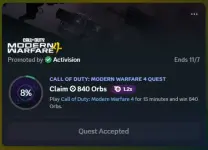
Na try ko now din yung extension sa browser working din paps dalawang games pinagsabay hahaSige lang... working pa yan until now.
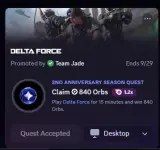
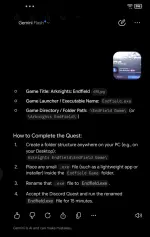
Soul Calibre ginawan ko ng automation si Gemini paps mag sesend nalang ako ng picture sya na mismo mag provide ng instructions hahaha
Using 𝐂𝐡𝐚𝐭𝐆𝐏𝐓 𝐂𝐨𝐝𝐞𝐱 for Quests...
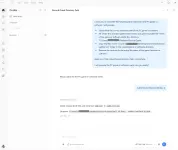
How much do you love my premium account contents such as this one? I just got my business verified on Google Maps! Leave a positive review by telling the whole world how much you love and enjoy the things I share. Kindly click this link: You do not have permission to view the full content of this post. Log in or register now.. You may also click my signature banner under this thread. Thanks!
- Create your MAIN FOLDER, and copy the two files sa main folder. Read the thread para malaman nyo kung ano yung dalawang files. In my example, my main folder is "Soul Calibre LLC".
- Right click the folder and click "copy as path". Do the same sa QUEST FOLDER.
- Send the prompt to Codex. Make sure na ilagay nyo yung directory path ng main folder and quest folder nyo sa prompt. Codex will ask for permissions when creating files and folders.
Code:
I want you to complete the following tasks based on what PC game or software I will provide:
- Search/find the correct directory path of the PC game or software.
- Re-create the directory path (folder names and game launcher file name) of the game or software inside this directory: {QUEST FOLDER PATH}.
- Copy the files inside {MAIN FOLDER PATH} folder to the created game or software directory.
- Rename the cmd.exe to the actual file name of the game launcher or software.

Keep your final output/response plain, clean, and simple.

I will provide the PC game or software name. Are you ready?How much do you love my premium account contents such as this one? I just got my business verified on Google Maps! Leave a positive review by telling the whole world how much you love and enjoy the things I share. Kindly click this link: You do not have permission to view the full content of this post. Log in or register now.. You may also click my signature banner under this thread. Thanks!
DONotorious
Forum Guru
Using 𝐂𝐡𝐚𝐭𝐆𝐏𝐓 𝐂𝐨𝐝𝐞𝐱 for Quests...
- Create your MAIN FOLDER, and copy the two files sa main folder. Read the thread para malaman nyo kung ano yung dalawang files. In my example, my main folder is "Soul Calibre LLC".
- Right click the folder and click "copy as path". Do the same sa QUEST FOLDER.
- Send the prompt to Codex. Make sure na ilagay nyo yung directory path ng main folder and quest folder nyo sa prompt. Codex will ask for permissions when creating files and folders.
Code:I want you to complete the following tasks based on what PC game or software I will provide: - Search/find the correct directory path of the PC game or software. - Re-create the directory path (folder names and game launcher file name) of the game or software inside this directory: {QUEST FOLDER PATH}. - Copy the files inside {MAIN FOLDER PATH} folder to the created game or software directory. - Rename the cmd.exe to the actual file name of the game launcher or software. Keep your final output/response plain, clean, and simple. I will provide the PC game or software name. Are you ready?
How much do you love my premium account contents such as this one? I just got my business verified on Google Maps! Leave a positive review by telling the whole world how much you love and enjoy the things I share. Kindly click this link: You do not have permission to view the full content of this post. Log in or register now.. You may also click my signature banner under this thread. Thanks!
maraming salamat bossing
brendan666
Established
anyone got banned to this trick? try ko sana
Nope. Hindi nakaka-ban yananyone got banned to this trick? try ko sana
djdoolky76
Elite
kung fan kayo ng Vencord, pwede niyo gamitin forked version ko ng vencord, meron nang plugin for Auto Quest farm. All Quest type is supported. 
Wala nang mano mano, automated lahat. but of course need niyo parin e claim manually ahahahaha
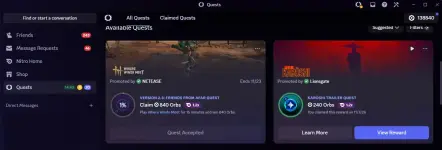
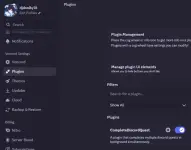
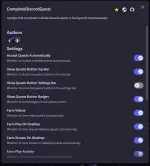
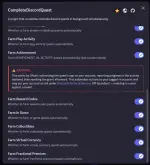
Wala nang mano mano, automated lahat. but of course need niyo parin e claim manually ahahahaha
Similar threads
-
👨🏫 Tutorial D1scord Auto Quest Extension | Easy Execute | Web Bypasser
- Started by rainych_ran
- Replies: 24
-
-
🔑 Code/Key D1sc0rd X XBox Game Pass 14 Days | #2
- Started by Soul Calibre
- Replies: 4
-
🔑 Code/Key D1sc0rd X XBox Game Pass 14 Days | #3
- Started by Soul Calibre
- Replies: 3
About this Thread
-
294Replies
-
14KViews
-
120Participants
Last reply from:
bottle
bottle
New Topics
-
XModHub Enhancer access????
- Started by BunnyJanJan
- Replies: 0
- ⚡ Game Cheats
-
Anubis Client Latest Version!
- Started by ACEDINO2000
- Replies: 0
- ⚡ Game Cheats
-
Looking for Ether Bot for Ether Online
- Started by adingkoy
- Replies: 0
- ⚡ Game Cheats
-
LOOKING FOR SF-PLUS.CO CHEAT
- Started by Okushhhh
- Replies: 0
- ⚡ Game Cheats
-
Drag and Drop Trainer Maker
- Started by coldhearted
- Replies: 1
- ⚡ Game Cheats
-
Looking for cheat engine expert or equivalent
- Started by jakeywakey
- Replies: 4
- ⚡ Game Cheats
-
𝚁𝚘𝚋𝚕𝚘𝚡 Delta Key System BYPASSER
- Started by Jocelyn Flores
- Replies: 28
- ⚡ Game Cheats
Trending Topics
-
-
UNLOCK WAND | WEMOD TO PRO USING ENHANCER v2.2.1.0 (PC GAMES CHEATS) 11/04 Update
- Luna x Lana
Replies: 15 -
-
-
-
-
Online now
- Members online
- 321
- Guests online
- 14,026
- Total visitors
- 14,347