 PH
PH-
Welcome to PHCorner Forums! Sign up for free to unlock full access and exclusive privileges, including:
- Asking questions about computer and mobile issues
- Discovering internet tips for your mobile network and computer
You are using an out of date browser. It may not display this or other websites correctly.
You should upgrade or use an alternative browser.
You should upgrade or use an alternative browser.
🔗 Direct Link Eset Smart Security Premium Trial Key Generator (30 Days)
- Thread starter ryansnetcafe
- Start date
commanderShepard
Eternal Poster
working pa rin?
commanderShepard
Eternal Poster
working sya at salamat!
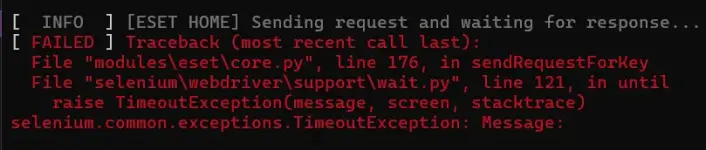
[ INFO ] [ESET HOME] Sending request and waiting for response...
[ FAILED ] Traceback (most recent call last):
File "modules\eset\core.py", line 220, in __press_button_with_text
File "selenium\webdriver\support\wait.py", line 121, in until
raise TimeoutException(message, screen, stacktrace)
selenium.common.exceptions.TimeoutException: Message:
During handling of the above exception, another exception occurred:
Traceback (most recent call last):
File "modules\eset\core.py", line 175, in sendRequestForKey
File "modules\eset\core.py", line 230, in __press_button_with_text
RuntimeError: Press button with text (['continue', 'continua']) error!!! Timeout exceeded.
During handling of the above exception, another exception occurred:
Traceback (most recent call last):
File "main.py", line 566, in main
File "modules\eset\core.py", line 185, in sendRequestForKey
RuntimeError: Request sending error!!!
[ FAILED ] Traceback (most recent call last):
File "modules\eset\core.py", line 220, in __press_button_with_text
File "selenium\webdriver\support\wait.py", line 121, in until
raise TimeoutException(message, screen, stacktrace)
selenium.common.exceptions.TimeoutException: Message:
During handling of the above exception, another exception occurred:
Traceback (most recent call last):
File "modules\eset\core.py", line 175, in sendRequestForKey
File "modules\eset\core.py", line 230, in __press_button_with_text
RuntimeError: Press button with text (['continue', 'continua']) error!!! Timeout exceeded.
During handling of the above exception, another exception occurred:
Traceback (most recent call last):
File "main.py", line 566, in main
File "modules\eset\core.py", line 185, in sendRequestForKey
RuntimeError: Request sending error!!!
ryansnetcafe
Elite
not working sayo sir? kaka test ko lang ngayon ok naman sakin need lang i update.[ INFO ] [ESET HOME] Sending request and waiting for response...
[ FAILED ] Traceback (most recent call last):
File "modules\eset\core.py", line 220, in __press_button_with_text
File "selenium\webdriver\support\wait.py", line 121, in until
raise TimeoutException(message, screen, stacktrace)
selenium.common.exceptions.TimeoutException: Message:
During handling of the above exception, another exception occurred:
Traceback (most recent call last):
File "modules\eset\core.py", line 175, in sendRequestForKey
File "modules\eset\core.py", line 230, in __press_button_with_text
RuntimeError: Press button with text (['continue', 'continua']) error!!! Timeout exceeded.
During handling of the above exception, another exception occurred:
Traceback (most recent call last):
File "main.py", line 566, in main
File "modules\eset\core.py", line 185, in sendRequestForKey
RuntimeError: Request sending error!!!
This error means that Selenium cannot find or click the “Continue” button within the maximum allowed time.
The exact point where it fails is:
selenium.common.exceptions.TimeoutException
Then your program converts the error into:
RuntimeError: Press button with text (['continue', 'continua']) error!!! Timeout exceeded.
So, in practice:
The exact point where it fails is:
selenium.common.exceptions.TimeoutException
Then your program converts the error into:
RuntimeError: Press button with text (['continue', 'continua']) error!!! Timeout exceeded.
So, in practice:
- sendRequestForKey() is sending a request.
- __press_button_with_text() waits for a button with the text continue or continua.
- Selenium waits until the timeout expires.
- The button is not found or cannot be clicked.
- sendRequestForKey() then raises another error: Request sending error!!!.
Most likely causes
- The website/page did not load correctly.
- The button's text has changed, for example "Continue" is no longer present in the HTML as expected.
- The button is inside an iframe, while Selenium is searching in the main page.
- The button exists but is not clickable yet.
- A popup/cookie banner appeared and is blocking the click.
- The website has changed since the code was written.
- The website detected Selenium/automation and displayed a different page.
- The timeout configured in WebDriverWait is too short.
Project Version: v1.5.7.1
Project Devs: rzc0d3r, AdityaGarg8, k0re,
Fasjeit, alejanpa17, Ischunddu,
soladify, AngryBonk, Xoncia,
Anteneh13, otre4, AHDR3,
Shariful797, ImHisako,
ppsmurf, ugvfpdcuwfnh, chrisdaloa
Telegram: phc.onl/#forbidden#rzc0d3r_official
---- Main Menu ----
1 - Settings
2 - Start
3 - Exit
-- Updater --
[ OK ] Project up to date!!!
-- WebDriver Auto-Installer --
[ INFO ] Google Chrome version: 154.0.8037.58
[ INFO ] Google Chrome webdriver version: 154.0.8037.57
[ OK ] The webdriver has already been updated to the browser version!
-- Browsers Initializer --
[ INFO ] Initializing Google Chrome for Windows
-- KeyGen --
[ INFO ] [emailfake] Mail registration...
[ OK ] Mail registration completed successfully!
[ INFO ] Register page loading...
[ OK ] Register page is loaded!
[ INFO ] Bypassing cookies...
[ FAILED ] Cookies were not bypassed (it doesn't affect the algorithm, I think )
)
[ INFO ] Data filling...
[ OK ] Successfully!
[ INFO ] [emailfake] ESET-HOME-Token interception...
[ OK ] ESET-HOME-Token: 3aa64131-d346-494b-8312-6188b0a39bf6
[ INFO ] Account confirmation is in progress...
[ OK ] Account successfully confirmed!
[ INFO ] [ESET HOME] Sending request and waiting for response...
[ FAILED ] Traceback (most recent call last):
File "modules\eset\core.py", line 220, in __press_button_with_text
File "selenium\webdriver\support\wait.py", line 105, in until
selenium.common.exceptions.TimeoutException: Message:
During handling of the above exception, another exception occurred:
Traceback (most recent call last):
File "modules\eset\core.py", line 175, in sendRequestForKey
File "modules\eset\core.py", line 230, in __press_button_with_text
RuntimeError: Press button with text (['continue', 'continua']) error!!! Timeout exceeded.
During handling of the above exception, another exception occurred:
Traceback (most recent call last):
File "main.py", line 566, in main
File "modules\eset\core.py", line 185, in sendRequestForKey
RuntimeError: Request sending error!!!
Press Enter to exit...
Project Devs: rzc0d3r, AdityaGarg8, k0re,
Fasjeit, alejanpa17, Ischunddu,
soladify, AngryBonk, Xoncia,
Anteneh13, otre4, AHDR3,
Shariful797, ImHisako,
ppsmurf, ugvfpdcuwfnh, chrisdaloa
Telegram: phc.onl/#forbidden#rzc0d3r_official
---- Main Menu ----
1 - Settings
2 - Start
3 - Exit
>> 2
-- Updater --
[ OK ] Project up to date!!!
-- WebDriver Auto-Installer --
[ INFO ] Google Chrome version: 154.0.8037.58
[ INFO ] Google Chrome webdriver version: 154.0.8037.57
[ OK ] The webdriver has already been updated to the browser version!
-- Browsers Initializer --
[ INFO ] Initializing Google Chrome for Windows
-- KeyGen --
[ INFO ] [emailfake] Mail registration...
[ OK ] Mail registration completed successfully!
[ INFO ] Register page loading...
[ OK ] Register page is loaded!
[ INFO ] Bypassing cookies...
[ FAILED ] Cookies were not bypassed (it doesn't affect the algorithm, I think
)[ INFO ] Data filling...
[ OK ] Successfully!
[ INFO ] [emailfake] ESET-HOME-Token interception...
[ OK ] ESET-HOME-Token: 3aa64131-d346-494b-8312-6188b0a39bf6
[ INFO ] Account confirmation is in progress...
[ OK ] Account successfully confirmed!
[ INFO ] [ESET HOME] Sending request and waiting for response...
[ FAILED ] Traceback (most recent call last):
File "modules\eset\core.py", line 220, in __press_button_with_text
File "selenium\webdriver\support\wait.py", line 105, in until
selenium.common.exceptions.TimeoutException: Message:
During handling of the above exception, another exception occurred:
Traceback (most recent call last):
File "modules\eset\core.py", line 175, in sendRequestForKey
File "modules\eset\core.py", line 230, in __press_button_with_text
RuntimeError: Press button with text (['continue', 'continua']) error!!! Timeout exceeded.
During handling of the above exception, another exception occurred:
Traceback (most recent call last):
File "main.py", line 566, in main
File "modules\eset\core.py", line 185, in sendRequestForKey
RuntimeError: Request sending error!!!
Press Enter to exit...
How to confirm the free-key limit
Right before the WebDriverWait times out, save the page screenshot and HTML:
driver.save_screenshot("debug_timeout.png")
with open("debug_timeout.html", "w", encoding="utf-8") as f:
f.write(driver.page_source)
Then inspect debug_timeout.png.
If it shows something like:
Free trial limit reached
Maximum number of keys reached
You have reached your limit
No more free keys available
then the limit is likely the reason.
If instead you see a normal ESET page with a different button, then the problem is more likely that __press_button_with_text() is looking for the wrong element/text.
If you send me the code around lines 175–230 of modules/eset/core.py, especially sendRequestForKey() and __press_button_with_text(), I can pinpoint exactly where it is failing.
Markjason123
Forum Veteran
Thanks dito paps
ryansnetcafe
Elite
try to install visual c++ 2015-2022 and see if it will work.
How to confirm the free-key limit
Right before the WebDriverWait times out, save the page screenshot and HTML:
driver.save_screenshot("debug_timeout.png")
with open("debug_timeout.html", "w", encoding="utf-8") as f:
f.write(driver.page_source)
Then inspect debug_timeout.png.
If it shows something like:
Free trial limit reached
Maximum number of keys reached
You have reached your limit
No more free keys available
then the limit is likely the reason.
If instead you see a normal ESET page with a different button, then the problem is more likely that __press_button_with_text() is looking for the wrong element/text.
If you send me the code around lines 175–230 of modules/eset/core.py, especially sendRequestForKey() and __press_button_with_text(), I can pinpoint exactly where it is failing.
Here is the breakdown of what is currently on your PC:try to install visual c++ 2015-2022 and see if it will work.
- Yes, you have Visual C++ 2015-2022 installed: This is represented by the entries "Microsoft Visual C++ v14 Redistributable (x64) - 14.51.36247" and "(x86)". Microsoft officially names the 2015–2022 cumulative package "v14" (which is the internal version of the libraries). The version number 14.51.x indicates that you have a highly updated release.
- Both architectures are present: Having both the (x64) version for 64-bit software and the (x86) version for 32-bit software is the ideal setup to prevent system errors.
- Additional packages: The two 2012 entries (version 11.0.x) are there to support older software or games. The final entry, Microsoft Windows Desktop Runtime - 9.0.20, is a fundamental component required to run modern applications built on the .NET 9 framework.
ESET-KeyGen_v1.5.7.2
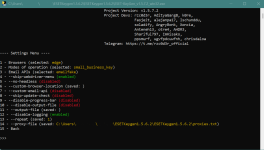
small-business-key not work SMART SECURITY PREMIUM
Activation failed
The subscription and the application do not match
The entered activation key is not valid for the installed application.
Purchase a new subscription or download a different ESET application.
More information about the activation error
small-business-key not work SMART SECURITY PREMIUM
Activation failed
The subscription and the application do not match
The entered activation key is not valid for the installed application.
Purchase a new subscription or download a different ESET application.
More information about the activation error
ryansnetcafe
Elite
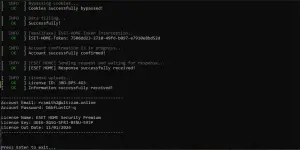
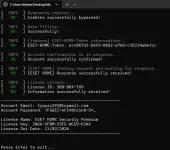
v1.5.7.2 is working.
Can you post the settings for me?View attachment 4363325
v1.5.7.2 is working.
Main Menu
1 - Settings
2 - Start
3 - Exit
Similar threads
-
Esset Smart Security Premium Trial 30 Days Trial Key
- Started by japoy03
- Replies: 0
-
🎁 Giveaways ANTIVIRUS ESET KEY SMART SECURITY PREMIUM 30 days
- Started by pakshet
- Replies: 19
-
🔑 Code/Key ESET HOME Security Premium trial 3o days #111
- Started by tugpak
- Replies: 2
About this Thread
-
64Replies
-
3KViews
-
37Participants
Last reply from:
Myterio
Myterio
New Topics
-
May nakapagtry na ba dito ng Artcraft Apps?
- Started by Chainsaw-Man
- Replies: 3
- 🔐 Cybersecurity & Privacy
-
NORTON 360 KEYS + VPN - 1 YEAR [10x]
- Started by papabanana
- Replies: 4
- 🔐 Cybersecurity & Privacy
-
ESET Smart Security Premium #16
- Started by ChuckY DolL
- Replies: 2
- 🔐 Cybersecurity & Privacy
-
Cybersecurity Resources and many more
- Started by biscoff cheesecake
- Replies: 2
- 🔐 Cybersecurity & Privacy
-
ESET Smart Security Premium #15
- Started by ChuckY DolL
- Replies: 7
- 🔐 Cybersecurity & Privacy
-
Best place to start learning your privacy for free
- Started by Riftster619
- Replies: 0
- 🔐 Cybersecurity & Privacy
-
How to Avoid Scams: 7 Simple Rules
- Started by PHC-BlackQuantum
- Replies: 0
- 🔐 Cybersecurity & Privacy
-
Kaspersky PREMIUM Anti Virus with Auto RENEW key
- Started by xTunesan13
- Replies: 3
- 🔐 Cybersecurity & Privacy
-
How to get IP adress of anyone and get details from it
- Started by akosikristo
- Replies: 0
- 🔐 Cybersecurity & Privacy
-
ESET Smart Security Premium #14
- Started by ChuckY DolL
- Replies: 1
- 🔐 Cybersecurity & Privacy
Trending Topics
Online now
- Members online
- 1,034
- Guests online
- 8,082
- Total visitors
- 9,116