PH
PHHi guys sharing my first IPTV very basic UI pero optimized for chrome browser in android device. Please also test on Android SmartTV.

1. Go to this page to register your PIN you can choose any 6 number combination that you like
*** Update isang link na lang for Register and Login (this is in preparation if i want to make the page an APK at iwas husstle na rin)
closed
Kung gusto nyo APK for Android here's is the link for apk
You do not have permission to view the full content of this post. Log in or register now.
Note: since this apk is not registered sa appstore android will ask you to scan before installing you can choose to scan or you can choose install without scanning.
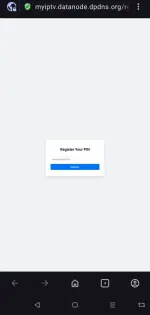
NOTE : Please ask for PIN approval in this thread or you can PM me. Lagay nyo anong PIN ang gusto nyo ipa approve
2. Wait for approval and once approved you can now login to this page
HOW TO CHANGE CHANNELS
1. For Android touch device just tap swipe-up or down the right edge of the screen.
2. For PC just hover the mouse pointer at the right edge of the screen
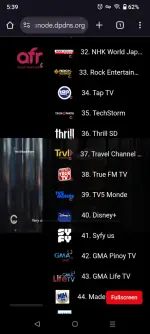
3. Channel Button added for smart TV user and PC user. YES the page is now fully compatible in all device PC and Smart TV user can use the channel Button to use the channel guide. Touch swipe right edge can still be use in touch device.
You can also use the search bar inside the channel guide to search for channels
FULL SCREEN MODE
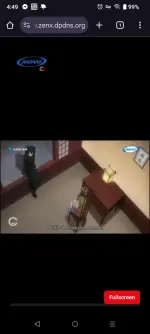
1. Simply press the red Fullscreen button to go Fullscreen mode then tap back to return to portrait or ESC key in PC
NOTE: NBA Games naka Auto scrape Live channels only playable during live games kapag walang games mostly dead ang channels.
Please report bugs its still in Beta. Salamat
(This project serves as a proof of concept for page security and protection mechanisms. All are invited to participate in the testing phase. All 'silip boys' are welcome to explore and interact with the page as they see fit, provided it piques their interest.)
1. Go to this page to register your PIN you can choose any 6 number combination that you like
*** Update isang link na lang for Register and Login (this is in preparation if i want to make the page an APK at iwas husstle na rin)
closed
Kung gusto nyo APK for Android here's is the link for apk
You do not have permission to view the full content of this post. Log in or register now.
Note: since this apk is not registered sa appstore android will ask you to scan before installing you can choose to scan or you can choose install without scanning.
NOTE : Please ask for PIN approval in this thread or you can PM me. Lagay nyo anong PIN ang gusto nyo ipa approve
2. Wait for approval and once approved you can now login to this page
HOW TO CHANGE CHANNELS
1. For Android touch device just tap swipe-up or down the right edge of the screen.
2. For PC just hover the mouse pointer at the right edge of the screen
3. Channel Button added for smart TV user and PC user. YES the page is now fully compatible in all device PC and Smart TV user can use the channel Button to use the channel guide. Touch swipe right edge can still be use in touch device.
You can also use the search bar inside the channel guide to search for channels
FULL SCREEN MODE
1. Simply press the red Fullscreen button to go Fullscreen mode then tap back to return to portrait or ESC key in PC
NOTE: NBA Games naka Auto scrape Live channels only playable during live games kapag walang games mostly dead ang channels.
Please report bugs its still in Beta. Salamat
(This project serves as a proof of concept for page security and protection mechanisms. All are invited to participate in the testing phase. All 'silip boys' are welcome to explore and interact with the page as they see fit, provided it piques their interest.)

 arayy mo sana magtagal ts