 PH
PHYes you heard it right, apple intelligence on older devices from iPhone 14 below.
how? here's how it is.
requirements:
iPhone running on 17.0-18.1.1
usb cable
pc/laptop
and this one

Step 1: Download these files iTunes and Nuggets :
You do not have permission to view the full content of this post. Log in or register now.
You do not have permission to view the full content of this post. Log in or register now.
You do not have permission to view the full content of this post. Log in or register now. - download this on your device
Step 2: run iTunes first and connect your device to pc and wait for it to get a connection between the pc and the device. (MAKE SURE NA NAKA DISABLE YUNG FIND MY NYO, IF NOT HINDI ITO GAGANA)
Step 3: run Nugget Tool and head to Eligibility click the checkbox and select for a model (eto ung pang spoof, recommended na gamitin ung base model or latest model) NOTE: WAG NYO PILIIN KUNG ANONG DEVICE GAMIT NYO HAHAHA | NOTE 2: MAWAWALA DIN PALA UNG FACE ID NYO DITO PERO MABABALIK DIN NAMAN AGAD, ILL EXPLAIN IT LATER.
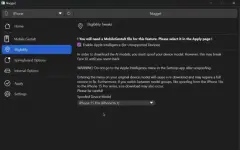
Step 4: i run nyo ung shortcut na MobileGestalt sa phone nyo and isave nyo yung file sa pc since need natin yan
Step 5: Choose nyo ung sinave nyo na file from the device to pc, then mag rereboot na ung phone nyo.
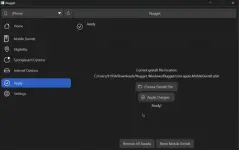
Step 6: once na mag reboot parang mag seset up ka ulit jan pero dont worry hindi yan nag reset. after mag set up punta ka sa settings and dapat may Apple Intelligence na jan
Join ka lang sa waitlist and after mo mag join kusa na mag dodownload ng Aplle Intelligence features yan.
THERE YOU HAVE IT, YOU NOW HAVE APPLE INTELLIGENCE ON YOUR DEVICE EVEN THO NA HINDI YAN IPHONE 15 UP.
FIXING FACE ID
Step 7: open Nugget Tool then sa eligibilty select mo lang ung original then apply mo na, use the same file you saved from the device after restarting it should fix the face id.