 PH
PHUPDATE: v1.2_Alpha is up! (If you're on an older version, update immediately, it's a critical one)
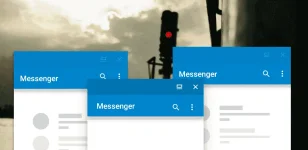
Hi everyone!
If you happen to be a fan of split-window mode in You do not have permission to view the full content of this post. Log in or register now.Nougat, there is a good chance that may find this nifty tools App that I have been working on - Parallel Windows for Nougat(Android 7.0 Nougat exclusive)
What it does? 3 things as of now:
#1 Provide an onscreen shortcut to toggle split-screen
#2 Quickly launch any new App in split-screen mode through a floating mini App drawer.
#3 Mirror an App!
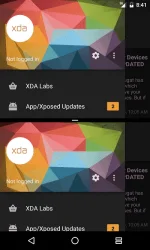
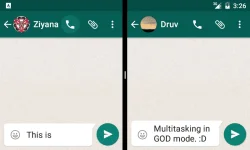
YES! You can run two You do not have permission to view the full content of this post. Log in or register now. of an App, two windows of almost any App on a phone but MANY windows of an App ontablet, as seen on the screenshots above.
The set of tools can be accessed by swiping from right edge of the screen, couple of screenshots of the App:
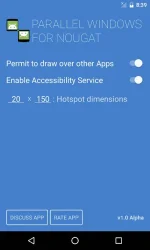
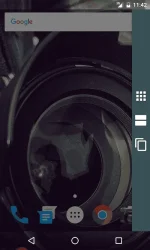
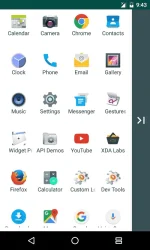
Here is a video demo (please note that it's on an emulator, expect some lags here and there.) In case you're only interested in checking out how the mirroring of App works, jump to 03:14 in the video. And if anybody can shoot a quality video, please do and upload to this thread.
Please subscribe, share the link of this thread with your Nexusfriends (running Android Nougat.)
Thank you for going through my post.
DOWNLOAD OPTIONS:
You do not have permission to view the full content of this post. Log in or register now.
You do not have permission to view the full content of this post. Log in or register now.
You do not have permission to view the full content of this post. Log in or register now.
If you like the App, please leave a rating on Google Play Store.
INSTALLATION INSTRUCTION AND SOME IMPORTANT NOTES ON THE APP IS LEFT ON THE You do not have permission to view the full content of this post. Log in or register now..

What's changed/new in v1.2_Alpha:
* The App is now battery ready - uses CPU for only the few seconds when you interact with it.
What's changed/new in v1.1_Alpha:
* The floating App drawer should be super responsive now.
* After swiping in left the tools menu, you can tap anywhere on the screen to exit (earlier you had to swipe back to the right.)
* Added quick sharing option.
Dont forget to hit like.....thanks for support
Hi everyone!
If you happen to be a fan of split-window mode in You do not have permission to view the full content of this post. Log in or register now.Nougat, there is a good chance that may find this nifty tools App that I have been working on - Parallel Windows for Nougat(Android 7.0 Nougat exclusive)
What it does? 3 things as of now:
#1 Provide an onscreen shortcut to toggle split-screen
#2 Quickly launch any new App in split-screen mode through a floating mini App drawer.
#3 Mirror an App!
YES! You can run two You do not have permission to view the full content of this post. Log in or register now. of an App, two windows of almost any App on a phone but MANY windows of an App ontablet, as seen on the screenshots above.
The set of tools can be accessed by swiping from right edge of the screen, couple of screenshots of the App:
Here is a video demo (please note that it's on an emulator, expect some lags here and there.) In case you're only interested in checking out how the mirroring of App works, jump to 03:14 in the video. And if anybody can shoot a quality video, please do and upload to this thread.
Please subscribe, share the link of this thread with your Nexusfriends (running Android Nougat.)
Thank you for going through my post.
DOWNLOAD OPTIONS:
You do not have permission to view the full content of this post. Log in or register now.
You do not have permission to view the full content of this post. Log in or register now.
You do not have permission to view the full content of this post. Log in or register now.
If you like the App, please leave a rating on Google Play Store.
INSTALLATION INSTRUCTION AND SOME IMPORTANT NOTES ON THE APP IS LEFT ON THE You do not have permission to view the full content of this post. Log in or register now..
What's changed/new in v1.2_Alpha:
* The App is now battery ready - uses CPU for only the few seconds when you interact with it.
What's changed/new in v1.1_Alpha:
* The floating App drawer should be super responsive now.
* After swiping in left the tools menu, you can tap anywhere on the screen to exit (earlier you had to swipe back to the right.)
* Added quick sharing option.
Dont forget to hit like.....thanks for support
