 PH
PH-
Welcome to PHCorner Forums! Sign up for free to unlock full access and exclusive privileges, including:
- Asking questions about computer and mobile issues
- Discovering internet tips for your mobile network and computer
You are using an out of date browser. It may not display this or other websites correctly.
You should upgrade or use an alternative browser.
You should upgrade or use an alternative browser.
🔒 Closed Laptop/desktop perdormance tweak ultimate
- Thread starter xrisxrane
- Start date
- Status
- Not open for further replies.
Is these really effective TS? As far as I know, ang index is for the basis lang kung gaano kabilis ang system mo changing po yung index value is di po nakakapabilis ng system except if may babaguhin ka sa system mo para tumaas ang index value .. correct me if i'm wrong po TS ..
ypur right but faking it makes ypur system perform as smoothly makikita mu yun if ma change mu na dapat ung app gamitin mu to see the changes ma reremove nya slight lags ng games at pwede sin ipartner mu sya download ka ng dispaly adapter ung moddede like chelv7 b if windows seven mau sa vista din and follow the instructions lang how to mod ypur pc laptop using that tweak kailangan din may upgrade ka sa ram like 4g of ram mas ok na un for multitasking at kung gaming naman may mga modded drivers din for your graphics driver. pm ka lang what do you want to try.hehe basta make sure you have a external drive to backup your important files maganda pag nka i3 ka much more performance gain.
well but i dont think you can play even batman arkham city with your i3 and only 4gb of ram a slight fix of the syatems smoothness can make much more less lag even tekken vs street fighter still be unplayable if you think iys not worth the try dont follow the mods itll just get you confused.what are you playing counter strike global defense but you cant play splinter cell.
cf,dota2 with multi app na naka open okay naman hindi naman laggy at tsaka sa ping din yanwell but i dont think you can play even batman arkham city with your i3 and only 4gb of ram a slight fix of the syatems smoothness can make much more less lag even tekken vs street fighter still be unplayable if you think iys not worth the try dont follow the mods itll just get you confused.what are you playing counter strike global defense but you cant play splinter cell.
well if thats the case good for you i cant argue on that just dont make your processor too hot or your gonna change the thermal paste on that like every 3 months or so. so suite yoursel bro
at eto nlang try mu advance seeting for your ping playing before playing dota try this one out go to registry editor find hkey/localmachine/microsoft/wnlindows nt/multimedia click network throttling and change the value to 60 for better image rendering if you have better ping i dont know if that suites you good day man.cf,dota2 with multi app na naka open okay naman hindi naman laggy at tsaka sa ping din yan
ypur right but faking it makes ypur system perform as smoothly makikita mu yun if ma change mu na dapat ung app gamitin mu to see the changes ma reremove nya slight lags ng games at pwede sin ipartner mu sya download ka ng dispaly adapter ung moddede like chelv7 b if windows seven mau sa vista din and follow the instructions lang how to mod ypur pc laptop using that tweak kailangan din may upgrade ka sa ram like 4g of ram mas ok na un for multitasking at kung gaming naman may mga modded drivers din for your graphics driver. pm ka lang what do you want to try.hehe basta make sure you have a external drive to backup your important files maganda pag nka i3 ka much more performance gain.
amd quad-core processor e2-6110(1.50ghz)
amd radeon r2 graphic
4gb ram dd3
yan po spec ng laptop na gamit ko .. may maisasuggest ka po ba dito ts? thanks in advance ts ..
replace your processor find something like about 3 ghz if you want to play more graphical games is this a laptop or desktop btw.amd quad-core processor e2-6110(1.50ghz)
amd radeon r2 graphic
4gb ram dd3
yan po spec ng laptop na gamit ko .. may maisasuggest ka po ba dito ts? thanks in advance ts ..
ReinAbrera
Journeyman
Working po ba ito Sir?
yup just find the app and download it install and domt forget to turn off your uac if uac is on this app will not work.Working po ba ito Sir?
replace your processor find something like about 3 ghz if you want to play more graphical games is this a laptop or desktop btw.
this is a laptop TS and i don't know if laptop are available for changing their processors .. i think they are built-in so only few hardware are changeable .. windows 10 nga rin po pala gamit ko na OS ..
and about sa 1.5ghz na processor speed is talagang nababagalan ako sadlife lang mukhang di na mapapalitan ang processors ng laptop ..
na try mu na ba tong buksan and check if the processors built some laptops kahit na i3 napapalitan ang processor like asus.this is a laptop TS and i don't know if laptop are available for changing their processors .. i think they are built-in so only few hardware are changeable .. windows 10 nga rin po pala gamit ko na OS ..
and about sa 1.5ghz na processor speed is talagang nababagalan ako sadlife lang mukhang di na mapapalitan ang processors ng laptop ..
hindi compatible pag ganyan kasi ung graphics ng windows ten is grid style sa visual performace palang maglalag na yan..
just dl some modded display adapters like chell v8 look for one compatible for windows 10 display adapter yan to fake your laptop zdl ka din ng project skylake.
1st thing you do is you need to install project skylake search mu lang yan tapos after installation reboot
2nd search this one inf auto tool install it reboot
3rd is your modded display adapter reboot automatically lang
4th try to copy dll files for your open gl search this modded dll for open gl mesh file open gl 3.1 or 3.2 the higher the better try mu kasi amd processor ka hanap ka din ng modded na drivers for your amd dapat precise go to this site amd.com or find the site to download any type of amd drivers yhen pick ypur choice
lastly is tweak your experience index by dl the app good luck
additional open msconfig via windows button+r type msconfig
click advanced option choose the maximum core like 2 and ypur ram to all the ram 4g
also go to startup and uncheck the unnecessary apps ypu dont use at startup
1st thing you do is you need to install project skylake search mu lang yan tapos after installation reboot
2nd search this one inf auto tool install it reboot
3rd is your modded display adapter reboot automatically lang
4th try to copy dll files for your open gl search this modded dll for open gl mesh file open gl 3.1 or 3.2 the higher the better try mu kasi amd processor ka hanap ka din ng modded na drivers for your amd dapat precise go to this site amd.com or find the site to download any type of amd drivers yhen pick ypur choice
lastly is tweak your experience index by dl the app good luck
additional open msconfig via windows button+r type msconfig
click advanced option choose the maximum core like 2 and ypur ram to all the ram 4g
also go to startup and uncheck the unnecessary apps ypu dont use at startup
just dl some modded display adapters like chell v8 look for one compatible for windows 10 display adapter yan to fake your laptop zdl ka din ng project skylake.
1st thing you do is you need to install project skylake search mu lang yan tapos after installation reboot
2nd search this one inf auto tool install it reboot
3rd is your modded display adapter reboot automatically lang
4th try to copy dll files for your open gl search this modded dll for open gl mesh file open gl 3.1 or 3.2 the higher the better try mu kasi amd processor ka hanap ka din ng modded na drivers for your amd dapat precise go to this site amd.com or find the site to download any type of amd drivers yhen pick ypur choice
lastly is tweak your experience index by dl the app good luck
additional open msconfig via windows button+r type msconfig
click advanced option choose the maximum core like 2 and ypur ram to all the ram 4g
also go to startup and uncheck the unnecessary apps ypu dont use at startup
thank you sa advise TS ..
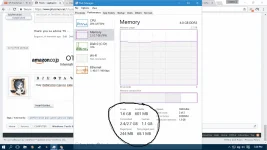
may itatanong nga po pala ako TS .. bakit po nasa 1gb ang naka cache na memory ng laptop ko?
nag attach po ako ng screen shot ng laptop ko ...
Attachments
hardc0reme
Journeyman
Pasubok ng mga nkasulat dito salamat sa share
thank you sa advise TS ..
may itatanong nga po pala ako TS .. bakit po nasa 1gb ang naka cache na memory ng laptop ko?
nag attach po ako ng screen shot ng laptop ko ...
page file yan yan yung mga startups mu download ka ng ccleaner tapos navigate to tools then startup mas makikita mu lahat dun mag screen shot ka ulit kung na install mu na ang ccleaner tuturo ko sayo san ka mag nanavigate ok..
page file yan yan yung mga startups mu download ka ng ccleaner tapos navigate to tools then startup mas makikita mu lahat dun mag screen shot ka ulit kung na install mu na ang ccleaner tuturo ko sayo san ka mag nanavigate ok..
Na install ko na TS nagawa ko na rin sinasabi mo ..
Oo nga pala TS sa windows 10 wala akong makitang performance index ..
- Status
- Not open for further replies.
Similar threads
-
❓ Help Movie streaming site for pc/laptop/desktop
- Started by xsephia0211
- Replies: 11
-
👨🏫 Tutorial [TUTORIAL] Gawing Passive Income Server ang Ubuntu/Linux Laptop/Desktop mo! (Docker Setup)
- Started by SancTum26
- Replies: 88
About this Thread
-
32Replies
-
1KViews
-
10Participants
Last reply from:
xrisxrane
xrisxrane
New Topics
-
Blackmagic Design Fusion Studio 21.1.2 (x64) Multilingual
- Started by PremiumCourses
- Replies: 0
- ⚙️ PC Apps, Themes, Tools
-
-
Autocad 2021 with crack
- Started by Newbieee
- Replies: 0
- ⚙️ PC Apps, Themes, Tools
-
OpenPlant Project Administrator 2026 v26.00.02.10 Win x64
- Started by PremiumCourses
- Replies: 0
- ⚙️ PC Apps, Themes, Tools
-
Lattice Semiconductor Diamond 3.14
- Started by PremiumCourses
- Replies: 0
- ⚙️ PC Apps, Themes, Tools
-
Hexagon Vero AlphaCAM 2026.2 Build 104 Win x64
- Started by PremiumCourses
- Replies: 0
- ⚙️ PC Apps, Themes, Tools
-
Internet Download Manager 6.43 Build 16 | 14.9 MB
- Started by DLBB
- Replies: 0
- ⚙️ PC Apps, Themes, Tools
-
SketchUp Pro 2027 27.0.264 | 2.12 GB
- Started by DLBB
- Replies: 0
- ⚙️ PC Apps, Themes, Tools
Trending Topics
Online now
- Members online
- 1,147
- Guests online
- 13,240
- Total visitors
- 14,387