 PH
PH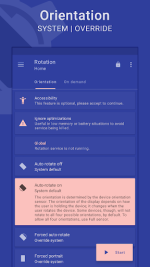
 App Description:
FEATURES
Orientations
• Auto-rotate on • Auto-rotate off
• Forced auto-rotate • Sensor auto-rotate • Reverse auto-rotate
• Forced portrait • Forced landscape • Reverse portrait
• Reverse landscape • Sensor portrait • Sensor landscape
• Full sensor • Sensor left • Sensor right • Sensor reverse
• Lock Current – Lock current orientation
Conditions
• Charging orientation • Dock orientation • App orientation
• Events priority - Customizable events preference in case two or more events occur simultaneously.
On demand
Themes
• A dynamic theme engine with background-aware functionality to avoid any visibility issues.
Others
• Start on boot • Notification • Vibration and more.
• Widgets, shortcuts and notification tiles to perform various operations.
# Rotation extension to automate over 40 actions via Locale / Tasker plugin.
• Quick setup to configure major features at once.
# Perform backup and restore operations to save and load the app settings.
Features marked with
#
are ρáíd, and the
Rotation Key
is required to use them.
LANGUAGES
English, Deutsch, Español, Français, हिंदी, Indonesia, Italiano, Português, Русский, Türkçe, 中文 (简体), 中文 (繁體)
PERMISSIONS
Internet access
– To display ads in free version.
Retrieve running apps
– To detect foreground app.
Usage statistics (Android 5.0+)
– To detect foreground app.
Modify system settings
– To change display orientation settings.
Draw over other apps
– To change foreground orientation.
Read device state and identity
Run at startup
– To start the service when the device boots up.
Control vibration
– To vibrate device when orientation changes.
Post notifications (Android 13 and above)
– To show notifications that help (and are required) in keeping the service running during various restrictions.
Modify USB storage (Android 4.3 and below)
– To create and restore backups.
ACCESSIBILITY
It uses an accessibility service to provide a better experience and to force the lock screen orientation on Android 8.0+ devices. It will not access window content or any other sensitive data.
Rotation > Conditions > Events > Accessibility.
------------------------------
-
Buy
Rotation Key
-
-
Some apps might not work properly when forced to work in certain orientations. Use Auto-rotate on/off from conditions to use system settings for those apps.
-
Reverse portrait orientation is disabled on some Xiaomi (MIUI) devices with the default launcher. Please try any other launcher (home screen) to make it work.
Android is a trademark of Google LLC.
 MOD Features:
- VIP/Unlocked
Download