PH
PH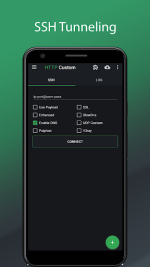
 App Description:
HTTP Custom is a AIO (All in One) tunnel VPN client with custom HTTP request header to secure surfing

PLEASE READ BEFORE YOU DOWNLOAD
Note:
- Can't disconnect vpn when it connecting, try use on/off data to force stop vpn.
Feature:
 Secure surfing using SSH and VPN Custom request header Free VPN server DNS Changer Share your SSH/VPN connection (Hotspot or USB Tethering) Export config No root needed
Why HTTP Custom:
 User friendly Free unlimited vpn server Custom HTTP request header AIO (All in One VPN Client)
Permission:
 Permission access photos, media and files
Give permission HTTP Custom read & write config
Give permission HTTP Custom to generate hwid and read isp card info
Permission access this device's locationGive permission HTTP Custom to read ssid, only for OS >= 8 (Oreo)
How to share connection tethering:
 ️ Start HTTP Custom until connected️ Switch on hotspot/usb tethering️ Check log it will show info tethering ip
 ort server as proxy, if not show default proxy for Hotspot 192.168.43.1 and USB Tether 192.168.42.129 port 7071️ Client connect to hotstpot and set proxy client like log info from HTTP Custom (you can see image on top how to setup proxy from android, if you use desktop please use proxifier then set type proxy as HTTPS in proxifier)
 MOD Features:
- VIP/Unlocked
Download