 PH
PH-
Welcome to PHCorner Forums! Sign up for free to unlock full access and exclusive privileges, including:
- Asking questions about computer and mobile issues
- Discovering internet tips for your mobile network and computer
You are using an out of date browser. It may not display this or other websites correctly.
You should upgrade or use an alternative browser.
You should upgrade or use an alternative browser.
try mo same sa specs ng pc ko yan at jan din ako bumili
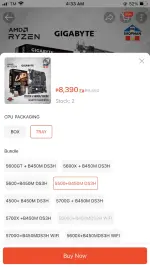
ryzen 5 5500 + gigabyte mobo b450 - 8,390
- You do not have permission to view the full content of this post. Log in or register now.
ssd teamgroup mp33 - 3,275
- You do not have permission to view the full content of this post. Log in or register now.
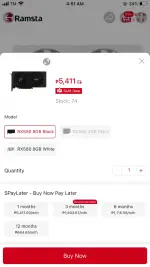
video card rx580 - 5,411
- You do not have permission to view the full content of this post. Log in or register now.
computer case - 2,035
- You do not have permission to view the full content of this post. Log in or register now.
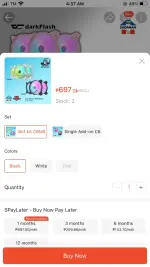
rgb fan - 697
- You do not have permission to view the full content of this post. Log in or register now.
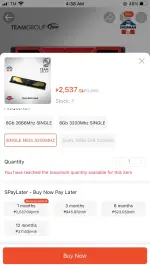
teamgroup elite plus ram - 2,537
- You do not have permission to view the full content of this post. Log in or register now.
total 22,345
pero if hindi ka magvideocard mas less sya pero mas ok kung magvivideo card ka.
kung di ka magvivideocard pwede ito ipalit mo ryzen 5 5600GT + gigabyte b450m
- You do not have permission to view the full content of this post. Log in or register now.
ikaw nadin bahala kung magdagdag kapa ng fan sa case.


additional if full set sama muna to!
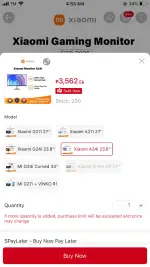
xiaomi monitor 3,562
- You do not have permission to view the full content of this post. Log in or register now.
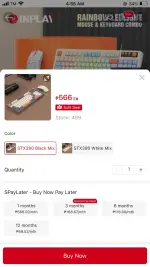
keyboard and mouse
- You do not have permission to view the full content of this post. Log in or register now.
ryzen 5 5500 + gigabyte mobo b450 - 8,390
- You do not have permission to view the full content of this post. Log in or register now.
ssd teamgroup mp33 - 3,275
- You do not have permission to view the full content of this post. Log in or register now.
video card rx580 - 5,411
- You do not have permission to view the full content of this post. Log in or register now.
computer case - 2,035
- You do not have permission to view the full content of this post. Log in or register now.
rgb fan - 697
- You do not have permission to view the full content of this post. Log in or register now.
teamgroup elite plus ram - 2,537
- You do not have permission to view the full content of this post. Log in or register now.
total 22,345
pero if hindi ka magvideocard mas less sya pero mas ok kung magvivideo card ka.
kung di ka magvivideocard pwede ito ipalit mo ryzen 5 5600GT + gigabyte b450m
- You do not have permission to view the full content of this post. Log in or register now.
ikaw nadin bahala kung magdagdag kapa ng fan sa case.
additional if full set sama muna to!
xiaomi monitor 3,562
- You do not have permission to view the full content of this post. Log in or register now.
keyboard and mouse
- You do not have permission to view the full content of this post. Log in or register now.
Attachments
MikeCONCEPT
Elite
### Budget PC Build Recommendation Under ₱20,000 PHP (September 2025)
Building a PC under ₱20,000 in the Philippines is challenging in 2025 due to rising component prices and inflation, but it's doable for a solid entry-level setup focused on productivity (e.g., office work, web browsing, light multitasking, and online learning) with light gaming capabilities (e.g., older titles or esports games like Valorant, League of Legends at 720p-1080p low-medium settings). For modern AAA gaming, you'd need at least ₱30,000-40,000.
The best approach is an AMD APU build (processor with integrated graphics), as discrete GPUs eat up too much budget. This setup is upgradable—add a GPU later when your budget grows. Prices are approximate based on current Lazada, Shopee, PC E×ρréšš, and EasyPC listings (as of late September 2025; check for flash sales or bundles to save ~₱500-1,000). Total: ₱18,950 (leaves room for shipping or tweaks).
#### Recommended Parts List
Total Estimated Cost: ₱18,950
#### Performance Expectations
#### Shopping & Assembly Tips
- Stretch to ₱25,000: Add a GT 1030 GPU (₱3,000) for 1080p gaming boost.
- If no gaming: Intel Core i3-12100 (~₱5,000) build saves ~₱1,000 but similar performance.
Prices fluctuate, so verify on sites like pcx.com.ph or easypc.com.ph
Building a PC under ₱20,000 in the Philippines is challenging in 2025 due to rising component prices and inflation, but it's doable for a solid entry-level setup focused on productivity (e.g., office work, web browsing, light multitasking, and online learning) with light gaming capabilities (e.g., older titles or esports games like Valorant, League of Legends at 720p-1080p low-medium settings). For modern AAA gaming, you'd need at least ₱30,000-40,000.
The best approach is an AMD APU build (processor with integrated graphics), as discrete GPUs eat up too much budget. This setup is upgradable—add a GPU later when your budget grows. Prices are approximate based on current Lazada, Shopee, PC E×ρréšš, and EasyPC listings (as of late September 2025; check for flash sales or bundles to save ~₱500-1,000). Total: ₱18,950 (leaves room for shipping or tweaks).
#### Recommended Parts List
| Component | Model/Specification | Estimated Price (₱) | Why This Choice? |
|---|---|---|---|
| CPU | AMD Ryzen 5 5600G (6 cores/12 threads, Radeon Vega 7 iGPU) | 6,500 | Excellent value APU for multitasking and light gaming (up to 60 FPS in esports). Handles productivity like Google Workspace or Zoom effortlessly. Outperforms older Ryzen 3 3200G. |
| Motherboard | ASRock A520M-HDV (AM4 socket, mATX) | 3,200 | Reliable budget board with good VRM for the 5600G. Supports future upgrades (e.g., Ryzen 5000-series CPUs). Avoid cheaper A320 for better PCIe lanes. |
| RAM | TeamGroup T-Force Vulcan Z 16GB (2x8GB) DDR4-3200 CL16 | 1,800 | Dual-channel 16GB is essential for smooth multitasking; 3200MHz speed boosts iGPU performance by ~20% in games. |
| Storage | Kingston NV2 500GB NVMe SSD (PCIe 3.0) | 1,500 | Fast boot times and app loading for productivity. 500GB fits OS, apps, and some files—add a HDD later if needed. |
| PSU | Cooler Master Elite V3 500W (80+ certified) | 1,500 | Efficient and reliable for this build; 500W gives headroom for future GPU upgrades. Non-modular to save cost. |
| Case | Montech Air 100 ARGB (mATX, tempered glass) | 1,800 | Good airflow with pre-installed fans; budget-friendly with modern looks. Includes ARGB for a touch of style. |
| Cooler | Stock Wraith s†éálth (included with CPU) | 0 (bundled) | Sufficient for stock speeds; no need for aftermarket unless overclocking. |
| OS | Windows 11 Home (USB key or free Linux alt) | 2,650 | Essential for productivity software. Use Ubuntu for free if budget-tight. |
Total Estimated Cost: ₱18,950
#### Performance Expectations
- Productivity: Handles Microsoft Office, video calls, web tabs (10+), and light photo editing smoothly. Boot time ~10 seconds.
- Gaming: 40-60 FPS in light games (CS:GO, Dota 2) at 1080p low. For heavier titles like Fortnite, drop to 720p medium. Not for 1440p or ray tracing.
- Benchmarks (based on similar 2025 tests): Cinebench R23 multi-core ~8,000 (great for the price); integrated GPU scores ~1,200 in 3DMark.
#### Shopping & Assembly Tips
- Where to Buy: Lazada/Shopee for deals (e.g., PC E×ρréšš bundles on Lazada often discount mobo+CPU). Physical stores like EasyPC or PC Worth for inspection. Compare via PCPartPicker (import PH prices manually).
- Assembly: Easy for beginners—follow YouTube guides (e.g., "AMD APU build 2025"). Takes 1-2 hours; no soldering needed. If unsure, pay ₱500-1,000 for shop assembly.
- Upgrades Path: Slot in a used GTX 1650 (~₱5,000) later for better gaming. Board supports up to Ryzen 7.
- Alternatives:
- Stretch to ₱25,000: Add a GT 1030 GPU (₱3,000) for 1080p gaming boost.
- If no gaming: Intel Core i3-12100 (~₱5,000) build saves ~₱1,000 but similar performance.
Prices fluctuate, so verify on sites like pcx.com.ph or easypc.com.ph
Similar threads
-
-
❓ Help PC Build Graduation Gift [via Wallmart]
- Started by WizKhalifaX_
- Replies: 0
About this Thread
-
2Replies
-
837Views
-
3Participants
Last reply from:
MikeCONCEPT
MikeCONCEPT
New Topics
-
Housebet free money
- Started by Dan pogi
- Replies: 0
- 💰 Crypto, Earn, & Referrals
-
Buying pa rin PI TOKEN !
- Started by Renzo05
- Replies: 0
- 💰 Crypto, Earn, & Referrals
-
INVESTMENT PLATFORM VENDO AI
- Started by PHC-Verification Purposes
- Replies: 0
- 💰 Crypto, Earn, & Referrals
-
Distrokid (Payout update)
- Started by PHC-JCHEESE
- Replies: 3
- 💰 Crypto, Earn, & Referrals
-
Bagong app guys naka 581pesos ako dito fresh proof
- Started by jeason25
- Replies: 1
- 💰 Crypto, Earn, & Referrals
-
Earn PPX Token with REVELX
- Started by rhielarth1617
- Replies: 0
- 💰 Crypto, Earn, & Referrals
-
-
Youtube channel for distrokid
- Started by Marlon_12345-
- Replies: 6
- 💰 Crypto, Earn, & Referrals
-
Basic fx trading strat
- Started by userdaniel03
- Replies: 0
- 💰 Crypto, Earn, & Referrals
Trending Topics
Online now
- Members online
- 1,130
- Guests online
- 12,407
- Total visitors
- 13,537