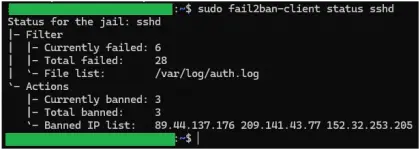
PH
PHI woke up 2 hours ago only to find out that my internet is down.. or so I thought. Akala ko talaga may problema na naman ang converge so I decided to check. Nakalagay naman ay "normal" ang status, and may connection din. I restarted the modem, still no internet. I turned it off, unplugged it and plugged it back in after 2 minutes, still "normal" status but no internet. My PC says "connected" but I cannot browse the internet. Iniisip ko na lang na may problema talaga ang converge. I am about to just wait pero nag-notify ang phone ko. Ang sabi "cannot connect to DNS". Eh I am using my own AdGuard Home DNS. I changed the DNS settings to "automatic" and boom.. MAY INTERNET! So, hindi converge ang may problema kundi yung DNS ko. I tried logging in to the AdGuard Home DNS portal pero ayaw nyang mag-load. Aside sa DNS, I am also using the same VPS to host my website. My DNS is running inside a docker so kung may problema sa DNS, sana hindi affected yung website, tama? But then even my website isn't working. I tried to connect to the VPS but it's not working. I then found out that my VPS is down. Buti na lang very handy ang Google Cloud. I restarted the VPS from GCP and waited until it's working again. Akala ko noong una baka nagka-error lang kaya nag-stop bigla yung VPS. But then, this showed up in my AdGuard Home DNS Portal...
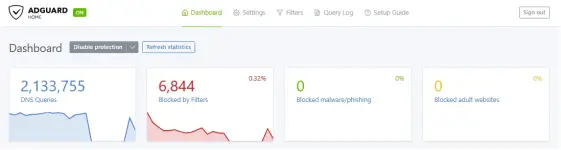
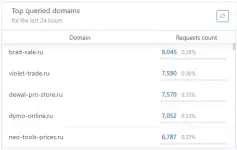
2M DNS queries?? At bakit may russian websites diyan? Suspicious, right? Buti na lang nag-try akong mag-login kanina sa DNS Portal kaya noong nag-reboot ako ng VPS ay nag-load yang DNS portal. And After checking the logs, I can see na tuloy-tuloy pa rin ang queries. I disconnected my devices sa DNS and cleared the logs para makasiguro na wala sa phone or laptop ko ang problema. Luckily, hindi naman na-häçk ang PC ko or what not kasi even after disconnecting my phone and laptop sa DNS ay may mga queries pa din. As you can see, I kept refreshing and tuloy-tuloy pa rin ang queries kahit hindi na connected and devices ko sa DNS.
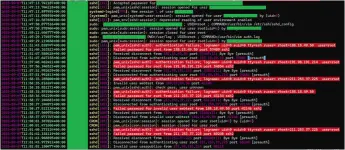
I am already thinking na something is wrong so I logged back in to my VPS and checked the log. And yeah, I found this...
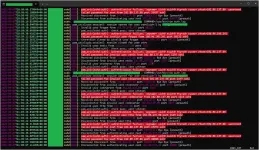
Confirmed! My VPS is under attack. I set PermitRootLogin to "no" naman na as a safety precaution. Shutdown the VPS for 5 minutes but still, when I check it again, tuloy pa rin ang bruteforce.
And just now, my DNS stopped working again. Well, it seems like hindi nila titigilan. I shut the VPS down and I am planning to build a new one. Ang hassle lang kasi ang mag-migrate.
May suggestion ba kayo? What if I change the VPS IP? Naka-static IP kasi eh. Ano sa tingin nyo?
2M DNS queries?? At bakit may russian websites diyan? Suspicious, right? Buti na lang nag-try akong mag-login kanina sa DNS Portal kaya noong nag-reboot ako ng VPS ay nag-load yang DNS portal. And After checking the logs, I can see na tuloy-tuloy pa rin ang queries. I disconnected my devices sa DNS and cleared the logs para makasiguro na wala sa phone or laptop ko ang problema. Luckily, hindi naman na-häçk ang PC ko or what not kasi even after disconnecting my phone and laptop sa DNS ay may mga queries pa din. As you can see, I kept refreshing and tuloy-tuloy pa rin ang queries kahit hindi na connected and devices ko sa DNS.
I am already thinking na something is wrong so I logged back in to my VPS and checked the log. And yeah, I found this...
Confirmed! My VPS is under attack. I set PermitRootLogin to "no" naman na as a safety precaution. Shutdown the VPS for 5 minutes but still, when I check it again, tuloy pa rin ang bruteforce.
And just now, my DNS stopped working again. Well, it seems like hindi nila titigilan. I shut the VPS down and I am planning to build a new one. Ang hassle lang kasi ang mag-migrate.
May suggestion ba kayo? What if I change the VPS IP? Naka-static IP kasi eh. Ano sa tingin nyo?