 PH
PHGusto ko lang sana i-share itong nadiskubre ko na fix. Hirap kasi hanapin ang solusyon sa internet pag sa forums ka lang mag e-escan. Mapapaisip ka nalang na bumili ng bagong mobo. Pero paano kung wala ka pang budget. So this is the scenario:
 You are using Asus Prime A320M-K with older CPUs like the A Series. Then bumili ka ng Ryzen CPU dahil gusto mo mag-upgrade (might be different mobo and CPU). Pagkasalpak mo sa CPU eh di naoopen yung PC mo. Ang usual culprit dyan is ang BIOS version mo. This fix will be very useful sa mga naguupgrade from old CPUs to a newer one pero di makapagstart ang pc kasi di upgraded and BIOS at di makapagupgrade ng BIOS version.
Pero bago mo gawin ang mga instructions na i-shashare ko. i-check mo muna kung ang BIOs version mo talaga ang may sala. Gawin mo muna to:
Checking your BIOS version and other info:
Solution if BIOS version can't be updated is the problem: Check this step by step video  You do not have permission to view the full content of this post.
Log in or register now. (This is not my video. I just want to share this kasi sa mga pc forums na nakita ko walang solution eh at ito ay 100% working sa akin)
You do not have permission to view the full content of this post.
Log in or register now. (This is not my video. I just want to share this kasi sa mga pc forums na nakita ko walang solution eh at ito ay 100% working sa akin)
 DO IT AT YOUR OWN RISK!!!! Possible kasi na magbibrick ang motherboard mo. Pero kung wala ka naman pake ma brick dahil syempre bibili ka rin naman at kung di mo pa naman lage ginagamit pc mo ay okay lang i-try mo
Here are the steps incase na nalilito kayo (kasi ang hina ng audio ng video)
1. Download the files > You do not have permission to view the full content of this post. Log in or register now.. Extract it after.
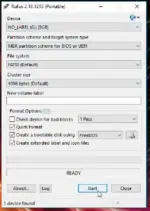
2. Prepare and insert a USB flashdrive (make sure na walang importanteng laman at wala talagang laman kasi ma foformat ito). Open Rufus (nasa file na naextract mo kanina). Setup mo ang Rufus gaya ng nasa picture. Make sure na ang naka set sa device ay yung flashdrive mo.
3. I-open mo ang flashdrive mo at makikita mo ang folder at files na LOCALE, autorun.ico, and autorun,inf
4. Open mo yung folder na dinownload mo kanina Flash Bios USB > Copy to USB. Copy the files inside the Copy to USB folder then paste sa loob ng flashdrive mo. Select "Replace file...".
5. Download the latest BIOS version of ASUS Prime A320M-K > You do not have permission to view the full content of this post. Log in or register now. . Kung sa ibang motherboard mo to gagawin, make sure na pumunta sa official page ng mobo mo, hanapin ang exact mobo mo, at saka mo i-download ang latest version ng BIOS.
6. I-extract ang zip file ng BIOS version na na download.
7. Open UEFITool na nasa Flash Bios USB folder. Click File > Open Image File > Open the folder kung saan yung BIOS version file > Select the .CAP file.
8. Right click mo yung file na nasa UEFITool then select Extract body. Name the file "bios" (no quotation marks). Then click Save. Close the UEFITool after.
9. Makikita mo ang bios.rom na file dun sa folder ng BIOS. Copy the bios.rom file then paste sa USB drive.
10. Restart PC then open BIOS setup (pressing DEL)
11. Open Advanced Mode > Tools > Load Optimized defaults (optional)
12. Open Boot > CSM > Enable CSM
13. Save changes.
14. Press DEL again to open BIOS setup
15. Select mo ang USB flashdrive mo para ito yung magboot. Advanced Mode > Boot > Select your flashdrive sa may Boot Override
16. After nyan, may lalabas na AMI Firmware Update Utility. Antayin lang matapos ito.
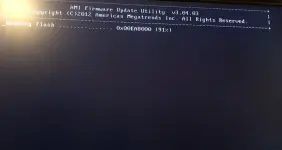
17. Pag tapos na at lumabas na yung C:\> turn off your pc then isalpak mo na yung bago mong Ryzen CPU then turn on your pc. Medyo kakabahan ka dito ng kaunti kasi medyo matagal ng kaunti ang paglabas ng display. Then BOOM! Pag nag on na yan, check mo yung bios version kung yun na yung latest. And I'm sure pag nagana na ang bago mong CPU eh updated na din ang BIOS mo nyan.
(BTW ang mga screenshots dito ay screenshots ko lang dun sa video kaya di maganda ang quality. While I'm doing this fix, di ko na naisip na mag save ng ss para magshare kasi syempre di ko naman ineexpect na gagana. Pero ito yung ginawa o finollow ko mga papsi para ma fix ang issue and it works kaya shinare ko ngayon)
Again DO THIS AT YOUR OWN RISK!!! May chances pa rin na magfail ito. Pero sa akin, nagwork ito. At sa tagal ko nang di nagpost dito sa PHC, ito ang unang pagpost ko ulit. Kaya sana'y makatulong sa inyo to.
You are using Asus Prime A320M-K with older CPUs like the A Series. Then bumili ka ng Ryzen CPU dahil gusto mo mag-upgrade (might be different mobo and CPU). Pagkasalpak mo sa CPU eh di naoopen yung PC mo. Ang usual culprit dyan is ang BIOS version mo. This fix will be very useful sa mga naguupgrade from old CPUs to a newer one pero di makapagstart ang pc kasi di upgraded and BIOS at di makapagupgrade ng BIOS version.Pero bago mo gawin ang mga instructions na i-shashare ko. i-check mo muna kung ang BIOs version mo talaga ang may sala. Gawin mo muna to:
Checking your BIOS version and other info:
- Wag mo muna ibenta or itapon ang old CPU mo at make sure na gumagana pa ito. If not, manghiram ka muna ng ibang CPU. Make sure na yung nahiram mo na CPU is older gen or series ng bagong bili mo na CPU na di mapagana ang pc mo. If same lang or much newer, wag nalang kasi di din gagana yan.
- If nasa Ryzen 3 series naman ang nahiram mo (older gen), try mo i-salpak sa mobo mo. If nagana, dl kana rekta ng latest BIOS You do not have permission to view the full content of this post.
Log in or register now.. If success ang update, salpak mo na ang bagong Ryzen mo at isa-uli mo na yang hiniram mong Ryzen 3 (make sure na walang pins na baliko) at pwede mo na i-close tong thread na to.
- Now, if you can start your PC with the old CPU or sa nahiram mo, check mo na yung BIOS version either sa BIOS setup or by Win + R then type msinfo32. Sa System Summary, makikita mo sa BIOS Version/Date ang version ng BIOS mo after ng American Megatrends Inc. (Example: American Megatrends Inc., 5606) sa example, 5606 ang version.
- Sa Asus Prime A320M-K, kapag same tayo ng issue na naka AMD A series pa lang, ang version ng BIOS nyan mostly ay nasa 5606 lang at yan lang ang isasagad nyan. Dahil sa 5862 update, na remove na ang support for Bristol Ridge (AMD 7th Gen A-series/ Athlon™ X4 series) nyan. Makikita mo yan sa BIOS updates sa website ng ASUS > You do not have permission to view the full content of this post. Log in or register now..
- Ngayon, naintindihan mo na na kaya di nagana PC mo dahil ang bago mong Ryzen ay di pa supported ng current BIOS version na gamit mo. Pero di mo maupdate sa newer version dahil di ka talaga makaka update pag A series nakasalpak sa pc mo ng new versions dahil di supported. Pero pag yung bagong CPU mo naman di naman nakakapag access ng BIOS dahil di makakapagstart.
- Kung latest version naman BIOS mo (possible only if hindi same ng issue ko) try to remove ram and install again. Kung di pa rin ay pasensya ka na brother di na sakop ng thread na to ang problema na yan
 .
.
Solution if BIOS version can't be updated is the problem: Check this step by step video
You do not have permission to view the full content of this post.
Log in or register now. (This is not my video. I just want to share this kasi sa mga pc forums na nakita ko walang solution eh at ito ay 100% working sa akin) DO IT AT YOUR OWN RISK!!!! Possible kasi na magbibrick ang motherboard mo. Pero kung wala ka naman pake ma brick dahil syempre bibili ka rin naman at kung di mo pa naman lage ginagamit pc mo ay okay lang i-try moHere are the steps incase na nalilito kayo (kasi ang hina ng audio ng video)
1. Download the files > You do not have permission to view the full content of this post. Log in or register now.. Extract it after.
2. Prepare and insert a USB flashdrive (make sure na walang importanteng laman at wala talagang laman kasi ma foformat ito). Open Rufus (nasa file na naextract mo kanina). Setup mo ang Rufus gaya ng nasa picture. Make sure na ang naka set sa device ay yung flashdrive mo.
3. I-open mo ang flashdrive mo at makikita mo ang folder at files na LOCALE, autorun.ico, and autorun,inf
4. Open mo yung folder na dinownload mo kanina Flash Bios USB > Copy to USB. Copy the files inside the Copy to USB folder then paste sa loob ng flashdrive mo. Select "Replace file...".
5. Download the latest BIOS version of ASUS Prime A320M-K > You do not have permission to view the full content of this post. Log in or register now. . Kung sa ibang motherboard mo to gagawin, make sure na pumunta sa official page ng mobo mo, hanapin ang exact mobo mo, at saka mo i-download ang latest version ng BIOS.
6. I-extract ang zip file ng BIOS version na na download.
7. Open UEFITool na nasa Flash Bios USB folder. Click File > Open Image File > Open the folder kung saan yung BIOS version file > Select the .CAP file.
8. Right click mo yung file na nasa UEFITool then select Extract body. Name the file "bios" (no quotation marks). Then click Save. Close the UEFITool after.
9. Makikita mo ang bios.rom na file dun sa folder ng BIOS. Copy the bios.rom file then paste sa USB drive.
10. Restart PC then open BIOS setup (pressing DEL)
11. Open Advanced Mode > Tools > Load Optimized defaults (optional)
12. Open Boot > CSM > Enable CSM
13. Save changes.
14. Press DEL again to open BIOS setup
15. Select mo ang USB flashdrive mo para ito yung magboot. Advanced Mode > Boot > Select your flashdrive sa may Boot Override
16. After nyan, may lalabas na AMI Firmware Update Utility. Antayin lang matapos ito.
17. Pag tapos na at lumabas na yung C:\> turn off your pc then isalpak mo na yung bago mong Ryzen CPU then turn on your pc. Medyo kakabahan ka dito ng kaunti kasi medyo matagal ng kaunti ang paglabas ng display. Then BOOM! Pag nag on na yan, check mo yung bios version kung yun na yung latest. And I'm sure pag nagana na ang bago mong CPU eh updated na din ang BIOS mo nyan.
(BTW ang mga screenshots dito ay screenshots ko lang dun sa video kaya di maganda ang quality. While I'm doing this fix, di ko na naisip na mag save ng ss para magshare kasi syempre di ko naman ineexpect na gagana. Pero ito yung ginawa o finollow ko mga papsi para ma fix ang issue and it works kaya shinare ko ngayon)
Again DO THIS AT YOUR OWN RISK!!! May chances pa rin na magfail ito. Pero sa akin, nagwork ito. At sa tagal ko nang di nagpost dito sa PHC, ito ang unang pagpost ko ulit. Kaya sana'y makatulong sa inyo to.