PH
PH4M: You do not have permission to view the full content of this post.
Log in or register now. | 3M: You do not have permission to view the full content of this post.
Log in or register now. | 2M: You do not have permission to view the full content of this post.
Log in or register now. |
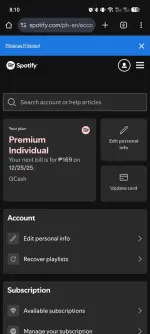
PAANO I-CLAIM:
1. Gumamit ng BAGONG Spotify account
2. I-click ang link
3. Huwag gumamit ng VPN
4. Pumili ng payment method (GCash/ShopeePay/etc.) - ₱0.00 sa buong trial period!
5. MAG-FEEDBACK!
MGA DAPAT GAWIN PAGKATAPOS MA-CLAIM:
1. Clear data ng Spotify app (sundin ang steps sa ibaba)
2. Gumawa ng playlist → I-download
3. Mag-set ng reminder 3 days before trial end
TUTORIAL: PAANO I-CLEAR DATA NG SPOTIFY APP
(Para hindi mawala ang Premium)
ANDROID:
1. Pumunta sa Settings > Apps > Spotify
2. Pindutin ang Storage
3. I-tap ang:
- Clear Cache (muna)
- Clear Data
4. Buksan ulit ang Spotify at mag-login
iOS (iPhone):
1. I-uninstall ang Spotify app
2. I-restart ang iyong iPhone
3. I-reinstall ang Spotify mula sa App Store
4. Mag-login gamit ang bagong account
CANCELLATION REMINDER:
"Cancel 1-2 days BEFORE end date para hindi ka mabilled!"
"Huwag i-cancel agad - mawawala ang Premium!"
KAPAG MAY ERROR:
"Sorry not eligible" = Na-claim na ng iba (isang beses lang magagamit ang link!) "Offer not available" = Subukan sa Incognito browser! SOLUSYON:
1. Sa Chrome/Firefox: Buksan ang link sa Incognito tab
2. Gumawa ng BAGONG Spotify account
3. Ulitin ang proseso