PH
PHArissa ofuma
Contributor
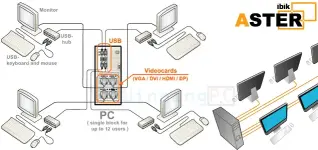
ASTER is a program which allows creating a few workplaces on the base of a single PC. ASTER is a multiseat software for Windows XP/7/8/10. ASTER does not use any thin clients and terminal stations, i.e. ASTER is analog of such multiseat programs, as MS MultiPoint, SoftXpand, Betwin, Userful, etc.
Giveaway Details
- Product name: ASTER Home v2.26
- Website: You do not have permission to view the full content of this post. Log in or register now.
- License type: 1-year license
- Platform: Windows
- Giveaway download link: You do not have permission to view the full content of this post. Log in or register now.
- Giveaway license: 03424-68386-64784-86291-31280
- This is a 2-workplaces 1-year license
- You get free updates for one year
- You get free tech support
- You must redeem the activation id before this offer has ended
– Download and install the ASTER Home.
– After install, run ASTER Home and register it by the license key above.
Highlights
- Low noise level
- Space is saved
- Upgrading costs are cut down
- Easy application
- Electric power is saved
- Local network is not required
- Environmentally friendly
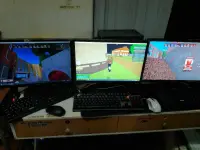
2 in 1 Multi PC Setup Tutorial Using Aster Multi Seat (None Gaming)
Components use in this project
Amd Athlon II x4 640
Gigabyte GA-78MTL
4gb ddr3
120gb ssd
2 monitor
2 keyboard
2 mouse
Windows 7 operating system
for audio output and mic input you can buy 1 usb sound card for the second user
14 days trial
Aster Multiseat software :
Click Here To Download
For Tut
You do not have permission to view the full content of this post. Log in or register now.
You do not have permission to view the full content of this post. Log in or register now.
You do not have permission to view the full content of this post. Log in or register now.