PH
PHHey everyone,
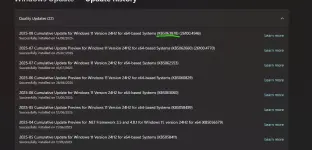
Just wanted to share a heads-up about a potentially serious issue I recently stumbled upon with the latest Windows 11 update, KB5063878. Like many of you, I try to stay on top of updates for security and performance, and I actually installed this one just a couple of days ago.
I first caught wind of trouble through a TikTok video, which led me to immediately check my own system. Sure enough, my laptop is running the same problematic update! A quick search online confirmed that several articles are discussing issues related to this ρá†ch.
The most concerning reports revolve around potential problems with Solid-State Drives (SSDs), with some users experiencing their drives disappearing or even becoming corrupted. While initial buzz suggested this might be isolated to Japan, it's becoming clear that users worldwide are encountering similar issues.
What’s the Culprit? The main trigger seems to be related to large, continuous file-writing operations on SSDs that are more than 60% full. This intensive activity can apparently lead to drive instability.
Scenario 2: You Have Installed KB5063878
Scenario 3: You're Already Experiencing Issues (e.g., drive disappearing, system instability)
I hope this helps shed some light on this situation. Let's keep each other informed in this thread if anyone experiences anything further or hears any official updates.
Stay safe, everyone!
Just wanted to share a heads-up about a potentially serious issue I recently stumbled upon with the latest Windows 11 update, KB5063878. Like many of you, I try to stay on top of updates for security and performance, and I actually installed this one just a couple of days ago.
I first caught wind of trouble through a TikTok video, which led me to immediately check my own system. Sure enough, my laptop is running the same problematic update! A quick search online confirmed that several articles are discussing issues related to this ρá†ch.
The most concerning reports revolve around potential problems with Solid-State Drives (SSDs), with some users experiencing their drives disappearing or even becoming corrupted. While initial buzz suggested this might be isolated to Japan, it's becoming clear that users worldwide are encountering similar issues.
What’s the Culprit? The main trigger seems to be related to large, continuous file-writing operations on SSDs that are more than 60% full. This intensive activity can apparently lead to drive instability.
What Should You Do? Here’s my take based on what I’ve learned:
Scenario 1: You Haven’t Installed KB5063878 Yet- Pause Updates Immediately. Navigate to Settings > Windows Update and select "Pause updates" for a few weeks. This will prevent the problematic update from automatically installing. Keep an eye on tech news for official word from Microsoft on a fix.
Scenario 2: You Have Installed KB5063878
- Check Your SSD Usage: Open File Explorer, right-click on your system drive (usually C), and select Properties. Take a look at the "Used space." Alternatively, use Disk Managementfor more precise details (right-click the Start button and select "Disk Management").
- If Your SSD is Below 60% Full (Like Mine - Currently at around 54%):
- Best Practice: Consider Uninstalling the Update. Go to Settings > Windows Update > Update history > Uninstall updates. Find KB5063878 and uninstall it. Afterwards, immediately pause updates as described above to prevent reinstallation. While some reports suggest uninstalling might not fully resolve underlying corruption if it occurred, it's still the best first step to remove the problematic code.
- Extra Caution: Even if you are below 60%, avoid performing very large, continuous file transfers to your SSD for the time being. Backing up to an external drive (which is a read operation) is still a good idea.
- If Your SSD is At or Above 60% Full:
- Best Practice: Uninstall the Update Immediately (as described above) and pause updates.
- Extra Caution: Minimize any large file-writing activities on your SSD. Consider freeing up some space if possible by moving non-essential large files to an external drive (this is a read operation and should be safe).
- Be Prepared: Keep a close eye on your system for any signs of instability or drive issues. Ensure you have a recent backup of your important data.
- If Your SSD is Below 60% Full (Like Mine - Currently at around 54%):
Scenario 3: You're Already Experiencing Issues (e.g., drive disappearing, system instability)
- Best Practice: If you can still access your system, try uninstalling KB5063878 immediately and then pause updates.
- Data Recovery: If your SSD is showing as unallocated or RAW, stop using the drive to prevent further potential data loss. Seek professional data recovery assistance if the data is critical, or research data recovery tools (like TestDisk) at your own risk.
- Consider System Restore: If you had System Restore enabled and a restore point from before the update, you could try reverting your system to that point.
General Best Practices (Regardless of Your Situation):
- Regular Backups are Crucial: This situation highlights the importance of regularly backing up your important files to an external drive or cloud storage.
- Stay Informed: Keep an eye on reputable tech news outlets and forums for updates and official statements from Microsoft.
- Be Cautious with Updates: While updates are important, it's sometimes wise to wait a few days or weeks after a major update release to see if any widespread issues are reported before installing.
I hope this helps shed some light on this situation. Let's keep each other informed in this thread if anyone experiences anything further or hears any official updates.
Stay safe, everyone!
 aba at back to reality contri ka na ulit
 pero nangyayari din yan sa mga gadgets tulad ng mga smartphones na pagka biglang updates ay nagkaka bugs ..