 PH
PHJay01272001
Elite
This is one of my findings as WFH employee na need na tumagal ang laptop during day brownout!
Note: This will affect performance. Less 1-5 fps in gaming siguro. This is not extreme battery saving setting.
Did you know that naka on ang turbo ng CPU naten by default? How to turn it off.
1. Go here and right click

2. Choose power options

3. Create Power Plan
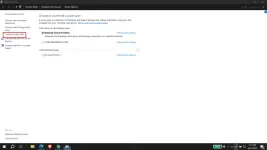
4. Kayo na bahala dito
Balanced if gagamitin niyo normally and magbabawas lang kayo temp
Power Saver if need niyo imaximize battery over performance
High Performance - Lam niyo na yan
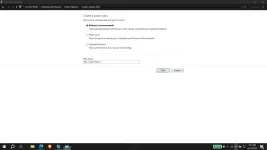
5. Save and next. Kayo na magpangalan
6. Kayo na rin diyan, di na kayo bata HAHAH
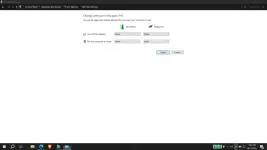
7. Create
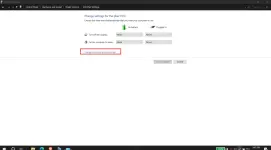
8. Select your created plan then click plan setting
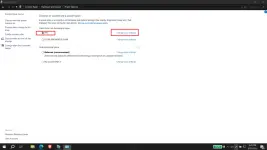
9.
10. Hanapin tong Processor Power Management
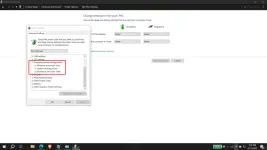
11. Click the +
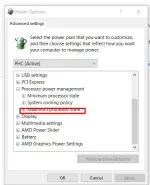
12. Both mo gawing 99% then apply then done
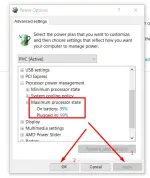
13. Enjoy
Additional Tips:
1. If you want maximum battery, power save mo rin gpu profile mo.
2. If you want lower temps, balance ka lang tapos do above
3. If you want high performance, balik mo sa 100%
Note: This will affect performance. Less 1-5 fps in gaming siguro. This is not extreme battery saving setting.
Did you know that naka on ang turbo ng CPU naten by default? How to turn it off.
1. Go here and right click
2. Choose power options
3. Create Power Plan
4. Kayo na bahala dito
Balanced if gagamitin niyo normally and magbabawas lang kayo temp
Power Saver if need niyo imaximize battery over performance
High Performance - Lam niyo na yan
5. Save and next. Kayo na magpangalan
6. Kayo na rin diyan, di na kayo bata HAHAH
7. Create
8. Select your created plan then click plan setting
9.
10. Hanapin tong Processor Power Management
11. Click the +
12. Both mo gawing 99% then apply then done
13. Enjoy
Additional Tips:
1. If you want maximum battery, power save mo rin gpu profile mo.
2. If you want lower temps, balance ka lang tapos do above
3. If you want high performance, balik mo sa 100%