❓ Help Pldt high to low internet speed

Guys baka may nakaka alam paano ayusin ang problem ko sa pldt net namin. Yung speed test kasi niya is nagsisimula sa 300 mbps tas mag eend ng 80-90 mbps nalang. Pag nirerestart yung modem okay naman, pero after a day bumabalik ulit yung problema.

Sana may makatulong, thank you.
 
Same din sa wired boss
ah, i see... you would have to give us some more details about your network. router, other devices on your LAN. check mo rin sa mga kapitbahay kung anong speed nakukuha nila. there may be congestion on your node (which shouldn't really happen with a properly designed fibre network, but costs are involved).
 
I also experience this same issue ang pagkakaiba lang is hindi nagbabago yung speed test ko.. 80-90 Mbps lang and yung plam ko is Home Fiber Plan 2399 500 Mbps .. nag LAN speed test na ko tas disabled wifi para isolated connection ko pero still the same.. pina change na plan ko sa backend sa activations team ng PLDT pero still the same.. napalitan na din modem ko still the same.. sabi ng tech maganda reading ko kasi nasa 18 dB lang reading.. di ko na alam san problema..
 
simple lang ang naging solution ko jan.

changing the provided ethernet cable given by pldt to a higher CAT level will not matter if same yung plan mo (in your case Plan 1699).

what is the best way to do?

rule of thumb -
unplug Ethernet Cable
wait about 30 seconds
re-plug it back

pag same below 100mbps / DL an UL

follow these STEP BY STEP:

power cycle all devices

1. Turn off both devices
o Unplug the modem (or modem/router combo) from power.
o If you have a separate router, unplug that too.

2. Wait 5 minutes
o This clears residual power and resets the memory/cache.
o For stubborn issues, wait up to 10 minutes.

3. Plug in the modem first
o Wait until all lights stabilize (usually 2–5 minutes).
o Key lights: Power, Online/Internet, and WAN should be solid.
- NO LOS light should be flashing

4. Plug in the router (if separate)
o Wait 1–2 minutes for it to boot and sync with the modem.
- if you have mesh set-ups, make sure have also established connection (green light on)

5. Check your connection
o Test internet on a wired device to isolate issue.

pag ayaw pa din, check and login to your Router Dashboard:
Access your PLDT modem router by typing You do not have permission to view the full content of this post. Log in or register now. into your browser. Log in with admin as the username and 1234 as the password. If that fails, your device might have different login details, and you may need to reach out to PLDT support.

once logged in
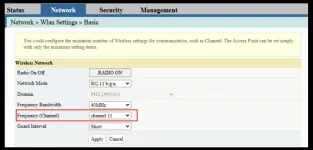
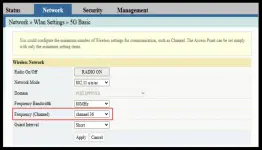
on network tab check both Basic and 5G Basic
then change Frequency Channel

change Frequency Channel for 2.4 Ghz and 5Ghz
*Network Mode should both be 802.11/a/n/ac

-Why is Frequency (Channel) needed to be configured?
By manually setting the channel, you:
  • Avoid overlap with nearby Wi-Fi networks.
  • Reduce interference from devices like microwaves, cordless phones, and Bluetooth.
  • Stabilize performance so your Wi-Fi stays strong and consistent.
  • Maximize speed by giving your devices a cleaner signal path.
  • Tailor range vs. speed (2.4 GHz for distance, 5 GHz for faster throughput).

- recommended Frequency (Channel)
for 2.4Ghz
Channel 1, 6, or 11 (whichever is least crowded).
Any non-overlapping channel (36, 40, 44, or 48 are safe picks).
for 5Ghz
*Advanced use (IoT, gaming, troubleshooting) → Band steering OFF, channels manual.


1755920921238.webp

1755920988948.webp


this is my speed test result on Wired connection:
You do not have permission to view the full content of this post. Log in or register now.

hope this helps to everyone having this wicked issue.
Cheers!
 
simple lang ang naging solution ko jan.

changing the provided ethernet cable given by pldt to a higher CAT level will not matter if same yung plan mo (in your case Plan 1699).

what is the best way to do?

rule of thumb -
unplug Ethernet Cable
wait about 30 seconds
re-plug it back

pag same below 100mbps / DL an UL

follow these STEP BY STEP:

power cycle all devices

1. Turn off both devices
o Unplug the modem (or modem/router combo) from power.
o If you have a separate router, unplug that too.

2. Wait 5 minutes
o This clears residual power and resets the memory/cache.
o For stubborn issues, wait up to 10 minutes.

3. Plug in the modem first
o Wait until all lights stabilize (usually 2–5 minutes).
o Key lights: Power, Online/Internet, and WAN should be solid.
- NO LOS light should be flashing

4. Plug in the router (if separate)
o Wait 1–2 minutes for it to boot and sync with the modem.
- if you have mesh set-ups, make sure have also established connection (green light on)

5. Check your connection
o Test internet on a wired device to isolate issue.

pag ayaw pa din, check and login to your Router Dashboard:
Access your PLDT modem router by typing You do not have permission to view the full content of this post. Log in or register now. into your browser. Log in with admin as the username and 1234 as the password. If that fails, your device might have different login details, and you may need to reach out to PLDT support.

once logged in
on network tab check both Basic and 5G Basic
then change Frequency Channel

change Frequency Channel for 2.4 Ghz and 5Ghz
*Network Mode should both be 802.11/a/n/ac

-Why is Frequency (Channel) needed to be configured?
By manually setting the channel, you:
  • Avoid overlap with nearby Wi-Fi networks.
  • Reduce interference from devices like microwaves, cordless phones, and Bluetooth.
  • Stabilize performance so your Wi-Fi stays strong and consistent.
  • Maximize speed by giving your devices a cleaner signal path.
  • Tailor range vs. speed (2.4 GHz for distance, 5 GHz for faster throughput).

- recommended Frequency (Channel)
for 2.4Ghz
Channel 1, 6, or 11 (whichever is least crowded).
Any non-overlapping channel (36, 40, 44, or 48 are safe picks).
for 5Ghz
*Advanced use (IoT, gaming, troubleshooting) → Band steering OFF, channels manual.


View attachment 3874724
View attachment 3874725


this is my speed test result on Wired connection:
You do not have permission to view the full content of this post. Log in or register now.

hope this helps to everyone having this wicked issue.
Cheers!
Thanks lods nag work din siya sa aking plan 1299 from 100 Mbps to 236 Mbps na siya.
 

About this Thread

  • 12
    Replies
  • 662
    Views
  • 8
    Participants
Last reply from:
quillezo

Trending Topics

Online now

Members online
989
Guests online
2,640
Total visitors
3,629

Forum statistics

Threads
2,278,367
Posts
28,982,823
Members
1,228,335
Latest member
buratnaatat
Back
Top