 PH
PH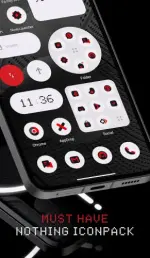
Requirements: 5.0 and up
Overview: The Lux Nothing Icon Pack is a fresh and innovative addition to the LuX IconPack series, drawing inspiration from the minimalist aesthetics of the Nothing brand. It serves as the perfect companion for your Nothing Phone, but it works flawlessly on every Android device.
With its unique shape style, the icons offer a stunningly different look that is sure to captivate any user. Each icon in the Lux Icon Pack has been carefully designed to deliver a perfect and unique experience. This pack includes over 3700+ icons and 100+ exclusive wallpapers to complement the look.
Lux N-thing Icon pack is still new, featuring 3800+ Icons, 100+ Wallpapers, and 7 KWGT Widgets. I can assure you that more icons will be added in every update.
Why Choose Lux Black Icon Pack over other Packs?
• 3700+ ICONS WITH TOP NOTCH QUALITY.
• Frequent Updates
• Exclusive Wall collection
• Icon preview &search.
• Dynamic Calendar
• Material Dashboard.
• Custom folder icons
• Category-based Icons
• Custom app drawer icons.
• Server based Icon Request
How to use this Icon pack?
Step 1: Install a supported theme launcher (Recommended NOVA LAUNCHER or Lawnchair if you are on any brand other than N-thing).
Step 2: Open Icon Pack and click on Apply.
For Nothing Users
Long press on the home screen - Customization - IconPack - Select 'LuX N-thing'
DISCLAIMER
A supported launcher is required to use this icon pack in case your default launcher does not support icon pack.
There's an FAQ section inside the app that answers many questions you may have. Please read it before emailing your question.
Icon Pack Supported Launchers
Action Launcher • ADW Launcher • Apex Launcher • Atom Launcher • Aviate Launcher • CM Theme Engine • GO Launcher • Holo Launcher • Holo Launcher HD • LG Home • Lucid Launcher • M Launcher • Mini Launcher • Next Launcher • Nougat Launcher • Nova Launcher(recommended) • Smart Launcher • Solo Launcher • V Launcher • ZenUI Launcher • Zero Launcher • ABC Launcher • Evie Launcher • L Launcher • Lawnchair
Icon Pack Supported Launchers not Included in Apply Section
Arrow Launcher • ASAP Launcher • Cobo Launcher • Line Launcher • Mesh Launcher • Peek Launcher • Z Launcher • Launch by Quixey Launcher • iTop Launcher • KK Launcher • MN Launcher • New Launcher • S Launcher • Open Launcher • Flick Launcher • Poco Launcher
This icon pack has been tested, and it works with these launchers. However, it may also work with others too. In case you do not find an apply section in the dashboard, you can apply the icon pack from a theme setting.
What's New:
• 60+ New Icons.
• New & Updated Activities.
Download
Download