 PH
PH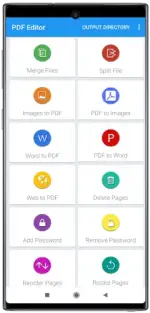
Requirements: 7.0+
Overview: A very comprehensive, feature-packed, user-friendly all-in-one document tool to perform various operation on pdf files
Pdf merge, word to pdf, jpg to pdf, edit pdf, convert to pdf and much more!
PDF Converter & PDF Editor - All-in-One Document Tool
Boost your productivity with the ultimate PDF Converter & PDF Editor app! Unlock a world of possibilities for your documents with our feature-packed, user-friendly tool.
 Convert Word to PDF:
Effortlessly convert DOC files to PDF on the go. Seamlessly transform your documents with a simple tap.
Convert Image to PDF:Turn JPGs into PDFs instantly. Choose multiple images from the gallery & convert them to PDF with ease.
PDF Merge:Combine multiple PDFs into a single, organized file. Simplify your document management.
Website to PDF:Save webpages as PDFs for offline reading. Archive articles and reports hassle-free.
Split Document:Break down large files into manageable units. Customize your PDFs to suit your needs.
Add Password:Enhance document security. Encrypt your PDFs with password protection.
Remove Password:Eliminate repetitive password entries. Easily remove password protection from frequently accessed PDFs.
Delete Pages:Streamline your PDFs by removing unnecessary pages. Easy, efficient, and clutter-free.
Extract Pages:Isolate and extract specific pages from any PDF document. Tailor your content to your requirements.
Add Watermark:Personalize your files by adding watermark text. Make your documents uniquely yours.
Rotate Pages:Effortlessly adjust the orientation of selected pages. Enhance readability and presentation.
Compress:Optimize your PDFs for easy sharing. Reduce file size without compromising quality.
Download our PDF Converter & PDF Editor now for a seamless and efficient PDF experience. Convert, edit, and manage PDFs with ease!
★ Untouched ρáíd apk with Original Hash Signature
★ Certificate MD5 digest: 1e88e9a2b950c9df0663570578d13f37
★ No changes were applied
➡ Languages: Full Multi Languages
➡ CPU architectures: Universal
➡ Screen DPIs: 160dpi, 240dpi, 320dpi, 480dpi, 640dpi
What's New:
- Now supporting dark mode!
- Compress PDF is now more powerful than ever.
- Word to PDF is now more robust.
- Remove password now works for PDF with AES-256 encryption
The best PDF app is now even better!.
Download
Download

