 PH
PH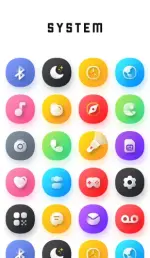
Requirements: 5.0 and up
Overview: Elevate your mobile experience with the exclusive Adaptive Version of the Gem Icon Pack, featuring adorable 3D-style icons set against vibrant, colorful backgrounds. This charming icon collection brings a delightful blend of depth and playfulness to your device's interface.
Over 4400+ icons and 100+ Exclusive Wallpapers, Gem Icon Pack stands out as a top-tier choice in the market. Each icon is meticulously crafted to provide a unique and immersive digital experience, combining cute 3D aesthetics with adaptive, colorful backgrounds that breathe life into your screen.
Want to personalize your look even further? No problem! Gem Icon Pack lets you customize icon shapes to match your style. Choose from circles, squares, ovals, hexagons, and more. (Note: Shape-changing options may vary depending on your launcher.)
For Changing the shape of the Icons
• The ability to change the shape of icons depends on the launcher you're using. Most launchers such as Nova,Niagara support icon shaping.
Whether you're a fan of cute designs or just looking to refresh your phone's appearance, Gem Icon Pack has got you covered. It's more than just an iconpack – it's a complete makeover for your device that combines style, fun, and functionality.
Transform your mobile experience today with Gem Icon Pack. Download now and give your phone the gem-like sparkle it deserves!
Why Choose Nothing Icon Pack over other Packs?
• 4400+ ICONS WITH TOP NOTCH QUALITY
• 100+ Matching Wallpapers
• 8 KWGT Widgets (Coming Soon)
• Frequent Updates
• Lots of alternative icon
Other Features
• Icon preview&search
• Dynamic Calendar
• Material Dashboard.
• Custom folder icons
• Category-based Icons
• Custom app drawer icons.
• Easy Icon Request
Still Confused?
Undoubtedly, Gem Icon Pack is best in Cute Looking 3D icon packs. and we do offer a 100% refund in case you didn't like it.
How to use this Icon pack?
Step 1 : Install supported theme Launcher
Step 2 : Open Nothing IconPack and Go to Apply section and Select Launcher to apply.
If your launcher is not in a list make sure you apply it from your launcher settings
DISCLAIMER
• A supported launcher is required to use this icon pack!
• FAQ section inside the app which answers a lot of questions you may have. Please read it before you emailing your question.
Extra Notes
• Icon pack needs a launcher in order to work. Some devices can apply iconpack without any launcher like Nothing,OnePlus,Poco Etc.
• Missing an Icon? feel free to send me an icon request and I will try to update this pack with your requests.
What's New:
• 55+ New Icons (Total Icons 4400+)
• New & Updated App Activities.
Download
Download