 PH
PH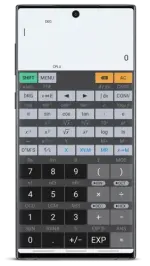
Requirements: 6.0+
Overview: HiPER Calc Pro is an advanced version of HiPER Scientific Calculator.
The calculator has up to 100 digits of significand and 9 digits of exponent. It detects repeating decimals and numbers in it can be also entered as fractions or converted to fractions.
You can also switch to the "E×ρréššion" mode where you can write E×ρréššions in a natural way and watch your calculations. When possible, an E×ρréššion is simplified and the result is displayed as an E×ρréššion using fractions, square roots and ? constant.
The calculator has several layouts suitable for various screen sizes:
- "pocket" for small devices
- "compact" for smartphones (in portrait and landscape orientation)
- "expanded" for tablets
The multiline display can be turned on in tablets to show the complete history of calculations and to provide access the previous results.
The users can choose from several high-quality themes.
The calculator has several functions, such as:
- basic arithmetic operations including percentage, modulo and negation;
- fractions (in the E×ρréššion mode any E×ρréššion including nested fractions can be entered as a numerator and a denominator);
- mixed numbers;
- periodic numbers and their conversion to fractions;
- unlimited number of braces;
- operator priority;
- repeated operations;
- calculation details - extended information about a calculation like all complex roots, unit circle etc.;
- complex numbers
- conversion between rectangular and polar coordinates
- advanced number operations such as random numbers, combinations, permutations, common greatest divisor, etc.;
- trigonometric and hyperbolic functions;
- powers, roots, logarithms, etc.;
- degrees, minutes and seconds conversion;
- fixed point, scientific and engineering display format;
- display exponent as SI units prefix;
- memory operations with 10 extended memories;
- clipboard operations with various clipboard formats;
- result history;
- binary, octal and hexadecimal numeral systems;
- logical operations;
- bitwise shifts and rotations;
- haptic feedback;
- more than 90 physical constants;
- conversion among 200 units;
- Reverse Polish notation.
The calculator has many settings to manage the full screen mode, decimal and thousand separators, etc.
All features are described with a built-in help.
What's New:
- Captured image can be re-cropped
- Manual entry of period in number (key "PERIOD")
- New function: Clear the main memory (key "MC")
- New function: Lambert W_0 function
- "Direct" and "relative" percentage calculation (see Settings/E×ρréššion)
- Relational operators can be used in custom functions
Download
Download