 PH
PH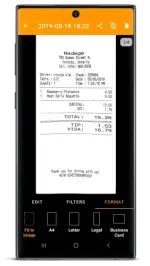
Requirements: 5.0+
Overview: Quickly scan your paper documents on the go and export them as multi-page PDF files.
Place any document in front of your device’s camera: our scanner app automatically recognizes the paper against the background, crops it, and cleans up the result. You obtain a crisp, legible scan. Batch scanning lets you scan dozens of pages in a matter of seconds. Powerful tools help you organize, share, or archive your documents.
== KEY FEATURES ==
Smart Scanning:
- Document detection & background removal
- Distortion correction
- Shadow removal and defect cleanup
- Filters (black & white, whiteboard, photo)
- Batch scanning
PDF Creation & Editing:
- Document merging & splitting
- Multiple page PDF creation
- Photos and PDF import
Security & Privacy:
- On-device document processing
- Fingerprint locking
- PDF password encryption
Document Organization:
- Document tagging
- Metadata and content search
- Custom naming schemes (Smart Document Names)
- Backup and multi-device sync with Genius Cloud (separate subscription)
Export:
- Box, Dropbox, Evernote, Expensify, Google Drive, OneDrive, FTP, WebDAV.
- Any WebDAV compatible service such as Citrix ShareFile, NextCloud, ownCloud, Synology, Yandex.
- Automatic background auto-export
What's New:
We've only made minor bug fixes and internal changes in this month's update.
Mod Info:
- No root or Lucky Patcher or Google Play Modded required;
- Ultra Subscription / ρáíd features unlocked;
- Disabled / Removed unwanted Permissions + Receivers + Providers + Services;
- Optimized and zipaligned graphics and cleaned resources for fast load;
- Ads Permissions / Services / Providers removed from AndroidManifest;
- Ads links removed and invokes methods nullified;
- Google Play Store install package check disabled;
- Debug code removed;
- Remove default .source tags name of the corresponding java files;
- Analytics / Crashlytics / Firebase disabled;
- Native crashlytics removed completely;
- Languages: Full Multi Languages;
- CPUs: armeabi-v7a, arm64-v8a, x86, x86_64;
- Screen DPIs: 120dpi, 160dpi, 240dpi, 320dpi, 480dpi, 640dpi;
- Original package signature changed;
Download
Download