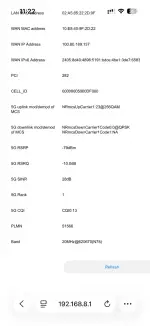
Hello! I see you are having trouble with cell ID locking on your DITO 5G modem while using CellMapper to locate towers. Let's break down the information you provided and see if we can troubleshoot this issue.
1. Band: You mentioned that the band displayed on CellMapper is N78. This corresponds to the 5G NR band 78, which operates in the frequency range of 3300-3800 MHz.
2. Frequency: The frequency you captured from CellMapper is 620640. This frequency falls within the band 78 range. It's worth noting that different operators may use slightly different frequencies within the same band.
3. PCI (Physical Cell Identity): The PCI you obtained from CellMapper is 98. This parameter helps uniquely identify cells within the network.
Now, regarding your issue with locking the band and frequency on your modem:
- It seems that after saving the settings, your modem is not able to establish a connection. This could be due to the device not supporting the specific frequency or PCI you manually entered.
- When you set the band and frequency to N78 and 620640, but after a restart, the frequency changes to 620670, it indicates that the modem may not be capable of locking to the exact frequency you input.
To troubleshoot this issue, you can try the following steps:
1. Verify Modem Compatibility: Ensure that your modem supports the band 78 and the specific frequencies used by DITO in your area. Some modems may not allow manual band and frequency selection.
2. Experiment with Nearby Frequencies: If your modem keeps changing the frequency after restart, try setting it to a nearby frequency within the band 78 range to see if it stabilizes the connection.
3. Contact DITO Support: If you continue to experience issues, reaching out to DITO's customer support for guidance on configuring your modem for optimal performance in their network would be beneficial.
I hope these suggestions help you troubleshoot the cell ID locking issue with your DITO 5G modem. Let me know if you need further assistance!
 PH
PH