 PH
PH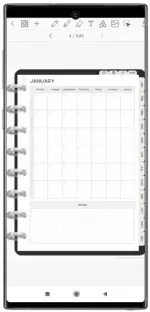
Requirements: 7.0+
Overview: Note taking, PDF editor, digital planner, PDF annotation, notebook & journal.
TAKE NOTES, ANNOTATE & EDIT PDFs
• Digital planning, journalling and note taking
• Smooth handwriting using a Bluetooth stylus (S Pen/Xiaomi Smart Pen recommended)
• Customize your pen color, thickness, and style (regular, fountain pen, and brush)
• Highlight and underline with the snap straight highlighter pen
• Color wheel for pen, highlighter and text
• Add photos and images
• Crop images
• Draw shapes with options for outline and fill
• Import custom fonts
• Handwriting to text: handwriting can automatically convert to text
• Smart eraser tool: choose what type of objects you want to erase
• Move, resize, rotate, and group objects
• Undo & redo your actions
• Pinch to zoom
DIGITAL PLANNER INCLUDED
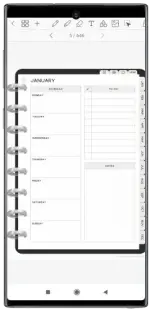
• Digital planners included with hyperlinked monthly, weekly and daily pages
• Undated & reusable planners: write in the dates yourself
• Landscape and portrait planners included
• Planner colors come in blush with rainbow templates and black minimal style
• Daily pages have notes space for journaling
• To do list and note templates included
• Perfect for getting organized
IMPORT PDF FILES & PLANNERS
• Any PDF file can be imported into the app
• Navigate PDF files using existing hyperlinks
• Export your file as an editable Penly file or as PDF (please note: Penly does not reliably export large PDFs)
CREATE HYPERLINKS
• Create your own hyperlinks in any document
• Turn any object into a hyperlink
• Hyperlink to pages or websites
STICKERS FUNCTIONALITY
• Bulk import stickers in one go
• Organize images using the stickers panel
• Create your own sticker collections
• Easily add stickers to any document
ORGANIZE & MANAGE DOCUMENTS
• Create folders and subfolders to organize your documents
• Duplicate, move, rename or delete files
• Documents automatically open to the last page visited
SYNC BETWEEN ANDROID DEVICES
• Link Google Drive to Penly to enable syncing
• Sync manually, or whenever app is opened/closed
OTHER
• English language support only
KNOWN ISSUES LOG
• Exporting a content heavy file in PDF format may result in crashing
• Interactive elements like check-boxes will not import from PDF
• On-screen keyboard may not show if "S-Pen to text" option is enabled in Android settings
What's New:
Fixed grouped objects becoming invisible
Download
Download