PH
PHadrianne12345
Eternal Poster
OpenWrt WireGuard Setup Guide
Installing required packages
- In your router’s webUI, navigate to System - Software, click Update lists.
- In the Filter field, type WireGuard, locate and install the wireguard-tools, kmod-wireguard, and luci-proto-wireguard packages.
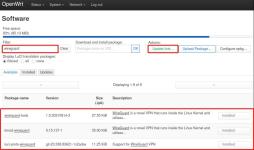
- Restart your router.
Creating an Interface
- You do not have permission to view the full content of this post.
Log in or register now. a WireGuard config file with the preferred server and parameters. Extract the archive, open the file with any text editors and copy its contents.
WireGuard config file generator is only available for accounts that were created after November 2020 (account ID format: i-XXXX-XXXX-XXXX). If you have an IVPN subscription created before this date (account ID format: ivpnXXXXXXXX) and wish to make use of the feature, contact our customer service to help you make the switch. - In OpenWRT, navigate to Network - Interfaces, click on the Add new interface. Give it any name, e.g. ivpnAustria, set Protocol to WireGuard VPN, then click on the Create interface button.
- In the General Settings tab, click on the Load configuration... button, paste the contents of the WireGuard config file from step 1 and click on the Import settings button.
( MAS MADALI LOAD CONFIGURE NINYO NA LANG DRAG OR PAST NINYO YUNG CONFIG SA WIRGUARD SERVER NINYO)
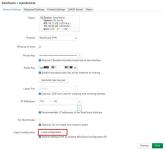
- In the Advanced Settings tab, set MTU to 1412.
- In the Peers tab, click Edit next to the imported peer configuration, check the Route Allowed IPs option, set Persistent Keep Alive to 25 and click Save.
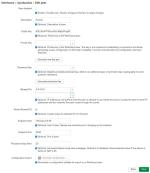
- Click Save & Apply.
Adding a Firewall zone
- Navigate to Network - Firewall
- Click the Add button and enter the following configuration:
- Name - Give it any name, e.g. ivpn_fw
- Input - Reject
- Output - Accept
- Forward - Reject
- Masquerading - Checked
- MSS clamping - Checked
- Covered networks - select the previously created VPN tunnel interface, e.g. ivpnAustria
- Allow forward to destination zones - Unspecified
- Allow forward from source zones - lan
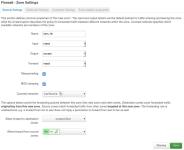
- Click Save & Save & Apply
Configuring a Kill-switch (optional)
To ensure the traffic on your LAN devices travels strictly via the VPN tunnel and to prevent any possible leaks if the router disconnects from the VPN server for any reason, edit your lan firewall zone and remove WAN from the Allow forward to destination zones field, then click Save & Save & Apply buttons.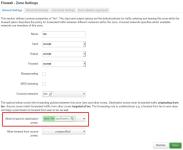
DNS
- Navigate to Network - Interfaces
- Click on the Edit button next to the WAN interface
- In the Advanced Settings tab, uncheck the Use DNS servers advertised by peer and enter the WireGuard regular DNS server IP address (172.16.0.1) or the one associated with the preferred You do not have permission to view the full content of this post.
Log in or register now. list.
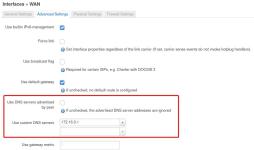
- Click Save.
- If your ISP additionally provides you with an IPv6 IP address, repeat steps 2 to 4 for the WAN6 interface.
- Click Save & Apply.
CTTS:
Additional info:
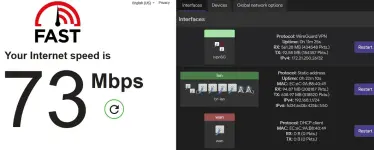
Ito po yung indication if connected na sya yung RX nya dapat may pkts sya na receive pag wala meaning hindi say connected especially galing na reboot yung router ninyo hindi sya automatically mag connect sa wireguard dahil sa NTP Server time nya base sa po sa incounter ginawa ko po punta kaayo sa system - Time Syncrohinzation tapos sundan ninyo po ito
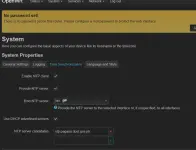
Tapos punta kaayo sa interface restart ninyo yung wireguard vpn ninyo mag coconnect na yan. if na reboot ninyo yung router ninyo punta lang kaayo sa interface restart ninyo si wireguard para maka connect sya kasi ito yung na incounter kos sa router hindi ko na try sa iba kasi ito lang yung router ko nga naka OPENWRT
PROOF:
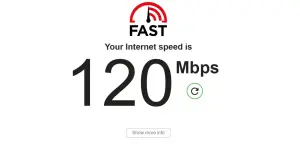
if na gulohan kaayo pasensya na po ngayon lang kasi ako naka share ng ganito.
 .
.