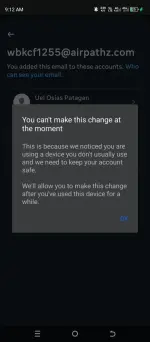
Hello! I'm sorry to hear that your account was häçked. Here are some steps you can take to try to regain control of your account and remove the unauthorized email:
1. Change Your Password: If you still have access to your account, immediately change your password to something strong and unique. This will help prevent further unauthorized access.
2. Contact Platform Support: Reach out to the platform's support team (e.g., Facebook support) and report the häçking incident. They may be able to assist you in recovering your account and removing the unauthorized email.
3. Enable Two-Factor Authentication: If the platform offers two-factor authentication, enable it to add an extra layer of security to your account.
4. Check for Any Unusual Activity: Review your account settings, connected apps, and recent activity to identify any other unauthorized changes made by the häçker.
5. Disconnect Unauthorized Email: If you are unable to remove the unauthorized email through your account settings, contact the platform's support for assistance. They may require some verification to confirm your identity before making any changes.
6. Secure Your Devices: Ensure that all devices you use to access your account are free from malware and have up-to-date security software installed.
7. Educate Yourself: Learn about common häçking techniques, phishing scams, and how to keep your account secure in the future to prevent similar incidents.
Remember, it's essential to act quickly and take steps to secure your account to minimize any potential damage caused by the häçk. Good luck in resolving the issue!
 PH
PH