 PH
PH-
Welcome to PHCorner Forums! Sign up for free to unlock full access and exclusive privileges, including:
- Asking questions about computer and mobile issues
- Discovering internet tips for your mobile network and computer
You are using an out of date browser. It may not display this or other websites correctly.
You should upgrade or use an alternative browser.
You should upgrade or use an alternative browser.
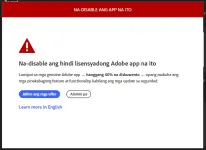
❓ Help Pa help Adobe Ps po na...
- Thread starter NO NE
- Start date
- Status
- Not open for further replies.
UnholyPasta
Forum Veteran
full unistall mo muna yan tapos punta ka sa monkrus or genp
PHC_LaCe12
Forum Master
gamit ka ng firewall like this You do not have permission to view the full content of this post.
Log in or register now.
tapos reinstall ka ng photoshop ka muma
tapos reinstall ka ng photoshop ka muma
Kahit latest Paps?gamit ka ng firewall like this You do not have permission to view the full content of this post. Log in or register now.
tapos reinstall ka ng photoshop ka muma
Nakita ko nga 'to dati sa comment section sa blueapp pero hindi ko ma gets nag search ako pero ang daming link na same genp hindi ko mainitindihan kung alin ang totoo 'don hahafull unistall mo muna yan tapos punta ka sa monkrus or genp
PHC_LaCe12
Forum Master
yes gagana yan sa latest kaso pure offline po sya wlaang generative fillKahit latest Paps?
Nakita ko nga 'to dati sa comment section sa blueapp pero hindi ko ma gets nag search ako pero ang daming link na same genp hindi ko mainitindihan kung alin ang totoo 'don haha
down ang genp e sa reddit, binannedfull unistall mo muna yan tapos punta ka sa monkrus or genp
very easy lang ito.
Open mo windows defender firewall
advanced settings
right click inbound rules then click mo new rule
piliin program then select next
browse mo yung .exe location ng adobe mo then next
click block the connection then next
check mo lahat domain, public at private then next
name mo block adobe inbound then finish
repeat mo steps sa outbound naman.
good luck po
Open mo windows defender firewall
advanced settings
right click inbound rules then click mo new rule
piliin program then select next
browse mo yung .exe location ng adobe mo then next
click block the connection then next
check mo lahat domain, public at private then next
name mo block adobe inbound then finish
repeat mo steps sa outbound naman.
good luck po
Salamat Papsvery easy lang ito.
Open mo windows defender firewall
advanced settings
right click inbound rules then click mo new rule
piliin program then select next
browse mo yung .exe location ng adobe mo then next
click block the connection then next
check mo lahat domain, public at private then next
name mo block adobe inbound then finish
repeat mo steps sa outbound naman.
good luck po

- Status
- Not open for further replies.
About this Thread
-
7Replies
-
321Views
-
5Participants
Last reply from:
NO NE
NO NE
New Topics
-
INTERNATIONAL WEBINAR AND 2 LOCAL SEMINAR
- Started by PHC-JIA
- Replies: 0
- ❓ Computer Discussion & Support
-
Pa req po AtmosFX for Halloween
- Started by YowGaming
- Replies: 0
- ❓ Computer Discussion & Support
-
Door Lock Keycard SDK
- Started by Porky Chao Fan
- Replies: 0
- ❓ Computer Discussion & Support
-
Counter strike sa mac
- Started by AYuna23
- Replies: 0
- ❓ Computer Discussion & Support
-
Booting Issue - FA506NFR
- Started by Impossible
- Replies: 0
- ❓ Computer Discussion & Support
-
Acrobat Pro DC ρá†ch. Need Help
- Started by skullkrasher99
- Replies: 3
- ❓ Computer Discussion & Support
-
Enlighten me please with these two
- Started by Jeii
- Replies: 4
- ❓ Computer Discussion & Support
-
Win 10 Home keys
- Started by Ali246
- Replies: 6
- ❓ Computer Discussion & Support
Trending Topics
Online now
- Members online
- 399
- Guests online
- 9,042
- Total visitors
- 9,441