PH
PHfluffy1993
Eternal Poster
Getting your Android handset online can be a challenge when it comes to putting the settings in manually but don’t worry, we're here to help. The settings below will make sure you phone is able to connect to theinternet and use MMS.
From the home screen:
1. Tap the Menu button.
2. Tap Settings .
3. Tap Wireless and networks or More... (depending on your version of Android).
4. Tap Mobile Networks.
5. Tap Access point names .
6. Tap the Menu button.
7. Tap New APN.
8. Enter the following data into the onscreen form, without changing any other settings:
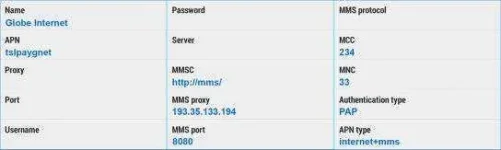
Name - Globe Internet
APN - tslpaygnet
MMSC - You do not have permission to view the full content of this post. Log in or register now.
MMS Proxy - 193.35.133.194
MMS Port - 8080
Authentication type - PAP
APN type - If given a choice, select
internet+mms , if the keyboard appears enter *
(As a check, the image below shows blue text in the fields you should have completed)
9. Tap the Menu button.
10. Tap Save .
11. Enable the newly-added APN by ensuring the line is ticked , or the radio button is lit by tapping on it.
12. Check the notification bar for H , 3G, E
or G with up and down arrows beside it, which will indicate your connection is working.
don't forget to like and give thanks..! and the rest of all, no hit & run..
#fluffy
From the home screen:
1. Tap the Menu button.
2. Tap Settings .
3. Tap Wireless and networks or More... (depending on your version of Android).
4. Tap Mobile Networks.
5. Tap Access point names .
6. Tap the Menu button.
7. Tap New APN.
8. Enter the following data into the onscreen form, without changing any other settings:
Name - Globe Internet
APN - tslpaygnet
MMSC - You do not have permission to view the full content of this post. Log in or register now.
MMS Proxy - 193.35.133.194
MMS Port - 8080
Authentication type - PAP
APN type - If given a choice, select
internet+mms , if the keyboard appears enter *
(As a check, the image below shows blue text in the fields you should have completed)
9. Tap the Menu button.
10. Tap Save .
11. Enable the newly-added APN by ensuring the line is ticked , or the radio button is lit by tapping on it.
12. Check the notification bar for H , 3G, E
or G with up and down arrows beside it, which will indicate your connection is working.
don't forget to like and give thanks..! and the rest of all, no hit & run..
#fluffy