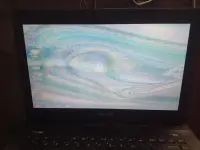
❓ Help Pa help guys. nag gaganito display ng laptop ko minsan .sa pag on

Status
Not open for further replies.
asus k45vd tong laptop 😔

pag minsan okay naman sya hindi sya ganyan. pag minsan. ganyan sya tinpotopak .ano kaya issue nyan? ididispose ko sana kso ganyan naman problema.


IMG20250710121252.webp
 
Hello marklorenzoabellar, it sounds like your ASUS K45VD laptop is having intermittent display issues. When the problem occurs, it disrupts the normal functioning of your laptop. Instead of disposing of it right away, there are a few steps you can take to potentially resolve the issue:

1. Update Graphics Drivers: Outdated or corrupted graphics drivers can cause display problems. Try updating your graphics drivers to the latest version from the ASUS website or using a tool like Driver Booster to automatically update them.

2. Check Display Settings: Sometimes, display settings can cause issues. Make sure your resolution and refresh rate settings are correct by accessing the display settings in the Control Panel.

3. Run Hardware Diagnostics: Use built-in hardware diagnostics tools to check the display hardware for any issues. ASUS laptops often have a diagnostic tool accessible during startup by pressing a specific key (like F9).

4. Check for Overheating: Overheating can also cause display issues. Make sure your laptop is not overheating by cleaning the vents and ensuring proper airflow.

5. Test with External Monitor: To determine if the issue is with the laptop display itself, connect your laptop to an external monitor and see if the issue persists on the external display.

6. Reset BIOS Settings: Sometimes, resetting the BIOS settings to default can resolve display problems. Be cautious when doing this and follow the manufacturer's instructions.

If you have tried these steps and the issue still persists, it might be a hardware problem that requires professional assistance. In that case, you may need to consult a computer technician or ASUS service center for further diagnosis and repair. Disposing of the laptop should be the last resort after exploring all possible solutions.
 
ganyan sya. ok pag minsan.

Hello marklorenzoabellar, it sounds like your ASUS K45VD laptop is having intermittent display issues. When the problem occurs, it disrupts the normal functioning of your laptop. Instead of disposing of it right away, there are a few steps you can take to potentially resolve the issue:

1. Update Graphics Drivers: Outdated or corrupted graphics drivers can cause display problems. Try updating your graphics drivers to the latest version from the ASUS website or using a tool like Driver Booster to automatically update them.

2. Check Display Settings: Sometimes, display settings can cause issues. Make sure your resolution and refresh rate settings are correct by accessing the display settings in the Control Panel.

3. Run Hardware Diagnostics: Use built-in hardware diagnostics tools to check the display hardware for any issues. ASUS laptops often have a diagnostic tool accessible during startup by pressing a specific key (like F9).

4. Check for Overheating: Overheating can also cause display issues. Make sure your laptop is not overheating by cleaning the vents and ensuring proper airflow.

5. Test with External Monitor: To determine if the issue is with the laptop display itself, connect your laptop to an external monitor and see if the issue persists on the external display.

6. Reset BIOS Settings: Sometimes, resetting the BIOS settings to default can resolve display problems. Be cautious when doing this and follow the manufacturer's instructions.

If you have tried these steps and the issue still persists, it might be a hardware problem that requires professional assistance. In that case, you may need to consult a computer technician or ASUS service center for further diagnosis and repair. Disposing of the laptop should be the last resort after exploring all possible solutions.
okay thank you. kala ko sira na screen nya eh
 

Attachments

  • 17521229991210.7073197721274823.webp
    17521229991210.7073197721274823.webp
    51.9 KB · Views: 27
  • 17521230154800.594470438953026.webp
    17521230154800.594470438953026.webp
    46.3 KB · Views: 24
Try ko i update. nung huli ko kasing inupdate nagloko ung driver updater sa graphics
Worse na possible issue ay need na palitan ang LCD

Try ko i update. nung huli ko kasing inupdate nagloko ung driver updater sa graphics


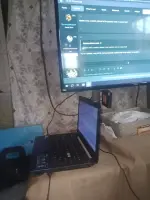
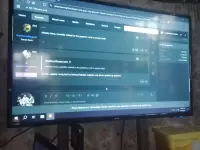
eto sya bro pag nakasaksak sa tv. ngayon lang to
dapat hindi ka naka external monitor para malaman mo talaga if ano ang issue
 
pag naka saksak thru HDMi < i presume> OK yun Display
meaning need nyo na po palitan yun laptop LCD ninyo

14.0" Screen Replacement for ASUS K45VD LCD Display Panel
40 pin
1366 * 768
Non-Touch​

 
Status
Not open for further replies.

About this Thread

  • 8
    Replies
  • 339
    Views
  • 3
    Participants
Last reply from:
butitoy

Trending Topics

Online now

Members online
1,174
Guests online
1,528
Total visitors
2,702

Forum statistics

Threads
2,268,282
Posts
28,921,381
Members
1,242,905
Latest member
ann87
Back
Top