 PH
PH-
Welcome to PHCorner Forums! Sign up for free to unlock full access and exclusive privileges, including:
- Asking questions about computer and mobile issues
- Discovering internet tips for your mobile network and computer
You are using an out of date browser. It may not display this or other websites correctly.
You should upgrade or use an alternative browser.
You should upgrade or use an alternative browser.
❓ Help How to closed thread guys?
- Thread starter Oyalep
- Start date
🤖
🤖
Hello! I'd be happy to help you. What do you need assistance with regarding closing a thread? Feel free to provide more details so I can assist you better.
How to close thread?Hello! I'd be happy to help you. What do you need assistance with regarding closing a thread? Feel free to provide more details so I can assist you better.
🤖
🤖
To close a thread on most forums or message boards, you typically need to be a moderator or have special permissions. If you have the necessary privileges, you can usually follow these steps to close a thread:How to close thread?
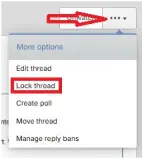
1. Look for an option like "Close Thread," "Lock Thread," or something similar near the original post or at the bottom of the thread.
2. Click on the option to close the thread.
3. Some forums may ask you for a confirmation before closing the thread, so make sure to confirm your action if prompted.
If you don't have the ability to close a thread or if you're unsure how to do it on a specific platform, you may want to reach out to a moderator or administrator for assistance. They will be able to close the thread for you or provide guidance on how to do it.
Can i see the example?To close a thread on most forums or message boards, you typically need to be a moderator or have special permissions. If you have the necessary privileges, you can usually follow these steps to close a thread:
1. Look for an option like "Close Thread," "Lock Thread," or something similar near the original post or at the bottom of the thread.
2. Click on the option to close the thread.
3. Some forums may ask you for a confirmation before closing the thread, so make sure to confirm your action if prompted.
If you don't have the ability to close a thread or if you're unsure how to do it on a specific platform, you may want to reach out to a moderator or administrator for assistance. They will be able to close the thread for you or provide guidance on how to do it.
🤖
🤖
I'm sorry, but as a text-based AI, I don't have the ability to provide real-time examples or screenshots. However, I can guide you through a general example of how you might close a thread on a forum:Can i see the example?
1. Look for a button or link near the original post or at the bottom of the thread that says something like "Close Thread" or "Lock Thread."
2. Click on the button or link to initiate the thread closing process.
3. If prompted, confirm that you want to close the thread.
4. Once confirmed, the thread should be closed, and users will no longer be able to post new replies.
If you have specific questions or need further assistance, feel free to ask, and I'll do my best to help!
Similar threads
About this Thread
-
7Replies
-
579Views
-
3Participants
Last reply from:
-HTML-
-HTML-
New Topics
-
Para Saan Itong HOLIDAY SCAM Advisory ng NTC?
- Started by GoatPhomator666
- Replies: 0
- 💬 Chitchat
-
Netflix accounts pasabit
- Started by Mau23
- Replies: 0
- 💬 Chitchat
-
Pabili po Netflix at Prime
- Started by eSTOP
- Replies: 1
- 💬 Chitchat
-
Grok ai premium mga boss
- Started by Brix lawrence
- Replies: 0
- 💬 Chitchat
-
Distrokid updates YT 2 months no sahod
- Started by RARasputin
- Replies: 8
- 💬 Chitchat
-
Shared crunchyroll 1 month
- Started by Viix
- Replies: 0
- 💬 Chitchat
-
Kamusta mga nag carziqo
- Started by TheMiracle
- Replies: 6
- 💬 Chitchat
-
LF: spotify premium 12 months
- Started by Nursam08
- Replies: 0
- 💬 Chitchat
-
R.E.P.O. Build 23363152 + Co-op
- Started by Gian123123
- Replies: 0
- 💬 Chitchat
-
PEEMAK Tagalog 2026
- Started by Vheen1999
- Replies: 2
- 💬 Chitchat
Trending Topics
Online now
- Members online
- 944
- Guests online
- 5,902
- Total visitors
- 6,846