 PH
PH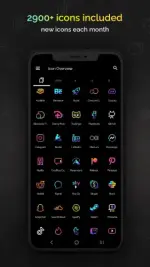
Requirements: 9 and up
Overview: Proudly made in Hamburg by pixel artist Moertel
The most complete pixel art icon pack on the Play Store - updated monthly. Embark on a digital road trip to the 90s and enjoy your phone like never before.
F E A T U R E S
• 4050 icons included
• 12 wallpapers included
• 6 widgets included
• Widgets: Digital clock (Android 10+)
• Widgets: Analog clock
• Widgets: Date
• Widgets: Greeting with time of day
• Widgets: Calendar
• Widgets: Text shortcut
• 20+ launchers supported (list below)
• Updated monthly with new icons and features
D E S I G N
• Crisp pixel art design in neon colours
• No shadows, no outlines
W I D G E T S
• Pick from 8 different widget colours
• Optionally combine colours to gradients
• Text in widgets is freely configurable (up to 500 characters)
• Choose from 8 placeholders (day, month, year, hour, minute, am/pm, greeting, weekday)
R E Q U I R E M E N T S
Google Pixel, Motorola and Xiaomi users - you need one of the launchers below because your stock launcher does not support third-party icon packs. I recommend Nova - it's free!
Samsung users - if you are on Android 12 with OneUI 4.0 (or newer), you'll be able to apply icons with the (free) Samsung app Theme Park. OneUI 3 and lower doesn't support icon packs but you could switch to an alternative launcher from the list below:
To apply the icon pack, you must have one of these launchers installed:
Action • ADW • Before • BlackBerry • CM Theme • ColorOS (12+) • Flick • Go EX • Holo • Holo HD • Hyperion • KISS • Lawnchair • LG Home • Lucid • Neo • Niagara • Nothing • Nougat • Nova (recommended) • OneUI 4.0 (with Theme Park) • OxygenOS • POCO 2.0 (note that MIUI and POCO 3+ are not supported) • Posidon • Smart • Solo • Square
I C O N R E Q U E S T S
5 free icon requests are included in the app. I draw around 100 new icons each month based on the most popular ones. If you want be absolutely sure your app is included in the following month's update, or if you've run out of requests, you can buy additional requests right from within the app.
I draw all icons pixel by pixel on a tiny 20x20 pixel canvas and then upscale them so they look amazingly crisp on your homescreen or app drawer. You can be sure I'm using all my skill to make cute and readable icons you'll enjoy looking at!
S U P P O R T
Any questions? Reach out to me anytime! I'm happy to hear from you and any feedback or suggestions you might have. In any case: Thanks for checking out my icon pack
What's New:
What's new in July 2025:
• New fancy Retro Mode UI
• Customisable widget colours
• Widget backgrounds
• Widget special effects (outline, rotation & more)
• 5 new icon votes with each app update
• Small bugfix: Shortcuts now show up in config screen
Download
Download