 PH
PH Spotify Premium (Spotishka) is a digital music service that gives you access to millions of tracks.
 What's New (Spotify Premium):
• Update to the latest version.
• The version number itself has been changed to the old one, as this helps to fix everything completely.
• Restrictions on screenshots have been removed.
What's New (Spotishka):• The external version of the application is 8.9.84.594. If you update this number to a newer one, various authorization errors may occur. If you install the current version, as in Google Play, many users will have empty playlists. The version used inside the application is 9.0.54.518, and outside - 8.9.84.594.
• All restrictions on creating screenshots have been removed.
• Update to the latest version.
• Russian translation updated.
 What's New (Spotishka TV):
• Required OS 5.0 and up.
• Clone version.
• No ads, analytics, restrictions.
Comrades, this is for TVs. Smartphones won't open it.
🛠 Changelog:
• The package name and other data have been changed from com.spotify.music to com.spotify.premium / su.aprelteam.spotishka. This will allow this version to install alongside the original Spotify or alongside our other modification.
• Almost all application limitations have been removed (selection of any songs and albums, switching tracks, random selection, FWD / BWD, Spotify Connect).
• The build number has been changed (you can install the previous version without deleting this one).
• Hidden updates (always the latest version in all app stores).
• Forced track shuffling is disabled.
• The name of the application has been changed to "Spotify Premium / Spotishka".
• Signature changed (updates only here).
• Dark theme changed to black (AMOLED).
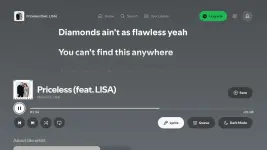
• Musixmatch is used for lyrics.
• Removed x86_64 and x86 libraries.
• Removed advertising and analytics.
• The "Create" button has been cut.
• Premium until 01.04.2075.
 Problems And Their Solutions:
• All actions with the account (login, data change) must be through the OBE of the country specified in the settings on the Spotify website:
https://open.spotify.com• For those whose Spotify crashes on startup, disable OBE. OBE is only required for signing in, and not in all cases. You don't need it to listen to music.
• For those who have endless scrolling of tracks - change the region on the Spotify website.
• Clearing the data usually solves the problem of tracks disappearing.
 Download Link:
You do not have permission to view the full content of this post. Log in or register now.
You do not have permission to view the full content of this post. Log in or register now.
You do not have permission to view the full content of this post. Log in or register now.
You do not have permission to view the full content of this post. Log in or register now.
