❓ Help [Feedback Gathering] Campus Bell - Student - centered community forum

Status
Not open for further replies.

Askterisk

Established
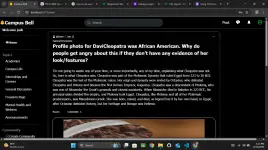
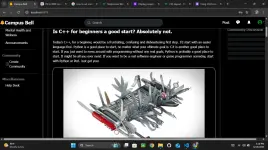
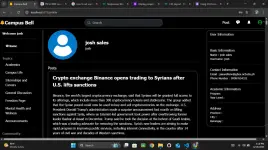
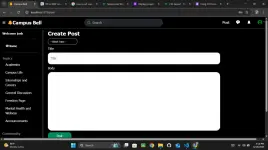
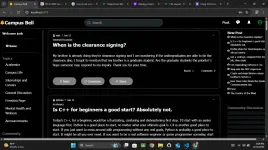
Hi guys, gusto ko sana mag gather feedback para sa forum na ginagawa ko. Nasa early stage pa lang sya pero may mga features na rin sya kahit papaano. Nag aaral ako ng web developing ngayong bakasyon and ito ang naisipan kong project.

You do not have permission to view the full content of this post. Log in or register now.

Forum Overview
- Utilizes institutional email for users to register (currently open to gmail users for testing purposes)
-Login and Register
-OTP verification for new users using email
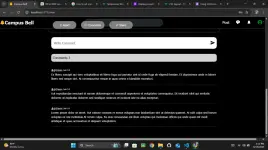
-Post and Comment creation
-React to post
-Post display
-Post sorting thru topics
-View specific post
-Profile page( unupdateable yet )

Pagpasensyahan nyo na po muna ang UI/UX nya kung di pa maganda hehehehe.. hindi pa naman kasi ako magaling sa programming. Pero it's my way para po matuto. Thanks a lot guys.

PS.
*Some screenshots taken from the website


Screenshot (64).webp

Screenshot (63).webp

Screenshot (61).webp

Screenshot (62).webp

Screenshot (60).webp

Screenshot (59).webp
 
Hi! Your forum project sounds interesting and it's great to see that you're learning web development during your break. I visited the forum site you shared and here are some feedback and suggestions based on the features you've mentioned:

1. Institutional Email Registration: Using institutional email for registration is a good way to ensure that users are part of the campus community. It might be beneficial to mention this prominently on the registration page to emphasize the exclusivity of the forum.

2. Login and Register: The login and registration process seemed straightforward, which is good for user experience. You could consider adding a "Forgot Password" option for users who may have trouble logging in.

3. OTP Verification: Implementing OTP verification adds an extra layer of security to user accounts, which is great for protecting user data. Make sure the process is smooth and quick to avoid any user frustration.

4. Post and Comment Creation: The ability to create posts and comments is essential for engaging users. Consider adding features like rich text formatting, image uploading, and editing capabilities for posts and comments to enhance user interaction.

5. React to Post: Adding a reaction feature can make interactions more engaging and provide users with a quick way to E×ρréšš their feelings towards a post. Consider adding more reaction options beyond just a like button.

6. Post Display and Sorting: Having posts displayed clearly and sorted by topics is crucial for easy navigation. Consider adding options for users to filter posts by date, popularity, or category to improve the browsing experience.

7. Profile Page: Even if it's not updateable yet, having a profile page is essential for users to view their activity and information. Consider adding features like profile picture uploads, bio sections, and user statistics to make the profile page more interactive.

Overall, your forum project has a good foundation with essential features for user engagement. Keep learning and refining your skills to enhance the functionality and design of the forum. Good luck with your web development journey!
 
Status
Not open for further replies.

About this Thread

  • 3
    Replies
  • 233
    Views
  • 2
    Participants
Last reply from:
Askterisk

Trending Topics

Online now

Members online
830
Guests online
1,826
Total visitors
2,656

Forum statistics

Threads
2,271,196
Posts
28,934,385
Members
1,239,465
Latest member
sajid2613
Back
Top