 PH
PHRastafries420
Elite
Kaya po ba ng wifi repeater if ganto po signal nya?nasa 10-15 meters po layo ng house namen btw pinsan ko pala sila and bingay din saken yung pw....sana may maka helpp Tnxxx
if wireless lang po?masyadong madami sagabal kasi d2kung papayag yung pinsan mo na magsaksak sa modem nila ng utp cable papunta sa inyo.
Bili ka ng modem, then utp cable 20-25 meters (yung ready to use na utp cable na ha).
pwede yan kung stable lang ang connection.if wireless lang po?masyadong madami sagabal kasi d2
Mas maganda idungaw mo ung wifi extender mo sa labas ng bahay nya pra mas malakas sagap mo pero xmpre dpt hnd kita ng mga tao baka hugutin o manakawif wireless lang po?masyadong madami sagabal kasi d2
stable sya ganto signalpwede yan kung stable lang ang connection.
para sa akin magandang gamitin Wavlink AX3000.

Goods yan.. gamit ka lang na repeater na magandastable sya ganto signalView attachment 3776993
minsan naman tumataas...pero yung ganton signal sa bahay na namin mismo
pwede naman wireless.if wireless lang po?masyadong madami sagabal kasi d2
any suggestions lods yung sulit sanaGoods yan.. gamit ka lang na repeater na maganda
 Ang technique nyan, ilagay mo lng ang wireless extender sa area kung san malakas sumagap ng wifi. Makita nyo naman po sa dashboard ng router na may signal indicator just keep scanning until you get a better wifi coverage then lagay mo lng dun if walang lagayan i mount lng din po yung router.
Try mo search sa orange app. TPlink, comfast, Wavlinkany suggestions lods yung sulit sana
Anong repeater/extender gami mo lods?Same here. 25meters from kapitbahay pa punta samin.. so nag lagay ako repeater goods naman
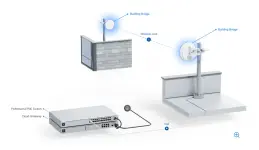
actually for a 10-15m run, this would be the best solution.utp cable ka na lang siguro abutin lang 400 pesos yung 20 meters non then hanap ka na lang ng router sa kapitbahay niyo na di na nagagamit or wala na linya bilhin mo na lang 100 mas maganda kasi talaga naka lan cable ka para less hassle kung binigay naman pala ng pinsan mo sa inyo ang pass okay na yan kahit magbayad na lang kayo sa kanila 200 per month