 PH
PHSTICKnoLOGIC
Forum Guru
CLI Guide
Welcome! In this section, we will help you step-by-step on how to contribute to You do not have permission to view the full content of this post. Log in or register now. using the CLI or Command LineIf you don't have git in your device, You do not have permission to view the full content of this post. Log in or register now..
Requirement/s:
- Device (recommended: laptop or PC)
- Github Account
- Brain.exe
for more information, visit the following:
You do not have permission to view the full content of this post. Log in or register now.
You do not have permission to view the full content of this post. Log in or register now.
--------------------------------------
Fork The First-Accord repository
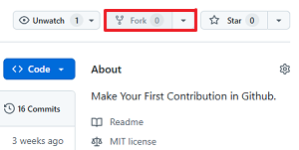
You do not have permission to view the full content of this post. Log in or register now. the First Accord repository by clicking the fork button at the top of You do not have permission to view the full content of this post. Log in or register now.. This will create a copy of this repository in your account.
Cloning the Repository
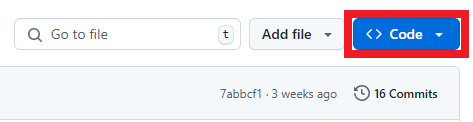
Now, clone the forked repository to your machine. Go to your GitHub account, open the forked repository, click the code button, then on the HTTPS tab, and then click the copy to clipboard icon.
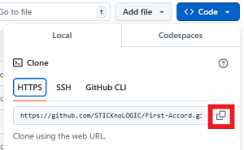
Open a terminal and run the following git command:
Bash:
git clone "url you just copied"Where "url you just copied" (without quotation marks) is the URL to this repository (your fork of this project). See the previous steps to obtain the URL.
For example:
Bash:
git clone https://www.github.com/this-is-you/first-accord.gitWhere this-is-you is your GitHub username. Here, you're copying the contents of the first-contributions repository on GitHub to your computer.
Create a Branch
Go to the repository directory on your computer (if you are not already there):
Bash:
cd first-accordNow create a branch command:
Bash:
git checkout -b your-branch-nameFor Example:
Bash:
git checkout -b sticknologic-branchMake necessary changes and commit those changes
Go to the contributors Folder/Directory and copy the content of TEMPLATE.json (the template consists of essential/required parameters in JSON structure. To know more, You do not have permission to view the full content of this post. Log in or register now.)
Bash:
cd contributorsNow in contributors Directory, Create a json file this-is-you.json(where this-is-you is your Github username), Open the created json file in a text editor and paste the content you copied from the TEMPLATE.json, edit the json file(You do not have permission to view the full content of this post. Log in or register now.). Now, save the file.
If you go to the project directory and execute the command git status, you'll see there are changes.

Add those changes to the branch you just created using the git add command:
Bash:
git add this-is-you.jsonWhere this-is-you is your GitHub username.
Now commit those changes using the git commit command:
Bash:
git commit -m "Add your-name to Contributors list"replacing your-name with your name.
Push changes to GitHub
Push your changes using the command git push:
Bash:
git push -u origin your-branch-nameSubmit your changes for review
If you go to your repository on GitHub, you'll see a Compare & pull request button. Click on that button.
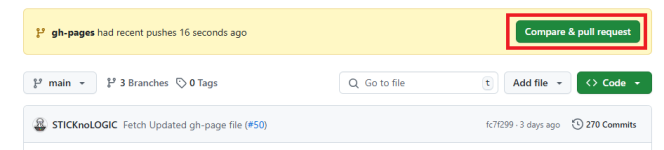
Now submit the pull request.
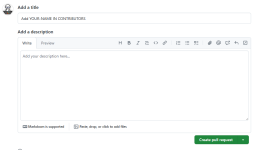
I'll be merging all of your modifications into the project's main branch shortly. Once the changes have been merged, you will receive an email notification.
Where to go from here?
Congratulations! You have successfully completed the standard workflow: fork -> clone -> edit -> pull request that you will frequently encounter as a contributor.You are welcome to join our community or group if you need assistance or have any questions.
Let's help you get started with contributing to other projects. I recommend beginning with You do not have permission to view the full content of this post. Log in or register now.. This project was heavily inspired by it, just so you know!

