 PH
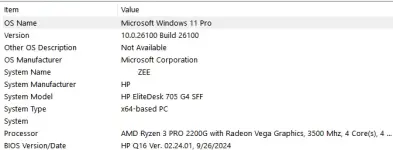
PHpwede pala yun. ryzen 3 pro 2200g pc ko pero nakakapag upgrade ako sa win11 kahit unsupported processor pc ko na walang nawawalang files at working lahat.
una punta ka lang sa official website ni MS tas DL mo yung .ISO na same language sa win10 mo tapos extract mo yung ISO gamit rar or zip sa desktop dapat nasa isang folder yung ISO para madali lang ma copy yung path. pagtapos mo extract yung files punta ka sa CMD run as admin tas type, cd [name ng path kung saan nakalagay yung extracted iso mo tapos/sources] hit enter. next type, setupprep.exe /product server hit enter para lumabas yung windows server setup. pag lumabas na click change how setup download updates tapos check mo yung not right now para ma check mo yung windows update kung gumagana ba after upgrade. tapos check Keep personal files and apps para walang mawawala after upgrading, tapos sundin mo lang yung kung anong nakalagay sa screen tas hintayin mo nalang matapos yung install.
una punta ka lang sa official website ni MS tas DL mo yung .ISO na same language sa win10 mo tapos extract mo yung ISO gamit rar or zip sa desktop dapat nasa isang folder yung ISO para madali lang ma copy yung path. pagtapos mo extract yung files punta ka sa CMD run as admin tas type, cd [name ng path kung saan nakalagay yung extracted iso mo tapos/sources] hit enter. next type, setupprep.exe /product server hit enter para lumabas yung windows server setup. pag lumabas na click change how setup download updates tapos check mo yung not right now para ma check mo yung windows update kung gumagana ba after upgrade. tapos check Keep personal files and apps para walang mawawala after upgrading, tapos sundin mo lang yung kung anong nakalagay sa screen tas hintayin mo nalang matapos yung install.