 PH
PHWalang SHAREIT? Mabagal sa BLUETOOTH?

Sharik allows you to effortlessly and instantly share files between devices by simply using your mobile hotspot or when both devices are connected to the same Wi-Fi network. It eliminates the need for an internet connection or external services, making file sharing quick, convenient, and accessible anytime, anywhere.
Why use SHARIK?
- No need internet connection
- Mabilis magpasa ng files
- Sender lang yung need mag install ng SHARIK
SHARIK App Download
TUTORIAL:
1. Connect sa same wifi / iopen ang hotspot ng sender tas connect yung receiver
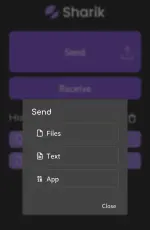
2. Open Sharik and click send > files
3. After makapili ng file, magsesend siya ng URL
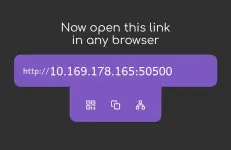
4. Punta sa chrome yung receiver tapos itype yung URL. (kailangan nakaconnect na sa hotspot).
DONE! Idodownload nung receiver yung file (pero no internet usage)
Sharik allows you to effortlessly and instantly share files between devices by simply using your mobile hotspot or when both devices are connected to the same Wi-Fi network. It eliminates the need for an internet connection or external services, making file sharing quick, convenient, and accessible anytime, anywhere.
Why use SHARIK?
- No need internet connection
- Mabilis magpasa ng files
- Sender lang yung need mag install ng SHARIK
SHARIK App Download
TUTORIAL:
1. Connect sa same wifi / iopen ang hotspot ng sender tas connect yung receiver
2. Open Sharik and click send > files
3. After makapili ng file, magsesend siya ng URL
4. Punta sa chrome yung receiver tapos itype yung URL. (kailangan nakaconnect na sa hotspot).
DONE! Idodownload nung receiver yung file (pero no internet usage)