 PH
PH-
Welcome to PHCorner Forums! Sign up for free to unlock full access and exclusive privileges, including:
- Asking questions about computer and mobile issues
- Discovering internet tips for your mobile network and computer
You are using an out of date browser. It may not display this or other websites correctly.
You should upgrade or use an alternative browser.
You should upgrade or use an alternative browser.
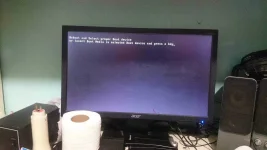
🔒 Closed Reboot and select proper boot device. need help mga master.
- Thread starter Bot-Passive
- Start date
-
- Tags
- boot
- Status
- Not open for further replies.
Bot-Passive
Honorary Poster
Yep alam ko po. Wala na po ba chance? Sayang mga po kase mga movie.need format nyan sir,
Learning KIDz
Forum Veteran
dapat po lagi nasa drive D. yong mga na DL mo. para safe pag nag ka error pc mo..Yep alam ko po. Wala na po ba chance? Sayang mga po kase mga môviê.
try nyo po ito.. watch po muna..

thunderv0ltz
Fanatic
Check hdd cable and insert to other slot. Or there might be other USB device in your PC, remove and restart your PC.
Bot-Passive
Honorary Poster
Ty sir try ko po.yup.. tama ung comment ng nasa itaas ko.. better checked first before formatting your HDD.. baka ngLoLOOSE lng hdd cable mo or try to insert it to other hdd port..
liempo_boy
Leecher
boss hinde binabasa yun hard drive mu, try mu palitan ng sata cable..
try ka ng working na hard drive kpg binasa, palitin na yun hard drive mu boss..
try ka ng working na hard drive kpg binasa, palitin na yun hard drive mu boss..
You have 2 options ts,
1. Remove you hard drive and install it to another unit, there you can access your data and back up it.
2. When formatting, your os tends to look for installed os. Eventuallu will detect the previous install and will give you the option whether overlap or fresh install (not the exact words). If overlapped you can access you data in drive c under OLD.WINDOWS. haba netong explanation sana gets mo ts
1. Remove you hard drive and install it to another unit, there you can access your data and back up it.
2. When formatting, your os tends to look for installed os. Eventuallu will detect the previous install and will give you the option whether overlap or fresh install (not the exact words). If overlapped you can access you data in drive c under OLD.WINDOWS. haba netong explanation sana gets mo ts
- Status
- Not open for further replies.
About this Thread
-
9Replies
-
535Views
-
7Participants
Last reply from:
iceboi
iceboi
New Topics
-
Win 10 Home keys
- Started by Ali246
- Replies: 6
- ❓ Computer Discussion & Support
-
Windows 11 26H2
- Started by tholitz
- Replies: 0
- ❓ Computer Discussion & Support
-
Help po !!!! My account got häçked Facebook and steam
- Started by bujoy20
- Replies: 6
- ❓ Computer Discussion & Support
-
Replace laptop lcd
- Started by toki07
- Replies: 0
- ❓ Computer Discussion & Support
-
Mga bossing patulong po nahäçk account ko due to carelessness
- Started by Jeii
- Replies: 2
- ❓ Computer Discussion & Support
-
Computer parts na cheap
- Started by bjenjay1
- Replies: 1
- ❓ Computer Discussion & Support
-
PC APPS - remote or auto saved type and auto audio
- Started by babyzero
- Replies: 0
- ❓ Computer Discussion & Support
-
Data Recovery May Chance pa bato
- Started by tambay28
- Replies: 0
- ❓ Computer Discussion & Support
-
Capcut PC pasabit po
- Started by L A Z A
- Replies: 0
- ❓ Computer Discussion & Support
-
Download Youtube Video using CMD
- Started by BeerGin69
- Replies: 2
- ❓ Computer Discussion & Support
Trending Topics
Online now
- Members online
- 1,333
- Guests online
- 7,678
- Total visitors
- 9,011