Based on the information you provided, here is a detailed response to your concerns about purchasing the Acer Nitro 5 (AN515-58 73V6) laptop with the mentioned issues:
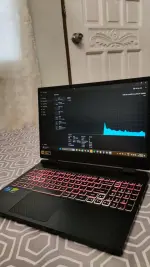
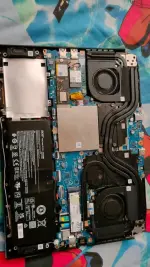
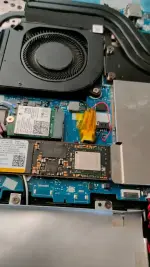
1. Issue Description: The main issues with the laptop are related to the CPU fan socket repair and the RGB lighting on the keyboard not functioning properly. The CPU fan is not controllable through Nitro Sense, but it is still working. The keyboard's RGB lighting doesn't work, but the keyboard itself is functional.
2. Potential Solutions:
- CPU Fan Socket Repair: If the CPU fan socket issue is affecting the RPM control and monitoring in Nitro Sense, you may need to have it looked at by a professional technician. They might need to assess the repair work done previously and possibly replace any faulty components or connectors. The repair cost will depend on the extent of the issue and the parts needed.
- Keyboard RGB Issue: The RGB lighting on the keyboard not working could be due to a software or hardware issue. You can try updating the laptop's drivers and firmware to see if that resolves the problem. If the issue persists, it might require further diagnosis by a technician to determine if it's a hardware-related problem. The repair cost will depend on the exact cause of the RGB lighting issue.
3. Where to Get It Repaired: You can consider taking the laptop to an authorized Acer service center or a reputable computer repair shop that specializes in laptop repairs. They will be able to diagnose the issues accurately and provide you with a repair quote.
4. Repair Cost: The cost of repairing the CPU fan socket and the keyboard RGB lighting will vary depending on the complexity of the issues and the parts that need to be replaced. It's best to get a quotation from the repair center after they have assessed the laptop.
5. Performance and Temperatures: It's worth noting that the laptop's performance and temperatures seem to be within acceptable ranges based on the information you provided. The temperatures under load for both the CPU and GPU are reasonable for a gaming laptop.
6. Warranty and DOP: Since the laptop's date of purchase (DOP) is in August 2023, you may want to check if the laptop is still under warranty. If it is, you could potentially get the repair work done through the warranty service, depending on the warranty terms and conditions.
In conclusion, while the Acer Nitro 5 laptop you're considering has some issues with the CPU fan socket and keyboard RGB lighting, these are repairable problems. You can explore getting it fixed by a professional technician to ensure that the laptop functions properly. Just make sure to consider the repair costs and warranty coverage before making a final decision.
 PH
PH