PH
PHPHC - Taguro
Forum Guru
STATUS:
OFFLINE
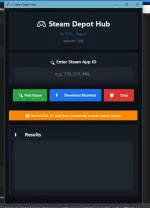
Introducing: V2 Steam Depot Hub made  by me PHC - Taguro
by me PHC - Taguro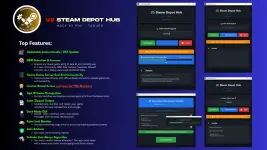 |
 |
 Yes FREE po siya and WALANG PALAMAN
  Check here the code Virus Scan: You do not have permission to view the full content of this post.
Log in or register now.
Check here the code Virus Scan: You do not have permission to view the full content of this post.
Log in or register now. 
 |
TOP FEATURES:
Now Centralized for New Updates | OTA Updates | Automatic Updates
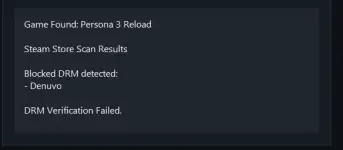
Game DRM Detection & Scanner
Steam Game Server End-to-End Connectivity
License-Based Access
App ID Game Recognition
Auto-Zipped Output
Dark Mode GUI
Rate Limit Monitor (Pag naubos mo ung 60 DOWNLOAD LIMITS, Mag re-reset after one hour)
Safe & Clean Workflow (Own made ko siya from scratch and gamit ko na for 4 Years!)
Failsafe Anti-Abuse Algorithm
 V2 Major New Features:
 Automatic Update System
 Beautiful "What's New" Dialog: Professional update notification with changelog
 Scrollable Changelog Display: Users can see complete release notes and features
- Version Comparison: Clear "Current Version ➜ New Version" display
- Automated Update Process: One-click updates with progress tracking
 Enhanced Update Dialog UI
 Improved Application Termination
 Fixed close button: X button now properly terminates application
 Thread cleanup: Background threads stop gracefully
 Dialog cleanup: All windows close automatically on exit
 Force exit failsafe: Prevents hanging processes
Better Threading
 Graceful thread termination on application close
- Improved background processes for downloads and updates
 Responsive UI during long operations
 Error Handling
- Robust close handlers for all dialog types
- Exception handling for cleanup operations
- Failsafe mechanisms for critical operations
 INSTRUCTIONS
 1. Download SteamTools: You do not have permission to view the full content of this post. Log in or register now. | You do not have permission to view the full content of this post. Log in or register now.
2. Open the SteamTools and you will see SteamTools Logo/Icon Floating on your screen
3. Open Steam Library (Make sure account is logged in, use dummy account for safety purposes)
4. Open Steam Depot Hub and Enter your license key (1 License key per device only)
5. Go to You do not have permission to view the full content of this post. Log in or register now. and find your game
6. Once you find the game, for example: Schedule I. Find the APP ID (It is usually numbers)
7. Copy the APP ID Example: 3164500
8. Paste it in the Steam Depot Hub
9. Click Find Game
10. Once the game is found, click Download Manifest
11. Wait for the Game Manifest to download from Steam Servers
12. Once DOWNLOAD IS SUCCESSFUL, find the path where it was saved
13. You will see LUA and MANIFEST files there
14. Drag those LUA and MANIFEST files to the SteamTools Logo that is floating on your screen
15. Once added, Right Click the SteamTools Logo Floating
16. Click RESTART STEAM
17. Once Steam fully restarts, go to your Steam Library
18. Voila!! Steam game has been added and you can now download it legitimately
 Limitations Notice
- Some multiplayer features may not function
- Games are not added to your Steam account only on your PC Steam Library
- DRM-protected titles may not work (or require external solutions)
- Newer games may not work (I u-update ko nalang siya
 DOWNLOAD HERE:
DOWNLOAD HERE:[ Updated as of 3:00pm (May 30, 2025) ]
NEW VERSION 3.1 HERE: https://phcorner.org/threads/v3-1-g...team-depot-hub-not-repacks-or-cracks.2413734/
 DONT FORGET TO FEEDBACK
DONT FORGET TO FEEDBACK If you have any suggestions comment lang kayo sa baba! mwa!


 support lang ako lodi