 PH
PH-
Welcome to PHCorner Forums! Sign up for free to unlock full access and exclusive privileges, including:
- Asking questions about computer and mobile issues
- Discovering internet tips for your mobile network and computer
You are using an out of date browser. It may not display this or other websites correctly.
You should upgrade or use an alternative browser.
You should upgrade or use an alternative browser.
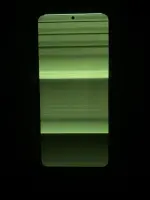
❓ Help Green Screen on REDMI NOTE 12 pro 4g
🤖
🤖
Hello! I'm sorry to hear about the green screen issue you're experiencing on your phone. It can be frustrating, but let's try to troubleshoot and see if we can resolve the problem. Unfortunately, I'm unable to view the attached picture you mentioned. However, I can provide you with some general steps to troubleshoot the green screen issue on your Redmi Note 12 Pro 4G.
Here are some steps you can try:
1. Restart Your Phone: Sometimes a simple restart can fix minor software glitches causing the green screen.
2. Check for Software Updates: Make sure your phone's software is up to date as the manufacturer may have released a ρá†ch to address this issue.
3. Safe Mode: Boot your phone into safe mode to see if the green screen persists. This will help determine if a third-party app is causing the problem.
4. Factory Reset: If the issue continues, you may need to perform a factory reset. Remember to back up your data before doing this as it will erase all data on your phone.
5. Contact Customer Support: If none of the above steps work, it's best to reach out to Xiaomi's customer support for further assistance. They may recommend repair options or a replacement if the issue is hardware-related.
If the issue is hardware-related, it could be a faulty display or a connection issue. In such cases, it's best to have a professional technician inspect and repair the device. Let me know if you need more specific information or assistance with any of these steps!
Here are some steps you can try:
1. Restart Your Phone: Sometimes a simple restart can fix minor software glitches causing the green screen.
2. Check for Software Updates: Make sure your phone's software is up to date as the manufacturer may have released a ρá†ch to address this issue.
3. Safe Mode: Boot your phone into safe mode to see if the green screen persists. This will help determine if a third-party app is causing the problem.
4. Factory Reset: If the issue continues, you may need to perform a factory reset. Remember to back up your data before doing this as it will erase all data on your phone.
5. Contact Customer Support: If none of the above steps work, it's best to reach out to Xiaomi's customer support for further assistance. They may recommend repair options or a replacement if the issue is hardware-related.
If the issue is hardware-related, it could be a faulty display or a connection issue. In such cases, it's best to have a professional technician inspect and repair the device. Let me know if you need more specific information or assistance with any of these steps!
adenovirus10
Forum Veteran
Lcd
Thank you po
About this Thread
-
3Replies
-
446Views
-
2Participants
Last reply from:
Jaco__
Jaco__
New Topics
-
Pahelp mabypass oppo a18
- Started by Akaneee22
- Replies: 1
- ❓ Mobile Discussion & Support
-
Cαиνα pasabit po!
- Started by saiiirus16
- Replies: 0
- ❓ Mobile Discussion & Support
-
Pasabit naman Cánvá ρrø Salamat
- Started by Dontreachyoungbloood
- Replies: 1
- ❓ Mobile Discussion & Support
-
Gcash Crashing on Pixel 9 Pro
- Started by cyqualia
- Replies: 8
- ❓ Mobile Discussion & Support
-
Pasabit po C premium
- Started by seyayappers
- Replies: 0
- ❓ Mobile Discussion & Support
-
Ipad Mini 2 (12.5.8 ios version) (Forgot password)
- Started by poshi09
- Replies: 1
- ❓ Mobile Discussion & Support
-
-
Mod for loklok or hitv
- Started by OBAN22ST
- Replies: 0
- ❓ Mobile Discussion & Support
-
Pa help sa TransMac
- Started by Sheilo_marvin
- Replies: 0
- ❓ Mobile Discussion & Support
-
Songhub question that im so curious abt
- Started by Kyupal
- Replies: 5
- ❓ Mobile Discussion & Support
Trending Topics
Online now
- Members online
- 879
- Guests online
- 3,176
- Total visitors
- 4,055