❓ Help Wifi automatically disconnect

Ginoong Halimaw

Eternal Poster
Mga bossing pa help naman pano ifix yung automatic ako na didisconnect sa wifi then mag rereconnect din agad for like 5 seconds. Nakakairita lang kasi habang naglalaro ako e biglang ma di disconnect sana may makatulong thanks in advance.

P.s btw android po cp ko realme 6 android 11
 
Try i-forget yung wifi then connect ka ulit with password.
Tinry ko na yan boss pero ganun pa din, kahit nirestart ko na din yung phone ko

try mo static, or baka puno na naka connect sa wifi or malayu ka masyado sa router.
Panong static boss?

By the way naka enable po pala yung wifi band steering ng wifi namin, nakaka affect din po ba un?
 
Tinry ko na yan boss pero ganun pa din, kahit nirestart ko na din yung phone ko


Panong static boss?

By the way naka enable po pala yung wifi band steering ng wifi namin, nakaka affect din po ba un?
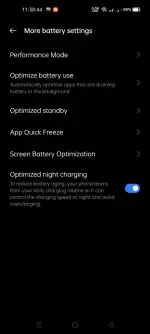
set static ip, wag Obtain/DHCP, minsan kasi nag aauto disconect yan pag may IP Conflict, also try mo reset wifi network settings mo sa under sa phone settings. baka bug, another factor, baka naka battery "OPTIMIZED" wifi mo sa settings ng android mo, check your phone BATTERY OPTIMIZATION, ang purpose kasi nito inislep nya mga services or apps para maka tipid ng power/batt ang phone mo.
 
I already tried the reset network settings po and di din sya gumana. Try ko yung static then about sa battery optimization, alin po dito?
set static ip, wag Obtain/DHCP, minsan kasi nag aauto disconect yan pag may IP Conflict, also try mo reset wifi network settings mo sa under sa phone settings. baka bug, another factor, baka naka battery "OPTIMIZED" wifi mo sa settings ng android mo, check your phone BATTERY OPTIMIZATION, ang purpose kasi nito inislep nya mga services or apps para maka tipid ng power/batt ang phone mo.

Screenshot_2025-05-27-11-38-44-97_b7ff6dd0e181029d8492f0876df908d6.webp
 
I already tried the reset network settings po and di din sya gumana. Try ko yung static then about sa battery optimization, alin po d
I already tried the reset network settings po and di din sya gumana. Try ko yung static then about sa battery optimization, alin po dito?


View attachment 3736984
hanapin modyan sa optimization pasukin mo lahat. try mo din static ip tas observe mo kung nag aauto disconect parin gamit ka ping or advance ip scanner para yung ma set mong static ip hindi duplicated or already used.
[/QUOTE]

I already tried the reset network settings po and di din sya gumana. Try ko yung static then about sa battery optimization, alin po dito?


View attachment 3736984
kung natry muna sa reset wifi network sa phone settings mo, probably sa side nayan ng router mo, ito mga factors nyan, 1st is IP Conflict, 2nd is Weak Signal (Malayu ka router), 3rd, IP lease ng router mo naka set sa auto renew every 5 secs, 4th Full users connected, 5th bug router need update firmware.
 
Anong wifi router mo? sa akin kasi naka Tenda ako and i noticed na nadidisconnect din ako and nawawala yung wifi signal pero hindi naman nag restart yung router, pero after few seconds lilitaw ulit then paulit ulit na ganon.

ang naging solution ko is hininaan ko yung power ng broadcasting wifi signal, instead na naka Extreme, naka Low lang, i think siguro malakas kumain ng power yung router, di na kinakaya ng power supply yung required power ni router kaya nawawala signal.

Broadcasting wifi signal means kung gano kalakas/kalayo yung kayang ibroadcast ni router, yung sakin kasi known siya as a long range router wherein kahit siguro 200m ang layo basta walang obstruction is makakareceive pa rin ng signal. (AC2100).
 
set static ip, wag Obtain/DHCP, minsan kasi nag aauto disconect yan pag may IP Conflict, also try mo reset wifi network settings mo sa under sa phone settings. baka bug, another factor, baka naka battery "OPTIMIZED" wifi mo sa settings ng android mo, check your phone BATTERY OPTIMIZATION, ang purpose kasi nito inislep nya mga services or apps para maka tipid ng power/batt ang phone mo.

mas lalong malaki ang chance ng ip address conflict pag nag-static ip ka sa device, at hindi mo in-exclude ang ip address na ito sa dhcp server.

hindi rin nag-o automatic disconnect due to ip address conflict. ang problema, with 2 devices having the same ip address, packets could get sent to the wrong one.

OP,
  • check your wifi signal. nangyayari ba disconnection pag lumipat ka ng lugar?
  • maybe create a heatmap of your house with an app like WiFi Overview (check the signal level at differant rooms/places)
  • regular periods ba ang disconnection mo, like every 15 o 30 minutes?
  • phone mo lang ba ang nagkakaganito? what about other wifi devices?
  • check how many devices are connected to your router, and check the maximum devices your router supports
 
mas lalong malaki ang chance ng ip address conflict pag nag-static ip ka sa device, at hindi mo in-exclude ang ip address na ito sa dhcp server.

hindi rin nag-o automatic disconnect due to ip address conflict. ang problema, with 2 devices having the same ip address, packets could get sent to the wrong one.

OP,
  • check your wifi signal. nangyayari ba disconnection pag lumipat ka ng lugar?
  • maybe create a heatmap of your house with an app like WiFi Overview (check the signal level at differant rooms/places)
  • regular periods ba ang disconnection mo, like every 15 o 30 minutes?
  • phone mo lang ba ang nagkakaganito? what about other wifi devices?
  • check how many devices are connected to your router, and check the maximum devices your router supports
Every minute po sya nag didisconnect
 
Every minute po sya nag didisconnect
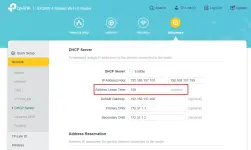
i wondered if your device/s and your router aren't being friendly with each other regarding DHCP operation. but unless somebody's messing with you, that's too short to be DHCP lease time expiring. most consumer grade routers i've seen default to 24 hours. mikrotik defaults to much less.

some clients do not like short lease times. if you have this option on your router, it might be good to check this anyway.
 
i wondered if your device/s and your router aren't being friendly with each other regarding DHCP operation. but unless somebody's messing with you, that's too short to be DHCP lease time expiring. most consumer grade routers i've seen default to 24 hours. mikrotik defaults to much less.

some clients do not like short lease times. if you have this option on your router, it might be good to check this anyway.
Di ko po nagets ano po yung hahanapin ko sa admin router?
 

About this Thread

  • 15
    Replies
  • 926
    Views
  • 8
    Participants
Last reply from:
xDopeCypher

Trending Topics

Online now

Members online
895
Guests online
721
Total visitors
1,616

Forum statistics

Threads
2,275,563
Posts
28,964,107
Members
1,231,866
Latest member
terrorspeed
Back
Top