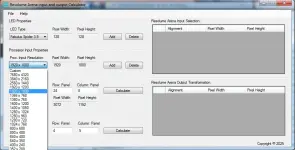
🖥️ PC App New Updare: Resolume Arena Input and Output transformation calculator

waldopulanco

Enthusiast
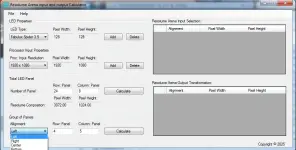
Resolume Arena Input and Output Calculator: allow to generate, copy and paste the width and height on every slices in input selection of Resolume Arena Advance Output, same with Output transformation.

How to use: Copy the generated width and height resolution from resolume arena in and out calculator and paste it to resolume arena on advance output
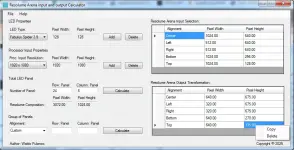
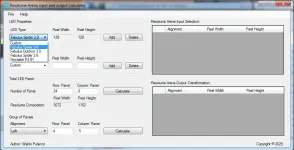
  • Compatibility OS: Windows 7, 8, 10 and 11
  • Requirement: Net Frame 4.6
  • New update added can now export directly to resolume arena
screenshot.webpscreenshot1.webpscreenshot2.webpscreenshot3.webp


Download Link: You do not have permission to view the full content of this post. Log in or register now.
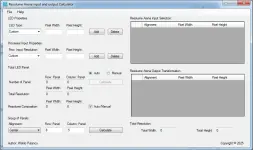
 
Resolume Arena Advance Output Calculator
Release Soon
  • Support Composition Export direct to resolume arena
  • Support Advance Output Export direct to resolution arena
  • Every slices had designated layer
  • Can export maximum of five slices
  • Auto calculate Output transformation
  • Can add LED Type manually
  • Can add resolution manually
  • Auto mapping every slices (input selection and ouput transformation)
  • Auto calculate Resolume Arena Composition
  • Manual add resolution arena Composition
Note: this is only applicable for single screen. but you can use multi screen output, just drag and drop the slices on another screen on resolution arena advance ouput.


Untitled4.webp
 
Resolume Arena Advance Output Calculator
Release Soon
  • Support Composition Export direct to resolume arena
  • Support Advance Output Export direct to resolution arena
  • Every slices had designated layer
  • Can export maximum of five slices
  • Auto calculate Output transformation
  • Can add LED Type manually
  • Can add resolution manually
  • Auto mapping every slices (input selection and ouput transformation)
  • Auto calculate Resolume Arena Composition
  • Manual add resolution arena Composition
Note: this is only applicable for single screen. but you can use multi screen output, just drag and drop the slices on another screen on resolution arena advance ouput.


View attachment 3756360
marami salamat sir
 
  • Support Composition Export direct to resolume arena
  • Support Advance Output Export direct to resolution arena
  • Every slices had designated layer
  • Can export maximum of five slices
  • Auto calculate Output transformation
  • Can add LED Type manually
  • Can add resolution manually
  • Auto mapping every slices (input selection and ouput transformation)
  • Auto calculate Resolume Arena Composition
  • Manual add resolution arena Composition
Note: this is only applicable for single screen. but you can use multi screen output, just drag and drop the slices on another screen on resolution arena advance ouput.

Compatible OS: Windows 7, 8, 10 and 11
Requirement: .NET Framework 4.6


Download Link:
New Version: You do not have permission to view the full content of this post. Log in or register now.

thanks!!!
 
What's new?
  • Auto Spacing - Allow you to Auto spacing every Slices onto Input Selection and Output Transformation, these value depend on the dimension of your single panel. eg. 64x128, 64x64, 96x96, 128x128, 128x256 etc..
  • Fixed Some minor bugs.
  • Support Composition Export direct to resolume arena
  • Support Advance Output Export direct to resolution arena
  • Every slices had designated layer
  • Can export maximum of five slices
  • Auto calculate Output transformation
  • Can add LED Type manually
  • Can add resolution manually
  • Auto mapping every slices (input selection and ouput transformation)
  • Auto calculate Resolume Arena Composition
  • Manual add resolution arena Composition
Note: this is only applicable for single screen. but you can use multi screen output, just drag and drop the slices on another screen on resolution arena advance ouput.
Compatible OS: Windows 7, 8, 10 and 11
Requirement: .NET Framework 4.6
Link: You do not have permission to view the full content of this post. Log in or register now.
 
Compatible to any version of Resolume Arena from version 6.0.7 up to Version 7.22.9, except version 4 and 5.

What's new?
  • Auto Spacing - Allow you to Auto spacing every Slices onto Input Selection and Output Transformation, these value depend on the dimension of your single panel. eg. 64x128, 64x64, 96x96, 128x128, 128x256 etc..
  • Fixed Some minor bugs.
  • Fixed Major bugs, eg some version cannot assign slices on every Layers.

  • Support Composition Export direct to resolume arena
  • Support Advance Output Export direct to resolution arena
  • Every slices had designated layer
  • Can export maximum of five slices
  • Auto calculate Output transformation
  • Can add LED Type manually
  • Can add resolution manually
  • Auto mapping every slices (input selection and ouput transformation)
  • Auto calculate Resolume Arena Composition
  • Manual add resolution arena Composition

Note: this is only applicable for single screen. but you can use multi screen output, just drag and drop the slices on another screen on resolution arena advance ouput.

Compatible OS: Windows 7, 8, 10 and 11

Requirement: .NET Framework 4.6Link:

New Version: You do not have permission to view the full content of this post. Log in or register now.

Note: if you want to enable auto spacing, it needs to register the product id, dont worry its totally free. just email the product id to webbrowser29@gmail.com. thanks you!

Youtube link: You do not have permission to view the full content of this post. Log in or register now.
 
Resolume Arena Advance Output Calculator
Compatible to any version of Resolume Arena from version 6.0.7 up to Version 7.22.9, except version 4 and 5.

What's new?
  • Added input and Output pixel grid preview
  • Auto Spacing - Allow you to Auto spacing every Slices onto Input Selection and Output Transformation, these value depend on the dimension of your single panel. eg. 64x128, 64x64, 96x96, 128x128, 128x256 etc..
  • Fixed Some minor bugs.
  • Fixed Major bugs, eg some version cannot assign slices on every Layers.

  • Support Composition Export direct to resolume arena
  • Support Advance Output Export direct to resolution arena
  • Every slices had designated layer
  • Can export maximum of five slices
  • Auto calculate Output transformation
  • Can add LED Type manually
  • Can add resolution manually
  • Auto mapping every slices (input selection and ouput transformation)
  • Auto calculate Resolume Arena Composition
  • Manual add resolution arena Composition
Note: this is only applicable for single screen. but you can use multi screen output, just drag and drop the slices on another screen on resolution arena advance ouput.
Compatible OS: Windows 7, 8, 10 and 11
Requirement: .NET Framework 4.6
Link:
New Version: You do not have permission to view the full content of this post. Log in or register now.

Note: if you want to enable auto spacing, it needs to register the product id, dont worry its totally free. just email the product id to webbrowser29@gmail.com. thanks you!

watch video here: You do not have permission to view the full content of this post. Log in or register now.

Background Music credit to Admiral Bob
Youtube link: You do not have permission to view the full content of this post. Log in or register now.
 

About this Thread

  • 9
    Replies
  • 179
    Views
  • 2
    Participants
Last reply from:
waldopulanco

Online now

Members online
635
Guests online
1,448
Total visitors
2,083

Forum statistics

Threads
2,291,669
Posts
29,072,120
Members
1,211,017
Latest member
okkidiamantati
Back
Top