 PH
PHJoeenshare
Forum Veteran
link download:
You do not have permission to view the full content of this post. Log in or register now.
PDF AI Reader: Editor, Scanner Overview
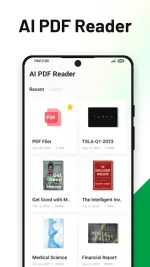
PDF Reader – Now Supercharged with AI and Broadened File Support! We’re excited to present the newest version of PDF Reader, your comprehensive tool for a seamless and efficient reading and managing experience on your mobile device. Now powered by the advanced ᑕᕼᗩTGᑭT-4o, ᑕᕼᗩTGᑭT-4, Gemini 1.5, Gemini Flash, Claude 3.5, and LLaMa 3 AI, enjoy smarter, faster, and more intuitive interactions with your documents.
Embrace versatility like never before with our latest update which now supports not only PDF, Word/Writer, Excel/Spreadsheet, and Powerpoint/Slides formats but also TXT, HTML, CSV, MD5, Markdown, and JSON. Transforming PDF Reader into a powerhouse for managing, annotating, and interacting with your files.
Features of PDF AI Reader: Editor, Scanner
Convert PDF to Word, TXT.
PDF Signature.
Seamless Viewing: Effortlessly open and navigate through your PDFs and other supported documents.
Easy Annotation: Highlight key points, insert text, and jot down notes within your files.
Powerful Search: Locate specific details quickly with our robust search feature, now enhanced by ᑕᕼᗩTGᑭT.
High-speed Performance: Enjoy blazing-fast performance when handling even larger and more complex files.
Cloud Integration: Sync your files across various devices using popular cloud storage services like Google Drive, Dropbox, Box or OneDrive.
Easy Sharing & Printing: Share your files effortlessly and print directly from your mobile device.
Enhanced Security: Access your password-protected files securely and confidentially.
Convenient Editing: Edit your documents conveniently, making changes to text and images as needed.
Document Scanning: Quickly scan physical documents to create high-quality PDFs on the go.
Document Conversion: Convert scanned documents and other file types seamlessly.
Direct Printing: Print your documents directly from the app with ease.
Advanced Document Search: Effortlessly find specific information within your documents using our enhanced search capabilities.
What's new
AI Multimodal Intelligence Handle multiple documents, images, and videos effortlessly. Advanced tasks like Q&A, key information extraction, and traceability.
AI Knowledge Base Transform files (documents, images, videos) into long-term knowledge memory. Our app never forgets! Access important data anytime, anywhere.
AI Quick Access Shortcuts Powerful shortcuts like AI Scan, AI Translate, and Ask AI. Get instant answers with just one tap.
0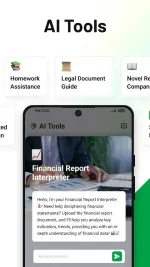

You do not have permission to view the full content of this post. Log in or register now.
PDF AI Reader: Editor, Scanner Overview
PDF Reader – Now Supercharged with AI and Broadened File Support! We’re excited to present the newest version of PDF Reader, your comprehensive tool for a seamless and efficient reading and managing experience on your mobile device. Now powered by the advanced ᑕᕼᗩTGᑭT-4o, ᑕᕼᗩTGᑭT-4, Gemini 1.5, Gemini Flash, Claude 3.5, and LLaMa 3 AI, enjoy smarter, faster, and more intuitive interactions with your documents.
Embrace versatility like never before with our latest update which now supports not only PDF, Word/Writer, Excel/Spreadsheet, and Powerpoint/Slides formats but also TXT, HTML, CSV, MD5, Markdown, and JSON. Transforming PDF Reader into a powerhouse for managing, annotating, and interacting with your files.
Features of PDF AI Reader: Editor, Scanner
Convert PDF to Word, TXT.
PDF Signature.
Seamless Viewing: Effortlessly open and navigate through your PDFs and other supported documents.
Easy Annotation: Highlight key points, insert text, and jot down notes within your files.
Powerful Search: Locate specific details quickly with our robust search feature, now enhanced by ᑕᕼᗩTGᑭT.
High-speed Performance: Enjoy blazing-fast performance when handling even larger and more complex files.
Cloud Integration: Sync your files across various devices using popular cloud storage services like Google Drive, Dropbox, Box or OneDrive.
Easy Sharing & Printing: Share your files effortlessly and print directly from your mobile device.
Enhanced Security: Access your password-protected files securely and confidentially.
Convenient Editing: Edit your documents conveniently, making changes to text and images as needed.
Document Scanning: Quickly scan physical documents to create high-quality PDFs on the go.
Document Conversion: Convert scanned documents and other file types seamlessly.
Direct Printing: Print your documents directly from the app with ease.
Advanced Document Search: Effortlessly find specific information within your documents using our enhanced search capabilities.
What's new
AI Multimodal Intelligence Handle multiple documents, images, and videos effortlessly. Advanced tasks like Q&A, key information extraction, and traceability.
AI Knowledge Base Transform files (documents, images, videos) into long-term knowledge memory. Our app never forgets! Access important data anytime, anywhere.
AI Quick Access Shortcuts Powerful shortcuts like AI Scan, AI Translate, and Ask AI. Get instant answers with just one tap.
0