 PH
PHPwede mo ba screen shot o ma picture send mo sakin para magawn ko nang solutionoo pre naka wifi ako nung nagroot ako, stuck parin ako sa miui recovery cmw... may nagsabi sakin need ko pac file ng firmware os ko
-
Welcome to PHCorner Forums! Sign up for free to unlock full access and exclusive privileges, including:
- Asking questions about computer and mobile issues
- Discovering internet tips for your mobile network and computer
You are using an out of date browser. It may not display this or other websites correctly.
You should upgrade or use an alternative browser.
You should upgrade or use an alternative browser.
- Status
- Not open for further replies.
yan pre sana magawan ng paraanPwede mo ba screen shot o ma picture send mo sakin para magawn ko nang solution

Cge pre try ko to w8 mo LNG reply ko kaso matatagalan pa kac NASA wala pa Ako sa officeView attachment 121406 View attachment 121407 View attachment 121406 View attachment 121407
yan pre sana magawan ng paraan
Ma
Basahin mo sa post ko makikita mi don't recovery.img DL ka ng rar o zip
talyo12 bro pwde kaba mag advanced backup ng smpm (no root), gamit miui recovery ?
kailangan ko lang yung boot.img at system backup nacreated gamit miui recovery...
Basahin mo sa post ko makikita mi don't recovery.img DL ka ng rar o zip
Ma
Basahin mo sa post ko makikita mi don't recovery.img DL ka ng rar o zip
tapos?
tapos?
Paki follow pang ang NAIA sulat din boss may tut nna Yuan
nagawa ko na ung bro,Paki follow LNG yung NASA post madali LNG yun
Boss sinonod ko po to. Pro wla along mkita na file without sa root explorer. San po ditosame problem po tayu ng star mobile play max ko. After pg root dina ng detect sim ko at wla nangsignal. Ito po ss ko young nkikita ko sa sim ko.ok na starmobile ko bumalik na signal at bumabasa na ng sim ni root ko pagkatapos ginamitan ko nang flashify at superuser
FOLLOW MO LANG TO TOL
Eto yung guide paano ma permanent root si sm play max, thanks sa fb group lalo na sa twrp ni diamond, do it at your own risk..
1, download muna kayo ng flashify at install, do not open.
2, download twrp You do not have permission to view the full content of this post. Log in or register now. at supersu official zip You do not have permission to view the full content of this post. Log in or register now. or any version at i place sa sdcard..
3, download kingroot at install(eto na!!! Dapat naka wifi connetivity kayo or hotspot, do not use data, pwede sana, kaso baka mag reboot si kingroot, mawala yung signal)
4, dapat full rooting sya successfully as 100℅ then open si flashify, i granted mo sya by allow access..
5, click mo yung flash >> recovery image >> choose file >> select mo yung recovery.img at i flash nyo po sya, pag successfully partition flash, reboot recovery..
6, Then in TWRP install si supersu.zip flash, wait then reboot na kayo, check nyo yung supersu, rooted na kayo
Extra: ibalik si signal at sim card, downlod kayo ng es file, root explorer or xplore open device/root >> system >> bin then find ''rild" file without " IDELETE LANG YAN THEN REBOOT, and see the effect
Attachments

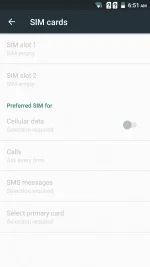
Boss patulong pls.ok na starmobile ko bumalik na signal at bumabasa na ng sim ni root ko pagkatapos ginamitan ko nang flashify at superuser
FOLLOW MO LANG TO TOL
Eto yung guide paano ma permanent root si sm play max, thanks sa fb group lalo na sa twrp ni diamond, do it at your own risk..
1, download muna kayo ng flashify at install, do not open.
2, download twrp You do not have permission to view the full content of this post. Log in or register now. at supersu official zip You do not have permission to view the full content of this post. Log in or register now. or any version at i place sa sdcard..
3, download kingroot at install(eto na!!! Dapat naka wifi connetivity kayo or hotspot, do not use data, pwede sana, kaso baka mag reboot si kingroot, mawala yung signal)
4, dapat full rooting sya successfully as 100℅ then open si flashify, i granted mo sya by allow access..
5, click mo yung flash >> recovery image >> choose file >> select mo yung recovery.img at i flash nyo po sya, pag successfully partition flash, reboot recovery..
6, Then in TWRP install si supersu.zip flash, wait then reboot na kayo, check nyo yung supersu, rooted na kayo
Extra: ibalik si signal at sim card, downlod kayo ng es file, root explorer or xplore open device/root >> system >> bin then find ''rild" file without " IDELETE LANG YAN THEN REBOOT, and see the effect
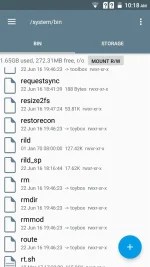
Pasensya na busy ako post ko bukasIto lang lumabas boss. San ba Jan boss?
Na download mo na ba lahat ng file ? Kac gun LNG sinunod ko na paraan para mabalik cignal ng phone moCge po. Badly need your help po.
Greattyphoon
Leecher
Mga boss pwede patulong!!piano ba iinstall c SuperSU gamit any twrp??
Greattyphoon
Leecher
Pwede mg patulong mg root sm play max??mg bayad LNG ako..dito ako Davao..
FOLLOW MO LANG TO TOL
Eto yung guide paano ma permanent root si sm play max, thanks sa fb group lalo na sa twrp ni diamond, do it at your own risk..
1, download muna kayo ng flashify at install, do not open.
2, download twrp Please Login or Register to view links at supersu official zip Please Login or Register to view links or any version at i place sa sdcard..
3, download kingroot at install(eto na!!! Dapat naka wifi connetivity kayo or hotspot, do not use data, pwede sana, kaso baka mag reboot si kingroot, mawala yung signal)
4, dapat full rooting sya successfully as 100℅ then open si flashify, i granted mo sya by allow access..
5, click mo yung flash >> recovery image >> choose file >> select mo yung recovery.img at i flash nyo po sya, pag successfully partition flash, reboot recovery..
6, Then in TWRP install si supersu.zip flash, wait then reboot na kayo, check nyo yung supersu, rooted na kayo
Extra: ibalik si signal at sim card, downlod kayo ng es file, root explorer or xplore open device/root >> system >> bin then find ''rild" file without " IDELETE LANG YAN THEN REBOOT, and see the effect
sir talyo..pahelp naman po jan..nasunod ko po lahat..pero pagdating sa twrp for installing supersu.zip wala po akong makitang supersu.zip..halos lahat na po ng supersu na dl ko na..hindi po sila makita pagdating sa twrp..pahelp naman po pls..
Eto yung guide paano ma permanent root si sm play max, thanks sa fb group lalo na sa twrp ni diamond, do it at your own risk..
1, download muna kayo ng flashify at install, do not open.
2, download twrp Please Login or Register to view links at supersu official zip Please Login or Register to view links or any version at i place sa sdcard..
3, download kingroot at install(eto na!!! Dapat naka wifi connetivity kayo or hotspot, do not use data, pwede sana, kaso baka mag reboot si kingroot, mawala yung signal)
4, dapat full rooting sya successfully as 100℅ then open si flashify, i granted mo sya by allow access..
5, click mo yung flash >> recovery image >> choose file >> select mo yung recovery.img at i flash nyo po sya, pag successfully partition flash, reboot recovery..
6, Then in TWRP install si supersu.zip flash, wait then reboot na kayo, check nyo yung supersu, rooted na kayo
Extra: ibalik si signal at sim card, downlod kayo ng es file, root explorer or xplore open device/root >> system >> bin then find ''rild" file without " IDELETE LANG YAN THEN REBOOT, and see the effect
sir talyo..pahelp naman po jan..nasunod ko po lahat..pero pagdating sa twrp for installing supersu.zip wala po akong makitang supersu.zip..halos lahat na po ng supersu na dl ko na..hindi po sila makita pagdating sa twrp..pahelp naman po pls..
- Status
- Not open for further replies.
About this Thread
-
39Replies
-
6KViews
-
11Participants
Last reply from:
jayart
jayart
New Topics
-
Mag tanong lang po
- Started by Jc_Love_
- Replies: 1
- ❓ Mobile Discussion & Support
-
Samsung A72 help
- Started by mark24123
- Replies: 0
- ❓ Mobile Discussion & Support
-
Saan pwedeng bumili ng legit micro sd card
- Started by grief
- Replies: 3
- ❓ Mobile Discussion & Support
-
Mgkno pa remove ng salmon Tecno camon 50 ultra
- Started by ralphy025
- Replies: 5
- ❓ Mobile Discussion & Support
-
Ipad Wont turn on
- Started by dayxdreamer12
- Replies: 0
- ❓ Mobile Discussion & Support
-
Work pa ba nétflîx cookies?
- Started by mitch1228
- Replies: 1
- ❓ Mobile Discussion & Support
-
Recommended Mobile Karaoke Setup
- Started by Asta_Lavista
- Replies: 0
- ❓ Mobile Discussion & Support
-
How to unlock realme 11 after resetting?
- Started by Jane2194
- Replies: 7
- ❓ Mobile Discussion & Support
Trending Topics
Online now
- Members online
- 1,125
- Guests online
- 7,395
- Total visitors
- 8,520