 PH
PHXiao (小) which means small, is a lightweight na CLI or program para sa console or terminal ng Windows mo. To use AI a lot faster and easier.
It uses ᑕᕼᗩTGᑭT 4.1-nano.
Why
Example
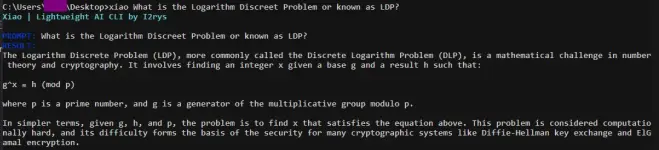
Let me know of your suggestions to improve it more.
Download here You do not have permission to view the full content of this post. Log in or register now.
If you're struggling let me know huhu
It uses ᑕᕼᗩTGᑭT 4.1-nano.
Why
- Kasi its very lightweight at mabilis.
- It takes less than 30 seconds to use it.
- Your message is sent in a linear way, meaning mas private.
Example
Let me know of your suggestions to improve it more.
Download here You do not have permission to view the full content of this post. Log in or register now.
- Make a folder anywhere then ilagay niyo yung file doon.
- Open Edit the system environment variables isearch niyo sa Windows.
- Click Environment variables then sa User variable sa taas hanapin niyo ang Path.
- Click niyo then click New iadd niyo yung path ng folder kung saan nakalagay si xiao.
- Click okay or ok 3 times hanggang maka exit.
- Open niyo console (cmd) or terminal and type xiao para sa usage (
xiao <prompt>, example: ~xiao Hello!`).
If you're struggling let me know huhu
