 PH
PH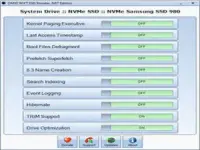
SSD Booster .NET fine-tunes your system settings to minimize unnecessary writes and maximize read speeds. Prevent wear and tear on your SSD while ensuring lightning-fast performance for your applications and operating system.
Ready to get the most out of your SSD? Download SSD Booster .NET today and experience the difference! Unlock hidden performance gains and enjoy a faster, more responsive system.
Features of SSD Booster .NET
Compact layoutSSD Booster .NET comes with a vintage-looking UI that displays a list of functions and adjacent on/off sliders. Also, it requires no installation, just run the executable each time you wish to make changes.
Provides quick access to a collection of advanced functions
There are a total of the features this app can turn on and off. For some – like Hibernate, Drive Optimization, and Event Logging — guessing their purpose is easy, but for others, that’s not that easy. For example, Prefetch SuperFetch deals with creating files containing data about launched applications and optimizing future launches.
8.3 Name Creation manages long names and descriptions where nonstandard characters were used, however, some processes may ask you to disable this function.
Time-saving SSD companion
That’s where SSD Booster .NET is useful the most. It practically brings some important drive tweaks, which normally take up time and effort only to locate them. As far as the slider work, that’s easy. When a feature is activated, the slider will turn green, and red for the opposite state.
In addition, the application comes with a system info tab that reveals your machine’s hardware and OS information. To check your specs, go to About and look for the System Information button.
To conclude
SSD Booster .NET looks like an interesting optimizer to have around, especially if you are putting your SSD through hoops that a casual user wouldn’t.
Download:
You do not have permission to view the full content of this post. Log in or register now.