 PH
PHladyjhamel
Elite
Win11Debloat
Quick method
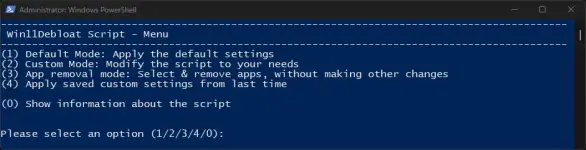
Download & run the script automatically via PowerShell. All files related to the script are saved to %temp%/Win11Debloat if you wish to inspect them. The script automatically cleans up the files after execution.- Open PowerShell, preferably as an administrator.
- Copy and paste the code below into PowerShell, press enter to run the script:
- Wait for the script to automatically download Win11Debloat.
- A new PowerShell window will open showing the Win11Debloat menu. Select either the default or custom mode to continue.
- Carefully read through and follow the on-screen instructions.
& ([scriptblock]::Create((irm "You do not have permission to view the full content of this post. Log in or register now.")))