 PH
PH
Playstore Link:
You do not have permission to view the full content of this post. Log in or register now.
FRep2 v2.7 [Unlocked]
Requirements: 7.0+
Overview: FRep2 is Finger Record/Replay App. Once you record your routine touch operations, you can replay it by single trigger. Your own automatic operation button will be easily created.
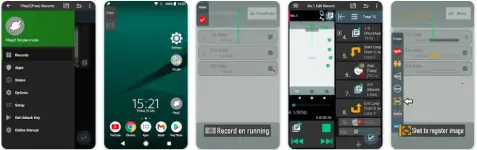
FRep2 records / replays your finger on running app, with image recognition.
- FRep2 has Simple mode which works without Setup Tool / USB debugging.
- Functions, appearance, and features unlocked by FRep2 Unlock Key.
- Import the records from FRep - Finger Replayer.
FRep2 is Finger Record/Replay App. Once you record your routine touch operations, you can replay it by single trigger. Your own automatic operation button will be easily created.
- Easy record/replay touches on app, by the button of floating console
- Console shows/hides depending on playable records for current app
- The timing and/or content of touches can be branched by image matching
With FRep2 Unlock Key, the unlimited number of records & Tasker plugin are available.
Usage Example
- Recording analog Tap/Swipe/Flick operations for automatic process/scroll/gesture.
- Preload delayed or continuous pushing in prospect of processing delay, such as CPU load or network communication.
- Avoid blind area or blurring by your finger and/or its shadow.
- Combination with automation App through FRep2 replay shortcut/Tasker plugin.
- Demonstrate your App in actual device.
= Notice =
- This app uses Accessibility Service (ACCESSIBILITY_SERVICE) to replay touch operations, to show the replay process, and to detect current app for responsive switching function of floating console.
- Full network access permission is used only for communication with the setup process (Precision mode) in localhost.
- Do not record including personal information and/or password.
- The replay result may differ depending on the load of your device / app. To make good reproducibility, take longer delay for processing wait, stop touch at end point for dragging/flick, and more, try editing sequence to add controls to wait the timing to replay.
== DISCLAIMER ==
THIS SOFTWARE AND THE ACCOMPANYING FILES ARE DISTRIBUTED and SOLD "AS IS" AND WITHOUT WARRANTIES AS TO PERFORMANCE OR MERCHANTABILITY OR ANY OTHER WARRANTIES WHETHER E×ρréššED OR IMPLIED. LICENSEE USES THE SOFTWARE AT HIS/HER OWN RISK. NO LIABILITY FOR CONSEQUENTIAL DAMAGES.
================
What's New:
[[2.7] - Added Play Sound control, to play short sound. (Requires Unlock Key)
*To specify an audio source (mp3, ogg, m4a, flac, or wav) on the device, allow Access Audio permission.
- Fixed an issue that touches would not be replayed after interruption on Android 15. (confirmed on Pixel 8a)
- Fixed chooser dialog of screen capturing permission on Android 14~.
- Updated to Android 15 development environment.
- Modified some UIs.
Special Features
ρáíd Features Unlocked
AOSP Compatible / No Google
CPUs arch: Universal
Full Multi Languages
All debug Info Removed
Original Signature Changed
♤ credit ♤ - ► @ youarefinished
Free Download:
Downloadlink:
You do not have permission to view the full content of this post. Log in or register now.
You do not have permission to view the full content of this post. Log in or register now.