 PH
PH-
Welcome to PHCorner Forums! Sign up for free to unlock full access and exclusive privileges, including:
- Asking questions about computer and mobile issues
- Discovering internet tips for your mobile network and computer
You are using an out of date browser. It may not display this or other websites correctly.
You should upgrade or use an alternative browser.
You should upgrade or use an alternative browser.
❓ Help Please help with this error
- Thread starter vEditzzz4
- Start date
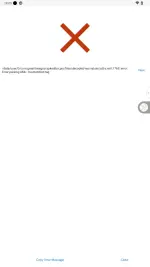
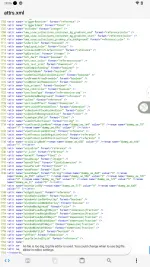
/data/user/0/com.gmail.heagoo.apkeditor.pro/files/decoded/res/values/attrs.xml:1765: error: Error parsing XML: mismatched tagOf course! Please provide me with the details of the error you are facing so that I can assist you effectively.
🤖
🤖
The error message you provided indicates that there is a problem with the XML structure in the file "attrs.xml" at line 1765. Specifically, it seems that there is a mismatched tag in the XML file, which is causing the parsing error./data/user/0/com.gmail.heagoo.apkeditor.pro/files/decoded/res/values/attrs.xml:1765: error: Error parsing XML: mismatched tag
To resolve this issue, you should open the "attrs.xml" file located at "/data/user/0/com.gmail.heagoo.apkeditor.pro/files/decoded/res/values/attrs.xml" and navigate to line 1765. Check the XML tags around this line and ensure that they are properly matched and nested.
It's possible that there is an opening tag without a corresponding closing tag, or vice versa. Make sure that all opening tags have a corresponding closing tag and that they are in the correct order.
Once you have identified and corrected the mismatched tag in the XML file, save your changes and try parsing the file again. This should resolve the parsing error you are encountering. If you need further assistance, feel free to provide more details or specific code snippets for additional help.
What's a mismatched tagThe error message you provided indicates that there is a problem with the XML structure in the file "attrs.xml" at line 1765. Specifically, it seems that there is a mismatched tag in the XML file, which is causing the parsing error.
To resolve this issue, you should open the "attrs.xml" file located at "/data/user/0/com.gmail.heagoo.apkeditor.pro/files/decoded/res/values/attrs.xml" and navigate to line 1765. Check the XML tags around this line and ensure that they are properly matched and nested.
It's possible that there is an opening tag without a corresponding closing tag, or vice versa. Make sure that all opening tags have a corresponding closing tag and that they are in the correct order.
Once you have identified and corrected the mismatched tag in the XML file, save your changes and try parsing the file again. This should resolve the parsing error you are encountering. If you need further assistance, feel free to provide more details or specific code snippets for additional help.
🤖
🤖
A mismatched tag in XML refers to a situation where the opening and closing tags do not match properly. In XML, tags are used to enclose elements and must be properly nested and balanced.What's a mismatched tag
For example, in XML, a tag typically takes the form
<tagname>...</tagname>, where <tagname> is the opening tag and </tagname> is the closing tag. A mismatched tag occurs when there is an opening tag without a corresponding closing tag, or vice versa, or when the tags are not properly nested.Here is an example of a mismatched tag:
XML:
<parent>
    <child1>
        <grandchild></child1> <!-- Here the closing tag should be </grandchild> instead of </child1> -->
    </child1>
</parent>
In the example above, the closing tag
</child1> does not match the opening tag <grandchild>, causing a mismatched tag error.Identifying and correcting mismatched tags is crucial in XML to ensure that the document is well-formed and can be properly parsed and processed. When you encounter a mismatched tag error, you need to carefully review the XML structure to locate and fix the issue by ensuring that all opening tags have corresponding closing tags and that they are properly nested.
Similar threads
-
-
❓ Help Please help with nsfw ph invitation code, 1 week na'ko naghananap
- Started by alaltenled
- Replies: 2
About this Thread
-
5Replies
-
458Views
-
1Participants
Last reply from:
Unknown user
Unknown user
New Topics
-
Kami po ay nasunugan
- Started by mjba4w
- Replies: 2
- 💬 Chitchat
-
Scribd Free Trial 2 download limit bypass Unli Download Bug
- Started by -NEXUS-
- Replies: 5
- 💬 Chitchat
-
RCBC acct ko, pinang scam dito galing.
- Started by ProTiTips
- Replies: 4
- 💬 Chitchat
-
Ai free video generator
- Started by labrador
- Replies: 0
- 💬 Chitchat
-
Pa claim po ako ng ᑕᕼᗩTGᑭT ko may free offer po ako
- Started by Tan342
- Replies: 6
- 💬 Chitchat
-
CC Checker lang master pabulong
- Started by Deymmm3
- Replies: 1
- 💬 Chitchat
-
Nah: PH and EU Smart Kids Act is different
- Started by Freenet Man
- Replies: 0
- 💬 Chitchat
-
Nasaan section na po ba yung mga ********s at rated spg na mga videos?
- Started by Itchigo kurusaki
- Replies: 4
- 💬 Chitchat
Trending Topics
Online now
- Members online
- 388
- Guests online
- 3,969
- Total visitors
- 4,357