 PH
PH-
Welcome to PHCorner Forums! Sign up for free to unlock full access and exclusive privileges, including:
- Asking questions about computer and mobile issues
- Discovering internet tips for your mobile network and computer
You are using an out of date browser. It may not display this or other websites correctly.
You should upgrade or use an alternative browser.
You should upgrade or use an alternative browser.
❓ Help How to create Facebook Account without suspension? any tips!
- Thread starter KnowledgeGraph 0
- Start date

🤖
🤖
Creating a Facebook account without the risk of suspension involves following certain guidelines and best practices. Here are some tips to help you set up and maintain a Facebook account securely:
1. Use Real Information: When creating a Facebook account, make sure to use your real name, email address, and date of birth. Providing accurate information will help you avoid suspicion and potential suspension.
2. Verify Your Account: Facebook may ask you to verify your identity by providing a phone number or confirming your email address. This step is crucial to ensure the authenticity of your account.
3. Avoid Multiple Accounts: Having multiple Facebook accounts is against the platform's terms of service. Stick to one account per person to prevent any issues with suspension.
4. Be Mindful of Friend Requests: Sending out too many friend requests to people you don't know can trigger Facebook's spam detection algorithms. Be cautious and send requests only to people you are acquainted with.
5. Don't Violate Community Standards: Make sure your posts, comments, and interactions comply with Facebook's community standards. Avoid posting offensive content or engaging in activities that might lead to account suspension.
6. Secure Your Account: Use a strong, unique password for your Facebook account and enable two-factor authentication for an added layer of security. This will help protect your account from unauthorized access.
7. Avoid Spamming: Refrain from posting the same content repeatedly or engaging in spammy behavior. Such activities can flag your account and lead to suspension.
8. Report Issues Promptly: If you encounter any issues with your account, such as unauthorized access or suspicious activities, report them to Facebook immediately. Timely action can help prevent further problems.
By following these tips and adhering to Facebook's terms of service, you can create and maintain a Facebook account without the risk of suspension. Remember to use the platform responsibly and respect the community guidelines to ensure a positive experience for yourself and others.
1. Use Real Information: When creating a Facebook account, make sure to use your real name, email address, and date of birth. Providing accurate information will help you avoid suspicion and potential suspension.
2. Verify Your Account: Facebook may ask you to verify your identity by providing a phone number or confirming your email address. This step is crucial to ensure the authenticity of your account.
3. Avoid Multiple Accounts: Having multiple Facebook accounts is against the platform's terms of service. Stick to one account per person to prevent any issues with suspension.
4. Be Mindful of Friend Requests: Sending out too many friend requests to people you don't know can trigger Facebook's spam detection algorithms. Be cautious and send requests only to people you are acquainted with.
5. Don't Violate Community Standards: Make sure your posts, comments, and interactions comply with Facebook's community standards. Avoid posting offensive content or engaging in activities that might lead to account suspension.
6. Secure Your Account: Use a strong, unique password for your Facebook account and enable two-factor authentication for an added layer of security. This will help protect your account from unauthorized access.
7. Avoid Spamming: Refrain from posting the same content repeatedly or engaging in spammy behavior. Such activities can flag your account and lead to suspension.
8. Report Issues Promptly: If you encounter any issues with your account, such as unauthorized access or suspicious activities, report them to Facebook immediately. Timely action can help prevent further problems.
By following these tips and adhering to Facebook's terms of service, you can create and maintain a Facebook account without the risk of suspension. Remember to use the platform responsibly and respect the community guidelines to ensure a positive experience for yourself and others.
Chisato-Chan
Elite
Basic lang yan ts may 100+ ako na fb panahong nag sself referral ako
panahong nag sself referral ako Tuts boss HHAAHHABasic lang yan ts may 100+ ako na fb
patuts bosBasic lang yan ts may 100+ ako na fb
KnowledgeGraph 0
Eternal Poster
not working, always got suspendpara sa dummy ba? gawa ka nalang dummy gmail?
hoping have spluk
FfBasic lang yan ts may 100+ ako na fb
Chisato-Chan
Elite
Tuts boss HHAAHHA
and how boss?
patuts bos
Di na to need ng number at vpn kaya unlimited yung gawa ko ng account.
Download niyo lang outlook sa playstore tapos yung fb na original (hindi lite) pero nalilipat naman yung account sa fb to fb lite automatically
Search niyo sa sa internet "name generator or name generator filipino"
tapos pili kayo kung saang website trip niyo mag generate ng name. Mag generate na kayo ng name tapos yung name na yun gawin niyong username para sa outlook. Example napili niyong name "Chisato Channying" yung username na gagawin niyo ay chisatochannying@outlook.com or @hotmail.com, kapag nagamit na yung username pwede niyo lagyan ng number sa dulo yung name
pag nag register kayo sa outlook/hotmail make sure na yung age is 18 plus at yung country kahit di mo na i edit yan default niyan is Philippines. Pag nakagawa na kayo ng outlook/hotmail, Mag register na kayo sa fb via email gamit yung name na ginamit niyo sa outlook/hotmail at email na nagawa niyo sa outlook/hotmail at siyempre Yung age matik 18 din pataas at dapat may profile picture at cober photo na kayong nakuha. Kahit sa fb kayo magkuha ng profile at cober basta yung totoong tao/muka Yung profile pic. Mas better kapag gagawa kayo ng fb ilagay niyo sa password manager yung password para di niyo makalimutan password at pwede din mag generate ng password (mas better) kapag nag ask yung fb na i save yung password mo para di na mag login pwede niyo din i save. After niyan may verification mag sesend sa email na ginamit sa outlook/hotmail. Click niyo lang yun para mag verify tapos kapag nakagawa na kayo ng fb, punta kayo mismo sa profile niyo may nakalagay dun finish setup your account, i finish niyo yun para all goods na di na ma ddisable yung fb mo. Btw yung outlook/hotmail mag ddisable yan minsan pero yung fb hindi depende nlng kung nag spam activity kayo like spamming, like,comment,etc. kasi madaling ma detect kapag bagong gawa mas better kapag mag spam dapat 3 months old na. Kapag gagawa ulit kayo, no need to reset/re install yung fb, logout niyo lang at exit niyo sa phone niyo at open niyo ulit para gawa ulit. Enjoy kung anong gagawin niyo sa fb na ginawa niyo
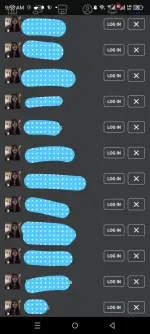
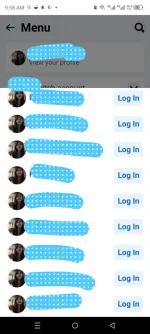
Chisato-Chan
Elite
Ok na na edit ko na. Nag gawa lng ako ng unlimited nung may unli burger na binibigay sa hotel101 kaya naka 300+ din ako na yumburger noonwaiting...
sayang nga dapat nung panahon ng coinsph gumawa nako madame fb nuj
October pa tong mga fb na ginawa ko hanggang ngayon buhay pa no issue niisa except sa email na disable
pero safe na safe yung fb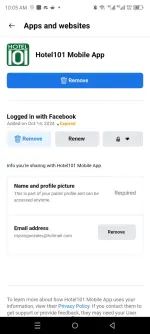
putcha dame nun... anu ginawa mo dun kinaen mo mag isa...Ok na na edit ko na. Nag gawa lng ako ng unlimited nung may unli burger na binibigay sa hotel101 kaya naka 300+ din ako na yumburger noon
tsaka nung panahon ng GODSWAR
Chisato-Chan
Elite
Kinain ko at pinagbibigay ko sa mga kakilala at kamag anak ko di ko na binenta kasi worth it naman kaininputcha dame nun... anu ginawa mo dun kinaen mo mag isa...
tsaka nung panahon ng GODSWAR
para san ba yang mga dummies mo? dami ah HAHAAHHADi na to need ng number at vpn kaya unlimited yung gawa ko ng account.
Download niyo lang outlook sa playstore tapos yung fb na original (hindi lite) pero nalilipat naman yung account sa fb to fb lite automatically
Search niyo sa sa internet "name generator or name generator filipino"
tapos pili kayo kung saang website trip niyo mag generate ng name. Mag generate na kayo ng name tapos yung name na yun gawin niyong username para sa outlook. Example napili niyong name "Chisato Channying" yung username na gagawin niyo ay chisatochannying@outlook.com or @hotmail.com, kapag nagamit na yung username pwede niyo lagyan ng number sa dulo yung name
pag nag register kayo sa outlook/hotmail make sure na yung age is 18 plus at yung country kahit di mo na i edit yan default niyan is Philippines. Pag nakagawa na kayo ng outlook/hotmail, Mag register na kayo sa fb via email gamit yung name na ginamit niyo sa outlook/hotmail at email na nagawa niyo sa outlook/hotmail at siyempre Yung age matik 18 din pataas at dapat may profile picture at cober photo na kayong nakuha. Kahit sa fb kayo magkuha ng profile at cober basta yung totoong tao/muka Yung profile pic. Mas better kapag gagawa kayo ng fb ilagay niyo sa password manager yung password para di niyo makalimutan password at pwede din mag generate ng password (mas better). After niyan may verification mag sesend sa email na ginamit sa outlook/hotmail. Click niyo lang yun para mag verify tapos kapag nakagawa na kayo ng fb, punta kayo mismo sa profile niyo may nakalagay dun finish setup your account, i finish niyo yun para all goods na di na ma ddisable yung fb mo. Btw yung outlook/hotmail mag ddisable yan minsan pero yung fb hindi depende nlng kung nag spam activity kayo like spamming, like,comment,etc. kasi madaling ma detect kapag bagong gawa mas better kapag mag spam dapat 3 months old na. Kapag gagawa ulit kayo, no need to reset/re install yung fb, logout niyo lang at exit niyo sa phone niyo at open niyo ulit para gawa ulit. Enjoy kung anong gagawin niyo sa fb na ginawa niyoView attachment 3677695View attachment 3677696
ah i see para sa burger pala AHHAAHHA
wala naba burger? HAHAHA
Chisato-Chan
Elite
Ewan ko kung meron pa kasi nilagay na nila yung otp. Trending dito dati yun. Nakadami ako kasi walang otp sa hotel101 datipara san ba yang mga dummies mo? dami ah HAHAAHHA
ah i see para sa burger pala AHHAAHHA
wala naba burger? HAHAHA
https://phcorner.org/threads/free-j...-attack-full-details-regular-updates.2092145/
tagal na pala HAHAHAHAEwan ko kung meron pa kasi nilagay na nila yung otp. Trending dito dati yun. Nakadami ako kasi walang otp sa hotel101 dati
https://phcorner.org/threads/free-j...-attack-full-details-regular-updates.2092145/
Chisato-Chan
Elite
Sayang kaka join mo palang ngayong march. September ganap Yung unli burger ehpara san ba yang mga dummies mo? dami ah HAHAAHHA
ah i see para sa burger pala AHHAAHHA
wala naba burger? HAHAHA
About this Thread
-
47Replies
-
3KViews
-
17Participants
Last reply from:
1wantutri
1wantutri
New Topics
-
500 lang induction cooker made in japan
- Started by benjthegreat
- Replies: 0
- 💬 Chitchat
-
FS ml account quit na
- Started by serene321
- Replies: 0
- 💬 Chitchat
-
Cheapest Loan Ph
- Started by jazzon
- Replies: 1
- 💬 Chitchat
-
Globe at home postpaid modem
- Started by beudbdka
- Replies: 0
- 💬 Chitchat
-
PA HELP PO SA MGA MARUNONG SA TECH
- Started by Mina65
- Replies: 4
- 💬 Chitchat
-
May nakapag try na ba dito sa pinduoduo?
- Started by Solo21
- Replies: 2
- 💬 Chitchat
-
Mas Mabilis pa yung 4G kaysa 5G sa Area Namin
- Started by GoatPhomator666
- Replies: 1
- 💬 Chitchat
-
Sharp Samm Videoke
- Started by bossa_negra
- Replies: 0
- 💬 Chitchat
-
Looking or help sana thanks
- Started by tabalu
- Replies: 0
- 💬 Chitchat
-
Kamusta na ung Carziqo
- Started by Mar_007
- Replies: 3
- 💬 Chitchat
Trending Topics
Online now
- Members online
- 1,054
- Guests online
- 7,587
- Total visitors
- 8,641